

WeekPad: Weekly Planner Diary
Giuseppe Lucariello Productivity iPhoneiPadiPod touch
WeekPad: Weekly Planner Diary is a free Productivity app for iPhone and iPad by Giuseppe Lucariello. Rated 4.7/5 from 3 ratings. Requires iOS 18.0.
- Rating
- 4.7
- 3 ratings
- Price
- Free
- on the App Store
- Size
- 4 MB
- Age 4+
- Updated
- Oct 6
- 2026 · v3.1.0
Screenshots


About WeekPad: Weekly Planner Diary
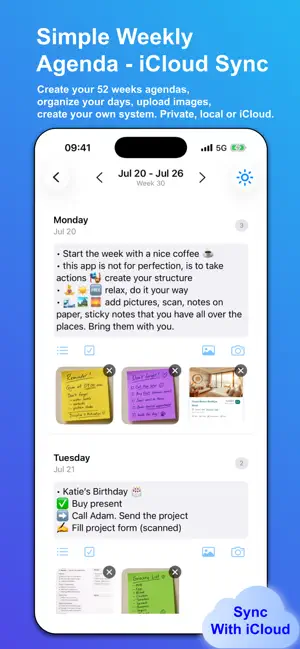
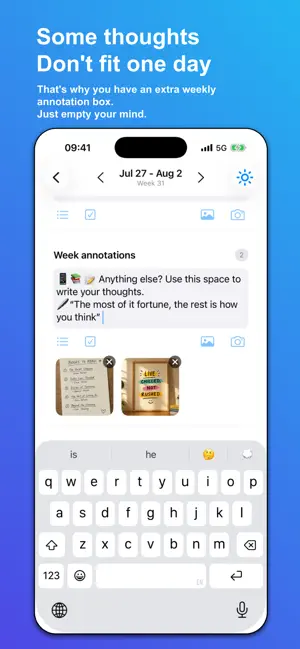
The closest thing to a paper planner on your iPhone. WeekPad is a weekly planner for iPhone and iPad built to feel like paper: one week to view, you swipe to turn the page, and it sends no notifications at all. Not fewer — none. You already have notes — on your phone, on sticky pads, in the margins of last year's diary. WeekPad gathers them somewhere calm: your year, one clean week at a time. Write your days, drop in photos, tick off your lists, then turn the page. No feeds. No pressure. A weekly planner and agenda for people who think in weeks. WHY IT FEELS LIKE PAPER • One week per page — the whole app is built around it, not an infinite scroll • You turn the page. Swipe from week to week, at your pace • No notifications, no reminders, no alerts — there's no setting to disable, because there are none • No streaks, no completion scores, no analytics. Nothing is measuring you • A blank page — write what you want, how you want, in plain text • Your handwriting belongs here too — photograph or scan a handwritten page, sticky note or ticket, straight onto the day • Works fully offline. No account, no sign-up, no server • Separate notebooks for separate parts of your life. They never mix WHAT IT ISN'T WeekPad isn't a calendar and doesn't try to replace one — no invites, no meetings, no availability. There's no stylus or Apple Pencil input either; you type. But your handwriting still belongs here: photograph or scan a handwritten page, a sticky note or a ticket, and it lands on the day it belongs to. There's no PDF export or printing. And it won't nag you into using it. WHY PEOPLE STAY • A full year at a glance — 52 weeks, one clean page each • Write freely — notes, bullets and checklists, in plain text you fully control • Keep the real stuff — photos, document scans and sticky-note snaps, right on the day they belong to • Share into WeekPad from any app — a photo, a note, a link — straight onto the right day • Search across every planner at once • Scroll, swipe from week to week, and journal if you like • Export anytime — your data, in your hands ONE PLACE FOR EACH PART OF YOUR LIFE Work shouldn't live next to your journal. Keep separate agendas for work, family, training and studies — each its own clean notebook. They never mix. WHAT YOU PAY, AND WHAT YOU GET Get WeekPad once and the whole app is yours — as many agendas as you like, with notes, photos, checklists, search, sharing and Export, all working offline. No free tier that runs out, no limits, no in-app unlocks, no ads. • WeekPad Sync PRIVATE BY DESIGN No account to create. No servers of ours. No database. Turn on Sync and your planner lives in your own iCloud — only you and Apple can reach it, never us. No ads, no trackers, no analytics, no data brokers. MADE BY ONE PERSON WeekPad is built and maintained by a single independent developer, not a company. THE HONEST PART Sync keeps your devices matching each other — it isn't a backup, and a change or deletion travels to your other devices. We can't see, control, or recover what's in your iCloud. Export regularly, and keep anything important stored safely elsewhere too. One week per page. Your year, on paper that syncs. IMPORTANT WeekPad is winding down. This is the last planned update. There will be no further updates, WeekPad may stop working with future versions of iOS, and iCloud Sync is now unsupported — it may stop working from 31 December 2026. Everything you have written stays on your device, exactly as it is. Nothing has been removed or locked. Please export your planners and keep your own copies of anything you care about. Settings > Export All Agendas. Terms of Use (EULA): https://weekpad.app/terms Privacy Policy: https://weekpad.app/privacy
What’s new
Version 3.1.0 · Updated October 6, 2026
WeekPad is winding down. This is the last planned update. There will be no further updates, WeekPad may stop working with future versions of iOS, and iCloud Sync is now unsupported — it may stop working from 31 December 2026. iCloud Sync no longer needs a subscription. It is included for everyone, provided as-is. If you still have a WeekPad Sync subscription, it is no longer needed: cancel it in your Apple Account settings so you stop being charged. Your sync keeps working either way. Everything you have written stays on your device, exactly as it is. Nothing has been removed or locked. Please export your planners and keep your own copies of anything you care about. Thank you for using WeekPad.
App privacy
The developer, Giuseppe Lucariello, reported these privacy practices to Apple.
Data Not Collected
The developer does not collect any data from this app.
Alternatives to WeekPad: Weekly Planner Diary
Looking for apps like WeekPad: Weekly Planner Diary? Here are 6 similar apps on the App Store. The highest rated is Private Writer Markdown Editor (5.0/5), and 4 of the 6 are free to download.
-
 PDF Editor: Document Assistant
-
 Private Writer Markdown Editor
5.0
Private Writer Markdown Editor
5.0
-
 Current: Visual Focus Timer
5.0
Current: Visual Focus Timer
5.0
-
 Video Transcriber - Transcript
2.3
Video Transcriber - Transcript
2.3
-
 Cadence - Habit Tracker
5.0
Cadence - Habit Tracker
5.0
-
 FileMaster: Offline Scanner
1.0
FileMaster: Offline Scanner
1.0
| App | Rating | Price | Last updated | Compare |
|---|---|---|---|---|
| WeekPad: Weekly Planner Diary | 4.7 / 5 (3 ratings) | Free | October 6, 2026 | |
| PDF Editor: Document Assistant | – | Free | Oct 25, 2026 | Compare |
| Private Writer Markdown Editor | 5.0 / 5 (3) | Free | Jul 14, 2026 | Compare |
| Current: Visual Focus Timer | 5.0 / 5 (3) | 2.99 USD | Apr 23, 2026 | Compare |
| Video Transcriber - Transcript | 2.3 / 5 (3) | 4.99 USD | Oct 24, 2026 | Compare |
| Cadence - Habit Tracker | 5.0 / 5 (9) | Free | Oct 29, 2026 | Compare |
| FileMaster: Offline Scanner | 1.0 / 5 (1) | Free | Jul 27, 2026 | Compare |