

Video Transcriber - Transcript
华芳 张 Productivity iPhoneiPadiPod touch
Video Transcriber - Transcript is a paid Productivity app for iPhone and iPad by 华芳 张. Rated 2.3/5 from 3 ratings. Requires iOS 17.0.
- Rating
- 2.3
- 3 ratings
- Price
- 4.99 USD
- on the App Store
- Size
- 482 MB
- Age 4+
- Updated
- Oct 6
- 2026 · v1.6
Screenshots


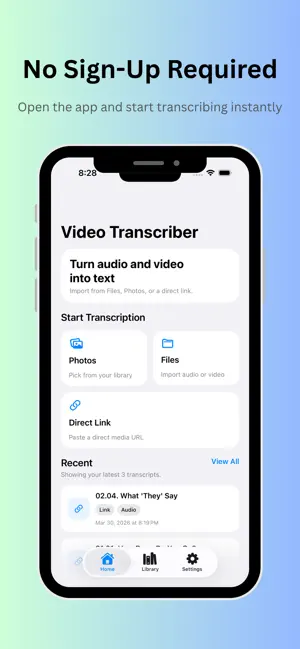

About Video Transcriber - Transcript
A private, simple transcription app with no sign-up, no uploads, and no distractions. Turn audio and video into text in a faster, simpler way. Video Transcriber helps you extract text from audio and video files so you can review, edit, save, and share your content more easily. Whether you are working with interviews, lectures, meetings, voice notes, online videos, or personal recordings, Video Transcriber gives you a clean and convenient way to turn spoken content into readable text. Designed for speed and simplicity, the app makes transcription easier for students, creators, professionals, researchers, and everyday users who need words from media files without a complicated workflow. Key Features ◉ Transcribe audio and video into text Import media files and convert spoken content into readable text for review and reuse. ◉ Support both audio and video sources Work with common media content in one place instead of switching between multiple tools. ◉ Review results in a clean, focused interface See your transcription results clearly and keep your workflow simple. ◉ Export and share your text Save or export transcripts for notes, writing, study, documentation, or content creation. ◉ Useful for many real-life scenarios Great for: • Meeting notes • Lecture and class review • Interview transcription • Podcast and video notes • Voice memo conversion • Content research and script drafting ◉ Why choose Video Transcriber? • No sign-up required • No file uploads • No ads or in-app purchases • A simple, focused transcription experience • Designed for convenience and privacy ◉ Why users love Video Transcriber • Simple and easy to use • Saves time when reviewing spoken content • Helps turn long media into searchable text • Useful for work, study, and personal projects • A practical tool for creators, students, and professionals ◉ Perfect for • Students Turn lectures and study recordings into text you can review anytime. • Professionals Capture spoken information from meetings, discussions, and work recordings. • Content creators Extract text from video or audio for captions, summaries, planning, and repurposing. • Researchers and journalists Make it easier to organize interviews and recorded material. ◉ Make your media searchable and reusable Instead of replaying the same audio or video again and again, turn it into text that is easier to scan, edit, and keep. Video Transcriber helps you save time and get more value from your recordings. Download Video Transcriber and turn your audio and video into text with less effort.
What’s new
Version 1.6 · Updated October 6, 2026
Translate, save, and review your transcripts more easily. • Added on-device translation on iOS 18 and later, with automatic source-language detection and target-language selection. • Save translations in multiple languages for each transcript, then edit, copy, or share them anytime. • Improved translation reliability and added safeguards to protect previously saved translations. • Added compact audio playback controls for easier listening and navigation. • Added storage information and safe temporary-file cleanup.
App privacy
The developer, 华芳 张, reported these privacy practices to Apple.
Data Not Collected
The developer does not collect any data from this app.
Alternatives to Video Transcriber - Transcript
Looking for apps like Video Transcriber - Transcript? Here are 6 similar apps on the App Store. The highest rated is Private Writer Markdown Editor (5.0/5), and all 6 are free to download.
-
 FileMaster: Offline Scanner
1.0
FileMaster: Offline Scanner
1.0
-
 WeekPad: Weekly Planner Diary
4.7
WeekPad: Weekly Planner Diary
4.7
-
 Private Writer Markdown Editor
5.0
Private Writer Markdown Editor
5.0
-
 PDF Editor: Document Assistant
-
 PatchDoc:File & Code Editor
5.0
PatchDoc:File & Code Editor
5.0
-
 MySend
5.0
MySend
5.0
| App | Rating | Price | Last updated | Compare |
|---|---|---|---|---|
| Video Transcriber - Transcript | 2.3 / 5 (3 ratings) | 4.99 USD | October 6, 2026 | |
| FileMaster: Offline Scanner | 1.0 / 5 (1) | Free | Jul 27, 2026 | Compare |
| WeekPad: Weekly Planner Diary | 4.7 / 5 (3) | Free | Oct 6, 2026 | Compare |
| Private Writer Markdown Editor | 5.0 / 5 (3) | Free | Jul 14, 2026 | Compare |
| PDF Editor: Document Assistant | – | Free | Aug 25, 2026 | Compare |
| PatchDoc:File & Code Editor | 5.0 / 5 (6) | Free | Oct 17, 2026 | Compare |
| MySend | 5.0 / 5 (1) | Free | Aug 13, 2026 | Compare |