

Omega Studio
MARCOS PROLO BUZZALIN0 Education iPhoneiPadiPod touch
Omega Studio is a free Education app for iPhone and iPad by MARCOS PROLO BUZZALIN0. Requires iOS 18.0. Updated September 9, 2026.
- Price
- Free
- on the App Store
- Size
- 31 MB
- Age 4+
- Updated
- Sep 9
- 2026 · v1.0
Screenshots


About Omega Studio
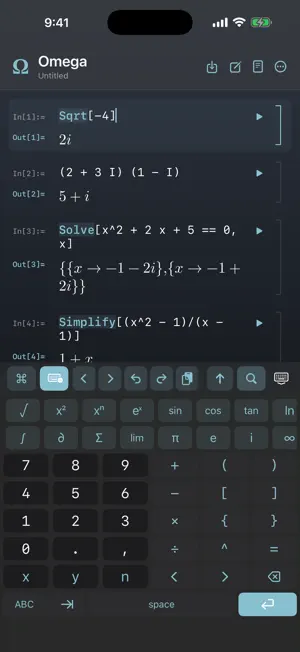
Omega Studio is a full computer algebra system that runs entirely on your iPhone. Not a calculator that rounds — an engine that works in exact arithmetic and hands back the answer, or tells you honestly that it cannot. Type an expression, press Return, get a result you can keep working with. EXACT, NOT APPROXIMATE Sqrt[8] is 2 Sqrt[2], not 2.8284271. 1/3 + 1/6 is 1/2. Integrals come back as closed forms when a closed form exists. Ask for a number and you get one, to as many digits as you want. WHAT IT KNOWS • Algebra — expand, factor, simplify, solve, systems, inequalities • Calculus — derivatives, integrals, limits, series, multivariable, vector calculus • Linear algebra — exact determinants, eigenvalues, decompositions, solving • Differential equations — symbolic and numerical, with the whole study of the solution • Discrete mathematics — number theory, combinatorics, graphs, logic, set theory • Statistics and probability — distributions, inference, Markov chains • Geometry — plane, solid, conics, and non-Euclidean GRAPHS AND PICTURES Plot functions, parametric curves, surfaces, vector fields, data and graphs, and zoom into any of them. A picture in a notebook is a result like any other: it can be named, referenced and used again. A NOTEBOOK, NOT A TAPE Every result has an identity. Name it, drag it into another cell, take it apart, or ask where it came from. Fold the cells you are finished with. Nothing is lost when the app stops — Omega recovers what you were typing. SCRIPTS For anything longer than one line: a page you write top to bottom and run with a button, with output beside the lines that produced it. A KEYBOARD BUILT FOR THIS Digits, brackets, Greek letters, integrals, sums and matrices, one tap away. It reads where your cursor is standing and offers what belongs there — the options a function takes, the letters a variable slot wants. IT TEACHES The Omega Book is fourteen chapters of lessons and worked examples, plus a reference page for every function the engine has. Learn Omega explains the app itself. Both are one gesture away while you write, and they keep your place. IT SHOWS ITS WORKING Many results come with a step-by-step: not the answer restated, but the method, named, with each step done. PRIVATE BY CONSTRUCTION No account. No analytics. No advertising. No network code of its own — Omega cannot send your work anywhere because it has nowhere to send it and no way to try. Everything stays on your phone. The one thing that leaves is Apple's, not this app's: buying a subscription happens in the App Store. SUBSCRIPTION Omega Studio opens on a 7-day free trial with everything unlocked — no account, no card, nothing to sign up for. After that a subscription keeps it open, monthly or yearly, billed to your Apple Account and cancelled any time in Settings. Your notebooks stay on the phone either way. Terms of Use: https://www.apple.com/legal/internet-services/itunes/dev/stdeula/ Privacy Policy: https://marcos39p.github.io/omega-site/privacy.html Requires iPhone with iOS 18 or later. Portrait, iPhone only.
App privacy
The developer, MARCOS PROLO BUZZALIN0, reported these privacy practices to Apple.
Data Not Collected
The developer does not collect any data from this app.
Alternatives to Omega Studio
Looking for apps like Omega Studio? Here are 6 similar apps on the App Store. The highest rated is SFRBM (5.0/5), and 5 of the 6 are free to download.
-
 Touch Trigonometry
-
 SFRBM
5.0
-
 SBBq 2026
-
 Learn Everyday Science!
4.4
-
 Fun Toddler Games for Kids 2-4
-
 Eventbert
| App | Rating | Price | Last updated | Compare |
|---|---|---|---|---|
| Omega Studio | – | Free | September 9, 2026 | |
| Touch Trigonometry | – | Free | Feb 11, 2026 | Compare |
| SFRBM | 5.0 / 5 (4) | Free | Oct 30, 2025 | Compare |
| SBBq 2026 | – | Free | May 12, 2026 | Compare |
| Learn Everyday Science! | 4.4 / 5 (7) | Free | Dec 18, 2025 | Compare |
| Fun Toddler Games for Kids 2-4 | – | 0.29 USD | Sep 17, 2025 | Compare |
| Eventbert | – | Free | Oct 22, 2026 | Compare |
Compare Omega Studio with the top alternatives: ratings, updates, ASO score and keyword gaps →