

Ankilock: Flashcard Blocker
AYA FUNAKI Productivity iPhoneiPadiPod touch
Ankilock: Flashcard Blocker is a free Productivity app for iPhone and iPad by AYA FUNAKI. Requires iOS 26.4. Updated October 13, 2026.
- Price
- Free
- on the App Store
- Size
- 30 MB
- Age 4+
- Updated
- Oct 13
- 2026 · v1.5
Screenshots


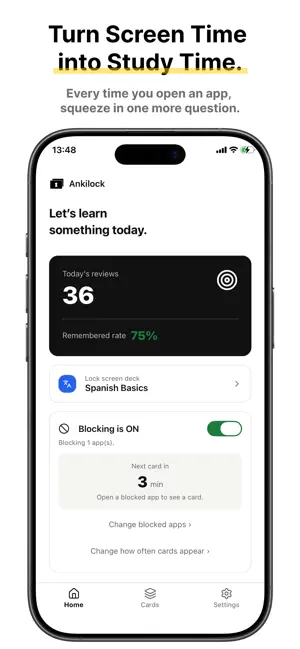
About Ankilock: Flashcard Blocker
Ankilock turns the moments you spend unlocking your phone into moments you spend learning. HOW IT WORKS Create flashcards for anything you want to remember — vocabulary, exam notes, facts, phrases, anything at all. Choose the apps that distract you the most. Every time you try to open one of those apps, Ankilock shows you one of your own flashcards first. Answer it, and you're through. Every flashcard is written by you, so it's always relevant to what you're actually trying to learn. Prefer not to start from a blank page? A few optional starter decks (Spanish basics, world history, human anatomy) come pre-loaded so you can try Ankilock right away — delete them anytime. FEATURES • Unlimited flashcards • Block as many apps and categories as you like • Organize cards into decks, and choose which decks show up on the lock screen (pick more than one, change anytime) • Review your cards anytime inside the app — not just when a blocked app is opened • Smart review: using spaced repetition, the cards you're about to forget are shown first • Import cards in bulk from a CSV file • Track your learning history and recall rate • Adjust how often cards appear • Your flashcards and learning history stay on your device. Anonymous usage analytics help us improve the app — they never include your card content or anything that identifies you, and you can turn them off anytime in Settings PRICING Try every feature free for 3 days after you install. After that, a subscription is required to keep using Ankilock. Without one, blocking is paused and only the purchase screen is shown — your cards and settings are kept. You can subscribe at any time, including during the free period, from the Home screen or Settings. Ankilock Premium is an auto-renewable monthly subscription. Payment is charged to your Apple ID account at confirmation of purchase. Subscriptions auto-renew unless cancelled at least 24 hours before the end of the current period, and your account is charged for renewal within 24 hours before the period ends. You can manage or cancel your subscription in your App Store account settings. The price is shown on the purchase screen. Terms of Use (Apple Standard EULA): https://www.apple.com/legal/internet-services/itunes/dev/stdeula/ Privacy Policy: https://emuemutaro.github.io/ankilock-privacy/
What’s new
Version 1.5 · Updated October 13, 2026
We've changed how pricing works. You can use every feature free for 3 days after installing. After that, a subscription is required to keep using Ankilock. Current subscribers are not affected. Fixed an issue where the remaining time on the Home screen and the blocking behavior could be incorrect after changing how often cards appear.
App privacy
The developer, AYA FUNAKI, reported these privacy practices to Apple.
Data Not Linked to You
The following data, which may be collected but is not linked to your identity, may be used for the following purposes:
- Identifiers: Device ID
- Usage Data: Product Interaction
Used for: Analytics
Alternatives to Ankilock: Flashcard Blocker
Looking for apps like Ankilock: Flashcard Blocker? Here are 6 similar apps on the App Store. The highest rated is Pocket Stitch (5.0/5), and all 6 are free to download.
-
 Simple Payslip
-
 Pocket Stitch
5.0
-
 Lottery Management
-
 TakeTime: Study App Blocker
4.5
-
 DopaLock: Screen Time Control
-
 What For? App Blocker & Focus
| App | Rating | Price | Last updated | Compare |
|---|---|---|---|---|
| Ankilock: Flashcard Blocker | – | Free | October 13, 2026 | |
| Simple Payslip | – | Free | Sep 18, 2026 | Compare |
| Pocket Stitch | 5.0 / 5 (2) | Free | Jul 6, 2026 | Compare |
| Lottery Management | – | Free | Oct 11, 2026 | Compare |
| TakeTime: Study App Blocker | 4.5 / 5 (20) | Free | May 31, 2026 | Compare |
| DopaLock: Screen Time Control | – | Free | Oct 12, 2026 | Compare |
| What For? App Blocker & Focus | – | Free | Oct 23, 2026 | Compare |