

What For? App Blocker & Focus
Kanta Sato Productivity iPhoneiPadiPod touch
What For? App Blocker & Focus is a free Productivity app for iPhone and iPad by Kanta Sato. Requires iOS 17.0. Updated November 2, 2026.
- Price
- Free
- on the App Store
- Size
- 49 MB
- Age 4+
- Updated
- Nov 2
- 2026 · v1.1.1
Screenshots


About What For? App Blocker & Focus
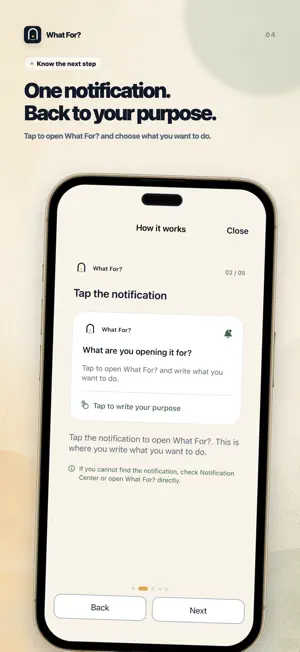
You came to reply, not lose the next twenty minutes to the feed. What For? is an iPhone app blocker that helps you use distracting apps with a purpose and a stopping point. Write what you came to do, choose a time limit, then return to what matters. A PURPOSE AND A TIME LIMIT Reply to a message. Look up one thing. Post an update. Choose 5, 10, 15 or 30 minutes before opening a selected app. When time is up, the app is restricted again. NO REASON TO OPEN? CHOOSE “NOT NOW” A pause is a chance to notice an automatic habit. Leave the app closed when you do not need it, and see those choices in your records. HOW IT WORKS 1. Allow Apple Screen Time access and select an app you want to use more intentionally. 2. Open that app. On the restriction screen, tap to write a purpose, then use the notification to open What For?. You can also open What For? yourself. 3. Write your purpose and choose your time limit. Free requires completing a rewarded ad on every unlock, including the first use. An unavailable or unfinished ad does not unlock the selected app. 4. Return to your selected app from the Home Screen. What For? does not switch apps for you. 5. The app is restricted again when your time ends. Review whether you did what you intended. RULES THAT FIT YOUR DAY Adjust default time, daily limits and cooldowns for each selected app. Review your purposes, skipped openings and reflections on Home and in Records. NO ACCOUNT REQUIRED Your written purposes, notes and selected-app identifiers stay on your device. What For? does not read messages, posts or searches inside other apps. ADS AND ANALYTICS The main app includes ads, including rewarded ads for Free unlocks. AdMob may process device, advertising and diagnostic data. Firebase Analytics and Crashlytics collect usage and diagnostic data; you can turn this collection off in Settings. Written purposes and notes are not sent to these services. See the privacy policy for details. REQUIREMENTS Requires iPhone with iOS 17 or later and Apple Screen Time permission for app restrictions. Notifications help you return to What For? and receive reminders. What For? is a personal habit tool, not a medical service. MONTHLY MEMBERSHIPS Custom lets you choose rewarded ads, dismissible interstitial ads, or no ads anywhere in the app. Ad duration varies; a lighter style does not guarantee a shorter ad. Pro includes Custom and adds app-specific combinations of passwords, math, sentence copying and random codes, plus settings protection. These features do not prevent revoking OS permissions or uninstalling. Custom and Pro are monthly auto-renewable subscriptions. Local prices appear in the purchase screen. Cancel in App Store settings at least 24 hours before renewal to avoid the next charge. Restore purchases from the plans screen. Deleting the app or its data does not cancel a subscription. Privacy: https://nanishini.knknt.chatgpt.site/en/privacy Terms: https://nanishini.knknt.chatgpt.site/en/terms Apple standard EULA: https://www.apple.com/legal/internet-services/itunes/dev/stdeula/
What’s new
Version 1.1.1 · Updated November 2, 2026
Improved screen layouts and guidance to make navigation and plan selection clearer.
App privacy
The developer, Kanta Sato, reported these privacy practices to Apple.
Data Linked to You
The following data, which may be collected and linked to your identity, may be used for the following purposes:
- Location: Coarse Location
- Identifiers: Device ID
- Usage Data: Product Interaction, Advertising Data
- Diagnostics: Performance Data, Other Diagnostic Data
- Purchases: Purchase History
Used for: Third-Party Advertising, Analytics, App Functionality
Data Not Linked to You
The following data, which may be collected but is not linked to your identity, may be used for the following purposes:
- Diagnostics: Crash Data
- Location: Coarse Location
- Usage Data: Product Interaction
Used for: Third-Party Advertising, Analytics, App Functionality
Alternatives to What For? App Blocker & Focus
Looking for apps like What For? App Blocker & Focus? Here are 6 similar apps on the App Store. The highest rated is App Blocker: LockKun (5.0/5), and all 6 are free to download.
-
 そのSNSどうして開いたの? スマホ依存制限で時間を有効化
-
 Swipe Fence : App Blocker
-
 App Blocker: LockKun
5.0
-
 Limifit:アプリ制限で脱スマホ脳
-
 DopaLock: Screen Time Control
-
 maeoki|SNS制限・スマホ使いすぎ対策
| App | Rating | Price | Last updated | Compare |
|---|---|---|---|---|
| What For? App Blocker & Focus | – | Free | November 2, 2026 | |
| そのSNSどうして開いたの? スマホ依存制限で時間を有効化 | – | Free | Jul 14, 2026 | Compare |
| Swipe Fence : App Blocker | – | Free | Sep 30, 2026 | Compare |
| App Blocker: LockKun | 5.0 / 5 (1) | Free | Oct 7, 2026 | Compare |
| Limifit:アプリ制限で脱スマホ脳 | – | Free | Sep 30, 2026 | Compare |
| DopaLock: Screen Time Control | – | Free | Oct 12, 2026 | Compare |
| maeoki|SNS制限・スマホ使いすぎ対策 | – | Free | Oct 29, 2026 | Compare |