

Swipe Fence : App Blocker
SANKAKU-TECH-LAB Productivity iPhoneiPadiPod touch
Swipe Fence : App Blocker is a free Productivity app for iPhone and iPad by SANKAKU-TECH-LAB. Requires iOS 17.0. Updated September 30, 2026.
- Price
- Free
- on the App Store
- Size
- 47 MB
- Age 4+
- Updated
- Sep 30
- 2026 · v1.0.16
Screenshots


About Swipe Fence : App Blocker
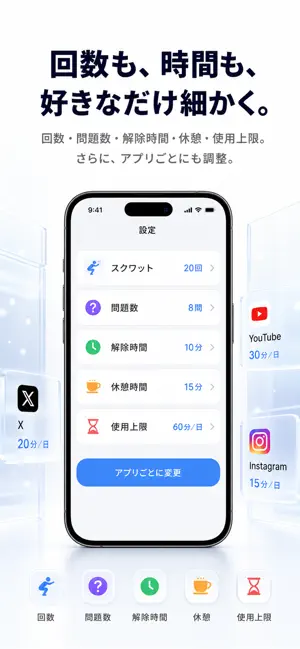
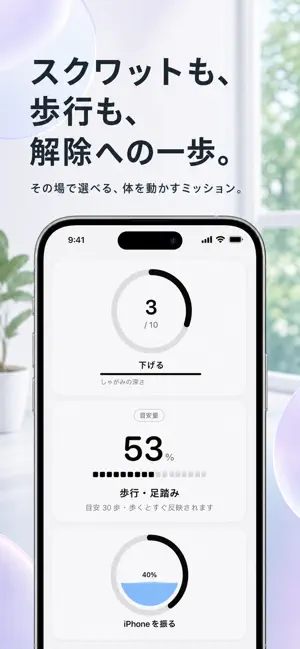
Swipe Fence puts a deliberate pause between you and distracting apps. Choose the apps you want to block. Before opening one, complete a mission you selected. Once the mission is complete, the app unlocks for the amount of time you configured. Build healthier habits around social media, videos, games, and any other apps that tend to pull you in. CHOOSE YOUR UNLOCK MISSIONS • Squats • Advanced math problems, including calculus, limits, real analysis, and complex analysis • Random character entry • Guided breathing • Shake your iPhone • Walking or stepping in place • Arithmetic Customize the mission type, number of repetitions or questions, text length, difficulty, and more. SET RULES FOR EACH APP Configure different unlock missions, unlock durations, break times, and usage limits for each blocked app. Keep lighter rules for some apps and stronger boundaries for others. FOCUS WITH POMODORO SESSIONS Alternate between focused work and breaks. During focus sessions, Swipe Fence blocks your selected apps, with support for exclusions when needed. SEE YOUR PROGRESS Review unlock time, unlock attempts, times you decided not to continue, and trends for each app. Compare your habits by day, week, or month. MAKE LIMITS HARDER TO LOOSEN Require a random verification code before making settings less restrictive. This adds useful friction when you are tempted to weaken a rule in the moment. BLOCK DISTRACTIONS ON MAC Connect the Mac version of Swipe Fence to use your iPhone missions when unlocking selected Mac apps and websites. Keep the same boundaries across your phone and computer. Screen Time permission is required to restrict apps on iPhone. Mac features require the Swipe Fence Mac app and its initial setup.
What’s new
Version 1.0.16 · Updated September 30, 2026
- Fixed an issue on iOS 17 where the app froze when opening a mission's detail settings. - For some apps such as YouTube, locking the app also blocks the same service's website in the browser. This is how iPhone (iOS) Screen Time works and can't be changed by Swipe Fence. We've clarified this in the guide. We'd love your support with a review! Your feedback keeps us going!
App privacy
The developer, SANKAKU-TECH-LAB, reported these privacy practices to Apple.
Data Linked to You
The following data, which may be collected and linked to your identity, may be used for the following purposes:
- User Content: Customer Support, Other User Content
- Identifiers: Device ID
- Usage Data: Product Interaction
- Diagnostics: Other Diagnostic Data
Used for: App Functionality
Alternatives to Swipe Fence : App Blocker
Looking for apps like Swipe Fence : App Blocker? Here are 6 similar apps on the App Store.
-
 Limifit:アプリ制限で脱スマホ脳
-
 NANISHINI: App Blocker & Focus
-
 FocusVault: App Blocker
-
 silentimer
-
 あと何分 見る時間を決める
-
 Agent Usage Monitor
| App | Rating | Price | Last updated | Compare |
|---|---|---|---|---|
| Swipe Fence : App Blocker | – | Free | September 30, 2026 | |
| Limifit:アプリ制限で脱スマホ脳 | – | Free | Sep 30, 2026 | Compare |
| NANISHINI: App Blocker & Focus | – | Free | Sep 28, 2026 | Compare |
| FocusVault: App Blocker | – | Free | Sep 7, 2026 | Compare |
| silentimer | – | Free | Jun 18, 2026 | Compare |
| あと何分 見る時間を決める | – | Free | Jul 15, 2026 | Compare |
| Agent Usage Monitor | – | Free | Aug 15, 2026 | Compare |