

Meeting Minutes Summary Notes
Junaid Abbas Productivity iPhoneiPadiPod touch
Meeting Minutes Summary Notes is a free Productivity app for iPhone and iPad by Junaid Abbas. Requires iOS 15.1. Updated November 4, 2026.
- Price
- Free
- on the App Store
- Size
- 47 MB
- Age 4+
- Updated
- Nov 4
- 2026 · v1.5
Screenshots
Save to Pinterest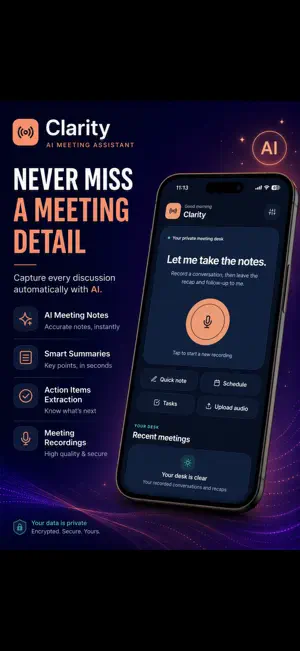


About Meeting Minutes Summary Notes
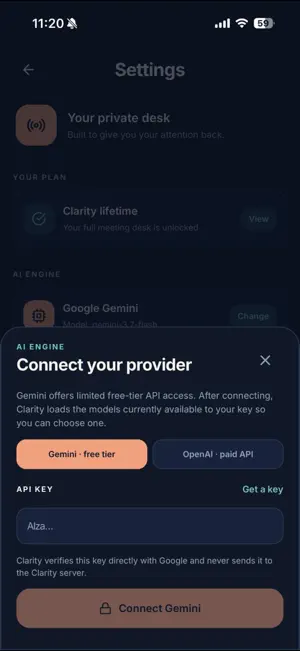
Clarity AI Meeting Assistant turns your meetings and conversations into clear, organized, and actionable information. Record meetings, generate AI notes and summaries, create transcripts, identify decisions and tasks, ask questions about meetings, create follow up drafts, and share your notes with ease. Whether you are attending a business meeting, client call, interview, team discussion, brainstorming session, consultation, lecture, or one to one conversation, Clarity helps you capture what matters while you stay focused. AI Meeting Recording Record your meetings with Clarity and let AI transform your conversations into useful information. Generate meeting notes, summaries, transcripts, decisions, action items, and follow up content from your recordings. AI Notes and Summaries Turn lengthy conversations into concise and organized notes. Clarity helps identify the important topics and information so you can quickly understand what happened during your meeting. Meeting Transcripts Generate a written transcript of your recorded conversation and review it whenever you need to check what was discussed or find important information. Ask Questions About Your Meeting Have a question about something discussed in your meeting? Ask Clarity and get answers based on the meeting content without listening through the entire recording. Decisions and Tasks Clarity identifies important decisions and action items from your meetings. Use Task Management to keep track of work that needs to be completed after the meeting. Follow Up Drafts Create follow up drafts based on your meeting. Quickly prepare communication after a discussion and keep conversations moving forward. Upload Audio Already have an audio recording? Upload it to Clarity and use AI to generate summaries, notes, transcripts, decisions, tasks, and other useful information. Schedule Meetings Schedule a meeting in Clarity so the app can prepare to record at the scheduled time. When automatic recording is enabled, Clarity can start recording your scheduled meeting automatically if you forget to start it manually. Share Your Notes Share meeting summaries and notes with colleagues, clients, or anyone who needs the information. Use your device sharing options to send your content to different supported platforms. Email Your Notes Send meeting notes and summaries by email. Configure Outlook or Apple Mail and quickly share your meeting information after a meeting. Export to PDF and Word Export your meeting notes in PDF and Word formats. Save, archive, print, or share your meeting documentation whenever you need it. Choose Your AI Engine Clarity gives you flexibility in choosing the AI technology used to process your meetings. Connect your preferred supported AI engine and choose the setup that works best for you. OpenAI and Gemini Support Clarity supports OpenAI and Gemini AI engines. Connect your preferred provider and use supported free AI options where available. Organize Your Meetings Keep recordings, transcripts, summaries, notes, decisions, tasks, and follow up information organized in one place. Return to previous meetings whenever you need to review them. Built for Productivity Spend less time manually taking notes and reviewing long recordings. Focus on listening, participating, and making decisions while Clarity helps organize the information for you. Use Clarity for business meetings, client calls, sales discussions, interviews, project meetings, brainstorming, consultations, research, lectures, and everyday conversations. Turn conversations into knowledge. Turn meetings into action. Stay organized with Clarity AI Meeting Assistant. Important Note Recording conversations may be subject to local laws and regulations. Always obtain appropriate consent from participants before recording a meeting or conversation and use Clarity responsibly.
What’s new
Version 1.5 · Updated November 4, 2026
Bug Fixes
App privacy
The developer, Junaid Abbas, reported these privacy practices to Apple.
Data Linked to You
The following data, which may be collected and linked to your identity, may be used for the following purposes:
- Contact Info: Email Address, Name
Used for: App Functionality
Data Not Linked to You
The following data, which may be collected but is not linked to your identity, may be used for the following purposes:
- User Content: Audio Data, Other User Content
Used for: Other Purposes
Alternatives to Meeting Minutes Summary Notes
Looking for apps like Meeting Minutes Summary Notes? Here are 6 similar apps on the App Store. The highest rated is Block It Out (5.0/5), and all 6 are free to download.
-
 Block It Out
5.0
-
 DayFlow: Plan Your Day
-
 iPDF local: PDF Editor
-
 SnapDWG: DWG Viewer & PDF
1.0
-
 Noterly: AI Note Taker
3.8
-
 Smart Bookmark
4.4
| App | Rating | Price | Last updated | Compare |
|---|---|---|---|---|
| Meeting Minutes Summary Notes | – | Free | November 4, 2026 | |
| Block It Out | 5.0 / 5 (2) | Free | Mar 17, 2026 | Compare |
| DayFlow: Plan Your Day | – | Free | Jul 9, 2026 | Compare |
| iPDF local: PDF Editor | – | Free | Nov 12, 2026 | Compare |
| SnapDWG: DWG Viewer & PDF | 1.0 / 5 (1) | Free | Jul 5, 2026 | Compare |
| Noterly: AI Note Taker | 3.8 / 5 (5) | Free | Oct 21, 2026 | Compare |
| Smart Bookmark | 4.4 / 5 (25) | Free | Oct 20, 2025 | Compare |