

iPDF local: PDF Editor
Thomas Rhode Productivity iPhoneiPadiPod touch
iPDF local: PDF Editor is a free Productivity app for iPhone and iPad by Thomas Rhode. Requires iOS 17.6. Updated September 28, 2026.
- Price
- Free
- on the App Store
- Size
- 28 MB
- Age 4+
- Updated
- Sep 28
- 2026 · v2.1
Screenshots


About iPDF local: PDF Editor
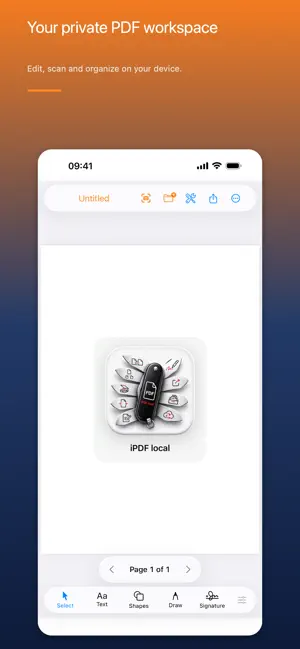
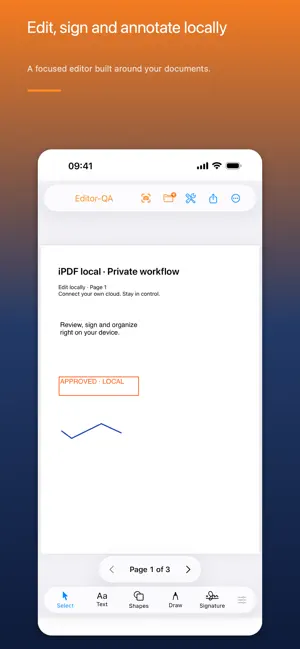
Edit and sign PDFs directly on your iPhone, iPad or Mac with Apple silicon. Scan documents using the camera on your iPhone or iPad. iPDF local is your private PDF workspace for everyday document tasks. Open PDFs, add text, highlight content, draw, manage pages or scan documents with a modern interface and without unnecessary cloud dependency. EDIT PDFs WITH EASE • Add text and edit your own text objects • Draw with a pen or highlight content • Add circles, rectangles and stamps • Adjust color, opacity, background and line width • Move, rotate, resize or delete objects • Rotate, reorder, add and remove PDF pages • Create new PDFs • Scan documents with the camera on supported iPhones and iPads • Export and share PDFs PRIVATE AND LOCAL The local PDF editor does not require an account with us. Documents and drafts are stored locally. You decide when to export them or process them with a server you configured yourself. No unnecessary cloud. No data collection by iPDF local. Your documents stay under your control. PRO FOR POWERFUL WORKFLOWS With Pro, iPDF local also becomes a powerful frontend for your own document infrastructure. STIRLING PDF Connect your own Stirling PDF server for advanced tools including: • Merge and split PDFs • Compress files • OCR • Crop and rotate pages • Protect PDFs • Add watermarks • Convert documents • Sanitize PDFs • And more Stirling PDF tools NEXTCLOUD Browse files in your private Nextcloud, open documents directly in iPDF local and return finished files to your own workflow. PAPERLESS-NGX Search your Paperless-ngx archive, open documents in iPDF local and send finished documents back to your document system. FOR EVERYONE — AND POWER USERS You do not need your own server to use iPDF local as a PDF editor. But if you already use Stirling PDF, Nextcloud or Paperless-ngx, iPDF local grows into an exceptionally powerful mobile document workflow. Start for free. Basic includes local editing, page controls and single-page scans. Pro adds handwritten signatures, editable sharing, multi-page scans, non-PDF imports and server integrations. Conversions and server tools require the corresponding service you configure. Unlock Pro Lifetime once — no new subscription required. The current price for your region is shown before purchase. The editor adds PDF content; it does not reconstruct existing PDF body text. Handwritten signatures are not qualified digital signatures. iPDF local is an independent app and is not affiliated with Stirling PDF, Nextcloud or Paperless-ngx.
What’s new
Version 2.1 · Updated September 28, 2026
iPDF local puts local PDF workflows front and center: edit, scan, sign and organize. Discover optional Pro workflows with Stirling PDF, Nextcloud and Paperless-ngx, plus a one-time Pro unlock with no new subscription.
App privacy
The developer, Thomas Rhode, reported these privacy practices to Apple.
Data Not Collected
The developer does not collect any data from this app.
Alternatives to iPDF local: PDF Editor
Looking for apps like iPDF local: PDF Editor? Here are 6 similar apps on the App Store. The highest rated is Paperparrot (5.0/5), and all 6 are free to download.
-
 Paperparrot
5.0
Paperparrot
5.0
-
 Swift Paperless
4.9
Swift Paperless
4.9
-
 Nextcloud Notes
2.2
Nextcloud Notes
2.2
-
 Nextcloud Talk
4.6
Nextcloud Talk
4.6
-
 Collabora Office
3.3
Collabora Office
3.3
-
 Nextcloud
4.7
Nextcloud
4.7
| App | Rating | Price | Last updated | Compare |
|---|---|---|---|---|
| iPDF local: PDF Editor | – | Free | September 28, 2026 | |
| Paperparrot | 5.0 / 5 (17) | Free | Oct 8, 2026 | Compare |
| Swift Paperless | 4.9 / 5 (75) | Free | Oct 20, 2026 | Compare |
| Nextcloud Notes | 2.2 / 5 (95) | Free | Sep 22, 2026 | Compare |
| Nextcloud Talk | 4.6 / 5 (441) | Free | Sep 25, 2026 | Compare |
| Collabora Office | 3.3 / 5 (125) | Free | Oct 15, 2026 | Compare |
| Nextcloud | 4.7 / 5 (10,381) | Free | Oct 8, 2026 | Compare |