

DueBy Budget Planner & Bills
Todd Lahman LLC Finance iPhoneiPadiPod touchMacApple Watch
DueBy Budget Planner & Bills is a free Finance app for iPhone and iPad by Todd Lahman LLC. Requires iOS 26.0. Updated October 19, 2026.
- Price
- Free
- on the App Store
- Size
- 88 MB
- Age 4+
- Updated
- Oct 19
- 2026 · v1.2
Screenshots


About DueBy Budget Planner & Bills
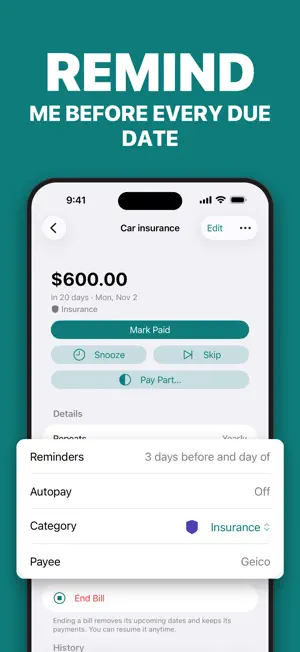
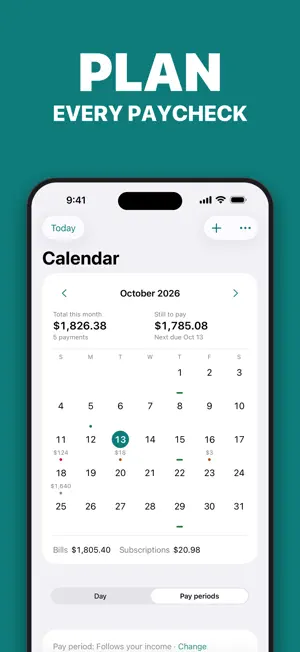
Never pay a late fee again. DueBy keeps your bills, subscriptions, and paychecks in one calm place, reminds you before every due date, and tells you what's safe to spend until payday. Add a bank statement or a receipt as a PDF, a photo, or a scan and skip the typing. New: tools for the self-employed and small businesses. No account needed. HOW IT WORKS 1. Add your first bills: rent, phone, Netflix. 2. Get a reminder three days before and on the day. 3. See what's safe to spend until payday. STATEMENTS AND RECEIPTS, NO TYPING • Choose the PDF your bank gives you, photograph a page, or scan it: DueBy turns it into transactions, sorted by category. • Paid cash? Scan the receipt: DueBy reads the store, total, and date into an expense and keeps the receipt with it. • Read on your device, with no bank login. CSV and Excel work too. BILLS THAT FINISH THE JOB • Mark Paid and Snooze right in the notification. • Due sorts every bill into Overdue, Today, This Week, and Later. SUBSCRIPTIONS, HONESTLY • The true yearly total: people guess about $86 a month; the average is about $219 (C+R Research). • Trials ending, price increases, and a cancel link on every subscription. PLANNING AROUND YOUR INCOME • A budget that follows your income, not just the calendar: bills come out by due date, goals get their share, and the rest is yours. • Pay periods follow your paydays, or choose your own. • Rollover carries what a category didn't spend into next month. • Transactions by day, week, month, or year, by category. LOANS, ACCOUNTS, AND REPORTS • Loans and debts, from a mortgage to money owed a friend: your debt-free date and the interest left. • A payoff plan across your debts: which to pay first, what paying extra saves. • Each account on its own, or All Accounts. • Reports for any week, month, or year: cash flow and categories. • A Tax Summary for your tax software or preparer: PDF, CSV, Excel, QuickBooks, TXF (US). US and Canadian form lines. DUEBY BUSINESS, FOR THE SELF-EMPLOYED • Profit and Loss by month, quarter, year, or your own dates, as PDF, CSV, or Excel. • Invoices as PDFs with your logo, repeating invoices, and customers. • A mileage log: iPhone records drives with your permission. Export a report. • Rentals, royalties, and farms, each with its own income and expenses. • Used For: mark a bill or transaction business or personal, whichever account paid it. • US and Canada only: tax lines (Schedule C and E, T2125 and T776), a quarterly tax estimate (US), tax instalments (Canada). EVERYWHERE YOU ARE • A calendar with due dates and paydays. • Widgets, a Live Activity, Siri, and an Apple Watch app. • A native Mac app with a menu bar extra. • Scan bills, import spreadsheets, export anytime. • Share a household through iCloud. • Dark mode, Dynamic Type, and VoiceOver support. PRIVATE BY DESIGN No account, no sign-in. DueBy never sees your bank password. Your data syncs only through your own iCloud, which we cannot read. The mileage log uses your location only if you turn it on. No analytics SDK, no advertising. Lock DueBy with Face ID, Touch ID, or your passcode. PLANS DueBy needs a subscription: DueBy Personal for your bills, budget, loans, and reports, or DueBy Business, which adds the business tools. Monthly or yearly. One subscription covers iPhone, iPad, Mac, and Apple Watch, with Family Sharing. DueBy helps you track money you manage yourself. It is not financial or tax advice. Payment is charged to your Apple Account. Subscriptions renew unless turned off at least 24 hours before the period ends; manage or cancel in Settings › Apple Account. Terms of Use (EULA): https://www.apple.com/legal/internet-services/itunes/dev/stdeula/ Terms of Service: https://dueby.app/terms Privacy Policy: https://dueby.app/privacy
What’s new
Version 1.2 · Updated October 19, 2026
DueBy 1.2 adds tools for the self-employed and small businesses, more for every budget, and new plans. NEW: DUEBY BUSINESS • Profit and Loss for a month, a quarter, a year, or your own dates, as Paid or as Billed, with PDF, CSV, and Excel files. • Invoices as PDFs with your logo. Keep customers with their contact details, record payments, and set an invoice to repeat. • A mileage log. iPhone can record drives as you drive, with your permission, and Apple Watch starts one by hand. Mark each drive business or personal, then export a report or a week's summary. • Rentals, royalties, and farms, each with its own income and expenses. In the US, also farmland you rent out for a share of the crop. • Used For: mark any bill or transaction business or personal, whichever account paid it. • In the US and Canada: tax lines for a business, a rental, and a farm (Schedules C, E, and F and Form 4835; T2125, T776, and T2042), a quarterly tax estimate (US), and tax instalments (Canada). NEW FOR EVERYONE • Bank statements without typing: choose the PDF your bank gives you, take a photo of a page, or scan it, and DueBy turns it into transactions sorted into categories. It is read on your device, with no bank login. CSV and Excel files work too. • Receipts: paid cash? Scan the receipt, and DueBy reads the store, the total, and the date into a new expense and keeps the receipt with it. You can add a receipt to any transaction, too. • Every screen follows the accounts you choose: one, several, or All Accounts. • Budget rollover, if you turn it on: what a category didn't spend, or overspent, carries into next month. • A payoff plan across your debts: which to pay first, and what paying extra saves. • Subcategories, and a Tax Summary to print or save for your tax software or preparer: PDF, CSV for a spreadsheet, Excel, and QuickBooks (bank CSV), plus TXF for US returns. US and Canadian returns get their form lines. • Choose the pay period that fits how you are paid. • Mark Paid is a check on every row. PLANS • DueBy now needs a subscription. If you used the free plan, DueBy tells you when it ends, and you can export your data first. • Two plans: DueBy Personal, and DueBy Business, which includes everything in Personal. A Business view from an earlier version now needs DueBy Business; its bills and transactions stay in All Accounts. • Our privacy policy now covers the mileage log's use of location and the customer details you keep.
App privacy
The developer, Todd Lahman LLC, reported these privacy practices to Apple.
Data Not Collected
The developer does not collect any data from this app.
Alternatives to DueBy Budget Planner & Bills
Looking for apps like DueBy Budget Planner & Bills? Here are 6 similar apps on the App Store. The highest rated is Bi Budget (5.0/5), and all 6 are free to download.
-
 Alcoin: Budget & Expenses
-
 Bi Budget
5.0
-
 Lunira: Budget Planner
-
 MoneyBadger Budget
5.0
-
 CleverNote Finance
-
 Cresce+ Budget & AI Finance
| App | Rating | Price | Last updated | Compare |
|---|---|---|---|---|
| DueBy Budget Planner & Bills | – | Free | October 19, 2026 | |
| Alcoin: Budget & Expenses | – | Free | Oct 13, 2026 | Compare |
| Bi Budget | 5.0 / 5 (2) | Free | Oct 2, 2026 | Compare |
| Lunira: Budget Planner | – | Free | Oct 1, 2026 | Compare |
| MoneyBadger Budget | 5.0 / 5 (4) | Free | Jun 17, 2026 | Compare |
| CleverNote Finance | – | Free | Oct 19, 2026 | Compare |
| Cresce+ Budget & AI Finance | – | Free | Oct 6, 2026 | Compare |