

AnyPane - SSH/VNC workspace
You Lu Developer Tools iPhoneiPadiPod touchMac
AnyPane - SSH/VNC workspace is a free Developer Tools app for iPhone and iPad by You Lu. Requires iOS 17.0. Updated October 31, 2026.
- Price
- Free
- on the App Store
- Size
- 27 MB
- Age 4+
- Updated
- Oct 31
- 2026 · v1.1.0
Screenshots


About AnyPane - SSH/VNC workspace
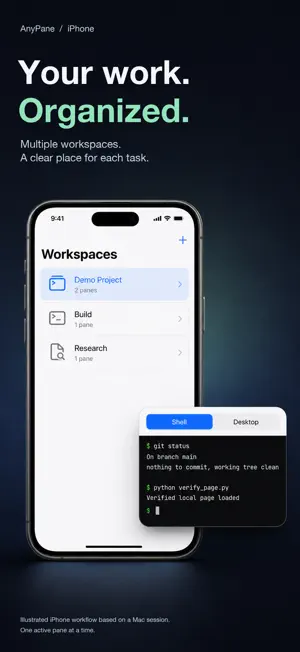
Keep each remote task organized without switching apps. AnyPane brings SSH terminals and VNC desktops into multiple workspaces on iPhone, iPad and Mac. ORGANIZE YOUR WORK Create multiple workspaces, each with up to four SSH/VNC panes. Combine terminals and desktops, adjust splits and rearrange panes on iPad and Mac. On iPhone, switch between panes with tabs. SSH terminals belong to each workspace; VNC sessions are shared across workspaces. CONNECT WITH SSH Use password authentication or an OpenSSH Ed25519 private key. Verify the server fingerprint on first connection. Reach a target through one SSH jump host and create local port forwards that listen only on your device's loopback address. KEEP A DESKTOP NEARBY Connect to a VNC desktop directly or through SSH. Direct VNC is not encrypted and TLS is not supported; prefer VNC over SSH. LOCAL CONFIGURATION Save connection settings on your device, with passwords, private keys and passphrases stored separately in the system Keychain. REQUIREMENTS AND LIMITS Requires iOS/iPadOS 17 or macOS 15 and authorized access to a compatible SSH or VNC server, with your own server credentials. AnyPane does not provide servers or service accounts. RSA keys, keyboard-interactive/OTP, SSH Agent, multi-hop jump chains, SFTP, RDP, SOCKS and remote forwarding are not supported. Reconnection is manual. Background connections on iPhone and iPad are not guaranteed. Closing a pane does not disconnect a session.
What’s new
Version 1.1.0 · Updated October 31, 2026
• Redesigned workspace: a cleaner native sidebar, pane cards with clear connection status, and a session bar that shows every session in the workspace, including ones running in the background. • Quick Open (⌘K): type a name and press Return to open and connect. • Open a saved connection in any workspace from Connections, or drag it onto a workspace in the sidebar. • Keyboard shortcuts on Mac and iPad: ⌘N, ⌘K, ⌘1–⌘4, ⇧⌘[ / ⇧⌘], ⌘R, ⌘., ⇧⌘W. • iPhone: Esc, Tab, Ctrl, arrow keys and more above the keyboard in SSH sessions. • Searchable, sortable Connections, Credentials and Local Forwards, with simpler editors. • Optional basic usage analytics helps us improve reliability. It is on by default, never includes server addresses, credentials or session content, and can be turned off in About & Help.
App privacy
The developer, You Lu, reported these privacy practices to Apple.
Data Linked to You
The following data, which may be collected and linked to your identity, may be used for the following purposes:
- Identifiers: Device ID
- Usage Data: Product Interaction
- Diagnostics: Performance Data, Other Diagnostic Data
Used for: Analytics
Alternatives to AnyPane - SSH/VNC workspace
Looking for apps like AnyPane - SSH/VNC workspace? Here are 6 similar apps on the App Store. The highest rated is Ship (5.0/5), and all 6 are free to download.
-
 Headmin!
-
 terminALL: SSH Remote Desktop
-
 termique - SSH Client
-
 Ship
5.0
Ship
5.0
-
 PVE Admin
5.0
PVE Admin
5.0
-
 JAR DLL EXE File Viewer
| App | Rating | Price | Last updated | Compare |
|---|---|---|---|---|
| AnyPane - SSH/VNC workspace | – | Free | October 31, 2026 | |
| Headmin! | – | Free | Jul 23, 2026 | Compare |
| terminALL: SSH Remote Desktop | – | Free | Oct 8, 2026 | Compare |
| termique - SSH Client | – | Free | Oct 19, 2026 | Compare |
| Ship | 5.0 / 5 (1) | Free | Feb 3, 2025 | Compare |
| PVE Admin | 5.0 / 5 (1) | Free | Oct 13, 2026 | Compare |
| JAR DLL EXE File Viewer | – | Free | Sep 30, 2026 | Compare |