

artcode DAW
Ryuya Yanagisawa Music iPad
artcode DAW is a paid Music app for iPad by Ryuya Yanagisawa. Requires iOS 15.6. Updated October 4, 2026.
- Price
- 9.99 USD
- on the App Store
- Size
- 36 MB
- Age 4+
- Updated
- Oct 4
- 2026 · v1.4.0
Screenshots

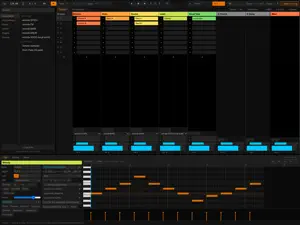


About artcode DAW
artcode DAW is a complete music production environment on one screen. Instruments, effects, recording, arrangement and export are all built in, so an empty project can become a finished track without installing anything else. There is nothing else to download. Everything works the moment you buy it. ■ A melody is enough Write the tune you can hear in your head. artcode DAW works out the chords, adds bass and drums, and builds it into a song. Draw it in the piano roll, or connect a keyboard and play it. You do not need to know any music theory. You need a melody. This runs the opposite way to most "AI songwriting": your melody leads, and artcode DAW fills in around it. It chooses chords by how they lead into one another, not bar by bar, and it can work out the key from your notes. Choose 21 styles, from pop to jazz, bossa nova and flamenco. What comes out is ordinary MIDI, so any chord you dislike can be changed. ■ Two views, one project Session is your sketchbook: a grid of short clips you trigger as ideas arrive, until the shape of the song appears. Arrangement is the timeline, where the same clips become a finished track. Move between them freely. Time signature and tempo can change partway through a song. ■ Everything you need to make sound Nine instruments - a subtractive synth, an FM synth, a wavetable synth, a dedicated bass, a drum machine, a singing-voice synth (Japanese and English), a sampler, a 16-pad drum sampler and a SoundFont (.sf2) player. Load a SoundFont from the Files app and play free acoustic pianos, strings and more. More than twenty effects: EQ (three-band and parametric), compressor, bus compressor, multiband, transient shaper, reverb, delay, granular delay, chorus, flanger, auto-pan, distortion, saturation, bitcrusher, ring modulator, beat repeat, vocoder, pitch snap (transparent correction through to hard robotic tuning), sidechain ducking, a maximizer and a spectrum analyzer. On SYNTH, FM and BASS you can breed presets into new sounds. ■ Audio that behaves Imported audio is analysed for tempo as it loads. Warp it to the project tempo, trim, retune, fade and crossfade it, or turn it into MIDI. ■ AI that runs on the device Bundled and offline. They write a melody that follows your chords, continue a drum pattern, or humanise a rigid beat. No network access. ■ Built for fingers Long-press for menus, pinch to zoom. The controls are sized to be hit with a fingertip. ■ Break chords apart Long-press a clip that holds chords and choose Arpeggio / Strum. The chords are replaced with a broken-up figure. Draw your own step sequence or strumming pattern, or start from 19 presets. The result is ordinary notes you can edit. ■ Finishing, done for you Auto mastering measures the song, places EQ, compression and a maximizer, and sets the loudness to a target such as streaming's -14 LUFS. Choose your low end, top end and attack. What it places are ordinary effects, so you can adjust them afterwards. ■ Finish it and take it with you A project saves as a single .artcode file with the audio inside it, and autosave brings you back if the app closes. Export to WAV (16 or 24-bit, or 32-bit float), MP3, per-track stems, or a standard MIDI file carrying tempo, time signature, track names and lyrics. Exports land in the Files app, ready to send anywhere. ■ What you make is yours Everything you create with artcode DAW belongs to you. Use it commercially, sell it, license it. No royalties, no credit required. The interface is in English and Japanese. No account, no online activation, no usage tracking. ■ What this version does not have (stated plainly) - VST3 plug-ins - iOS does not allow loading third-party code - AI audio generation and stem separation - they need a large extra download - MIDI hardware input and output - the iOS WebView does not support it (reading and writing MIDI files does work) If you need those, look at the Mac and Windows versions.
What’s new
Version 1.4.0 · Updated October 4, 2026
A big update. Everything built up in the desktop version that can run on iPad is now here. ■ Two new instruments • artcode WAVE — a wavetable synth. Eight tables whose shape changes step by step; move Position and the tone moves. 46 presets • SoundFont (.sf2) — load one from the Files app and play free acoustic pianos, strings and more ■ Auto mastering From the Main track, it measures the song, places EQ, compression and a maximizer, and sets the loudness to a target (streaming -14 LUFS up to -5). Choose low end, top end and attack, or "Clean" to keep things clear. Everything it places can be adjusted afterwards ■ 12 new effects Parametric EQ, bus compressor, transient shaper, multiband, bitcrusher, flanger, auto-pan, ring modulator, granular delay, beat repeat, maximizer and spectrum analyzer ■ Songwriting help • "Another reading": three different chord sets for the same melody • 21 chord styles, including jazz, bossa nova, gospel, tango, flamenco and Celtic • "Make a song" now has 23 genres, from city pop and drum & bass to reggae, Afro and classical • Smoother voice leading, adjustable chord spread, bass that follows the root, re-pick any single bar • Tap a melody style to hear it before choosing • Make a sound: breed SYNTH / FM / BASS presets into five new sounds ■ Change time signature and tempo mid-song Long-press the ruler and choose to change the time signature from that bar. Tempo can ramp on the Main track ■ Audio • Hand-drawn fades and crossfades on clips • Long-press an audio clip and choose "Convert to MIDI" ■ Export • Stems: every track exported on its own, straight into the Files app • WAV at 16 or 24-bit, or 32-bit float ■ Peace of mind • Autosave and recovery, including imported audio • Choose how much processing headroom to leave ■ Fixes Audio clips that could go missing from exports, audio that kept playing at the loop point, reverb that could cut out partway through an export, and many more. Questions or requests: [email protected]. This is made by one person, and every message is read.
App privacy
The developer, Ryuya Yanagisawa, reported these privacy practices to Apple.
Data Not Collected
The developer does not collect any data from this app.
Alternatives to artcode DAW
Looking for apps like artcode DAW? Here are 6 similar apps on the App Store. The highest rated is ARPJAM Studio (5.0/5), and 2 of the 6 are free to download.
-
 Bruno Drum Synth
4.3
Bruno Drum Synth
4.3
-
 Polybeep
4.7
Polybeep
4.7
-
 ARPJAM Studio
5.0
ARPJAM Studio
5.0
-
 ARPJAM
5.0
ARPJAM
5.0
-
 Scale Navigator Dashboard
4.9
Scale Navigator Dashboard
4.9
-
 HouseBud MIDI Chord Pads
5.0
HouseBud MIDI Chord Pads
5.0
| App | Rating | Price | Last updated | Compare |
|---|---|---|---|---|
| artcode DAW | – | 9.99 USD | October 4, 2026 | |
| Bruno Drum Synth | 4.3 / 5 (6) | 4.99 USD | Oct 14, 2026 | Compare |
| Polybeep | 4.7 / 5 (3) | 4.99 USD | Jan 12, 2026 | Compare |
| ARPJAM Studio | 5.0 / 5 (6) | 12.99 USD | Oct 19, 2026 | Compare |
| ARPJAM | 5.0 / 5 (1) | Free | Sep 10, 2026 | Compare |
| Scale Navigator Dashboard | 4.9 / 5 (9) | Free | Apr 9, 2026 | Compare |
| HouseBud MIDI Chord Pads | 5.0 / 5 (3) | 4.99 USD | Sep 25, 2026 | Compare |
Compare artcode DAW with the top alternatives: ratings, updates, ASO score and keyword gaps →