

ARPJAM Studio
Takashi Tsunoda Music iPhoneiPadiPod touchMac
ARPJAM Studio is a paid Music app for iPhone and iPad by Takashi Tsunoda. Rated 5.0/5 from 6 ratings. Requires iOS 15.0. Updated October 28, 2026.
- Rating
- 5.0
- 6 ratings
- Price
- 12.99 USD
- on the App Store
- Size
- 84 MB
- Age 4+
- Updated
- Oct 28
- 2026 · v2.12.3
Screenshots



About ARPJAM Studio
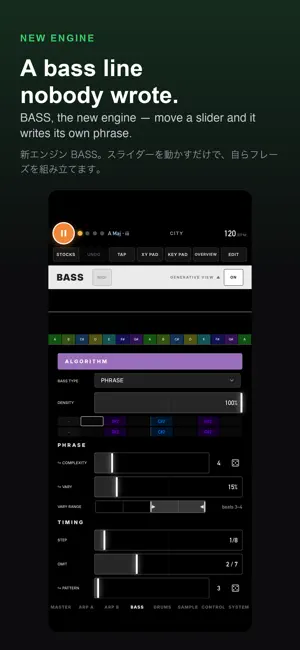
No sequences. No loops. A generative synth that plays on by your rules. And you can play right along. Key, scale, density, complexity — just set the rules, and five machines (arpeggios, bass, drums and a sampler) keep playing, with a different phrase every time. What you shape is not a song — it is a way of sounding. No AI picks the notes: your rules and probability do. Move a slider and the sound changes shape without ever stopping. Density, contour, filter, tape movement. It is built so that nothing you touch can break it. Then play right along with your own fingers. The on-screen key pad holds only the notes of the current scale, so nothing goes off-key. Play ARP A, ARP B, BASS or DRUMS, or connect a MIDI keyboard. What you play can be captured into the looper. ■ Five machines • ARP A / ARP B — two independent arpeggio engines. Ten arpeggio types, including Phrase (builds melodies) and Fingerpick (fingerstyle guitar) • BASS — a dedicated bass engine (STEP / COMPLEXITY / OMIT / PATTERN) • DRUMS — a drum machine built from probabilities (KICK / SNARE / HIHAT / NOISE) • SAMPLE — record one bar, slice it, rearrange it • Chord progressions (presets / automatic / 16 custom slots), ten time signatures, six LFOs ■ Slice (SAMPLE) • Record one bar from a mic or line input, with count-in and click • Record the app itself (ARP A / ARP B / drums), and overdub onto it • Load audio files — and the audio from a video file • Up to 64 slices, ordered by the same rules as the arps: direction, reverse, octave, probability, groove • STRETCH (on by default) — change tempo without changing pitch • Its own filter, envelope and delay / reverb sends ■ Play • On-screen key pad — always in scale; play ARP A, ARP B, BASS or DRUMS • PEDAL (sustain) and a one-bar looper that records how hard you played and transposes with the chords • MIDI keyboard input (ARP A / ARP B / BASS; damper pedal, pitch bend, standard control changes) • XY pad and performance FX that work only while held ■ Sound (11 voices) • Piano — three velocity layers, stereo, damper release • Electric piano — harmonics shift with how hard you strike • Nylon-string guitar — synthesised with a physical string model • Marimba, kalimba, handpan and chime — struck instruments, measured from the real ones and synthesised • Waveforms (sine / triangle / saw / square) plus an acid filter • Filter, ADSR, five drive types, tremolo — shaped per voice • Delay, reverb, Glitch, Granular • DRIFT / FLUTTER — tape movement on the synth voices and the live input alike • Concert pitch A=415–444 Hz ■ Connect • AUv3 plug-in — as an instrument and as an effect • Ableton Link, MIDI Clock, MIDI out (ARP A / ARP B / BASS / DRUMS), LFOs and XY as MIDI CC • External audio input (line / microphone) • Background playback — keeps playing when you switch to another app (iPhone / iPad) • WAV recording and export One-time purchase. No subscription.
Ratings & reviews
5.0
6 ratings
What’s new
Version 2.12.3 · Updated October 28, 2026
Fixed notes recorded into the looper (from the KEY PAD or a MIDI keyboard) playing back at the wrong pitch, such as an octave off, when the algorithm is Fingerpick.
App privacy
The developer, Takashi Tsunoda, reported these privacy practices to Apple.
Data Not Collected
The developer does not collect any data from this app.
Alternatives to ARPJAM Studio
Looking for apps like ARPJAM Studio? Here are 6 similar apps on the App Store. The highest rated is 1981 FM: 80s Track Generator (5.0/5), and 2 of the 6 are free to download.
-
 Nocturne LoFi
3.7
Nocturne LoFi
3.7
-
 1981 FM: 80s Track Generator
5.0
1981 FM: 80s Track Generator
5.0
-
 LoFi Jazz Generator
5.0
LoFi Jazz Generator
5.0
-
 Disto Disco
5.0
Disto Disco
5.0
-
 mSteps
5.0
mSteps
5.0
-
 VisualSound - AV Modular Synth
5.0
VisualSound - AV Modular Synth
5.0
| App | Rating | Price | Last updated | Compare |
|---|---|---|---|---|
| ARPJAM Studio | 5.0 / 5 (6 ratings) | 12.99 USD | October 28, 2026 | |
| Nocturne LoFi | 3.7 / 5 (3) | 1.99 USD | Oct 24, 2026 | Compare |
| 1981 FM: 80s Track Generator | 5.0 / 5 (3) | Free | Oct 20, 2026 | Compare |
| LoFi Jazz Generator | 5.0 / 5 (1) | Free | Aug 31, 2026 | Compare |
| Disto Disco | 5.0 / 5 (4) | 4.99 USD | Sep 24, 2026 | Compare |
| mSteps | 5.0 / 5 (3) | 5.99 USD | Oct 2, 2026 | Compare |
| VisualSound - AV Modular Synth | 5.0 / 5 (1) | 19.99 USD | Aug 8, 2026 | Compare |
Compare ARPJAM Studio with the top alternatives: ratings, updates, ASO score and keyword gaps →