

EarTimer
Tomokazu Shinozaki Utilities iPhoneiPadiPod touch
EarTimer is a free Utilities app for iPhone and iPad by Tomokazu Shinozaki. Requires iOS 26.0. Updated October 18, 2026.
- Price
- Free
- on the App Store
- Size
- 9 MB
- Age 4+
- Updated
- Oct 18
- 2026 · v1.1.1
Screenshots


About EarTimer
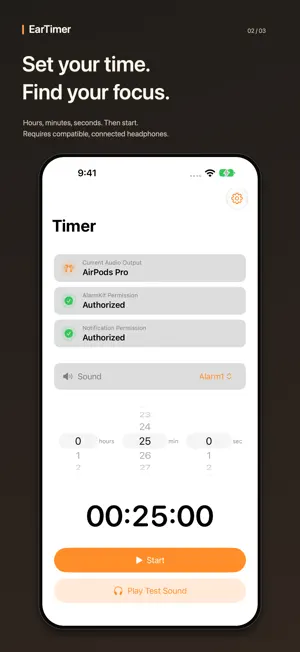
A quiet break. A focused study session. A reminder through your headphones. EarTimer helps you keep track of time in libraries, shared workspaces, and other quiet places. Set a countdown and hear the timer through connected wired headphones or Bluetooth earphones, including AirPods. MAKE TIME FOR YOUR NEXT TASK • Take a short break between study or work sessions. • Set aside time to read or focus without watching the clock. • Keep track of a quiet rest in a shared space. SET, START, AND STAY IN CONTROL • Choose hours, minutes, and seconds. • Check the current audio output before you start. • Test playback through your connected headphones. • Pause, resume, or cancel a running timer. • See and control your timer in a Live Activity on the Lock Screen, and in the Dynamic Island on supported iPhones. HOW HEADPHONE PLAYBACK WORKS EarTimer starts timer audio when a supported external audio output is connected. If that output disconnects, the app pauses its audio rather than intentionally routing the timer sound to the iPhone speaker. Without headphones, the system timer may still show an alert and vibrate; the selected timer sound does not start. KEEP THESE LIMITATIONS IN MIND Keep EarTimer running; do not force-quit it before your timer ends. Headphone audio is not guaranteed after force-quitting, an iPhone restart, or termination by iOS. Calls, Siri, other audio apps, Bluetooth reconnection, and system conditions can interrupt playback. Reopen EarTimer with headphones connected to prepare playback again. Check your audio output and volume before use. Do not rely on EarTimer as your only alarm for an important wake-up or deadline. FREE WITH OPTIONAL AD REMOVAL The free app can show a non-personalized banner ad on the Timer screen. A one-time Remove Ads in-app purchase removes the banner. Customers who purchased EarTimer before it became free retain their ad-free experience. Purchases can be restored in Settings. Advertising and privacy choices are explained in the app's privacy policy. Requires an iPhone with iOS 26.0 or later. Headphone audio requires a compatible connected output; Live Activity availability depends on the device and system settings.
What’s new
Version 1.1.1 · Updated October 18, 2026
Updated the App Store description and screenshots to make headphone playback, quiet breaks, and focus sessions easier to understand.
App privacy
The developer, Tomokazu Shinozaki, reported these privacy practices to Apple.
Data Used to Track You
The following data may be used to track you across apps and websites owned by other companies:
- Identifiers: Device ID
Data Linked to You
The following data, which may be collected and linked to your identity, may be used for the following purposes:
- Location: Coarse Location
- Identifiers: Device ID
- Usage Data: Product Interaction, Advertising Data
Used for: Third-Party Advertising, Developer’s Advertising or Marketing, Analytics, App Functionality
Data Not Linked to You
The following data, which may be collected but is not linked to your identity, may be used for the following purposes:
- Diagnostics: Performance Data, Other Diagnostic Data, Crash Data
Used for: Third-Party Advertising, Developer’s Advertising or Marketing, Analytics, App Functionality
Alternatives to EarTimer
Looking for apps like EarTimer? Here are 6 similar apps on the App Store. The highest rated is Flip Clock Pro: Desk Clock (5.0/5), and 5 of the 6 are free to download.
-
 CalMerge - Calendar to PDF
-
 Race Timer: SpeedGate
-
 LANChat Pro
-
 Warranti: Warranty Tracker
-
 Flip Clock Pro: Desk Clock
5.0
Flip Clock Pro: Desk Clock
5.0
-
 Barcode+QRcode Scanner
5.0
Barcode+QRcode Scanner
5.0
| App | Rating | Price | Last updated | Compare |
|---|---|---|---|---|
| EarTimer | – | Free | October 18, 2026 | |
| CalMerge - Calendar to PDF | – | Free | Jul 22, 2026 | Compare |
| Race Timer: SpeedGate | – | Free | Sep 28, 2026 | Compare |
| LANChat Pro | – | Free | Oct 22, 2026 | Compare |
| Warranti: Warranty Tracker | – | 0.99 USD | Oct 9, 2026 | Compare |
| Flip Clock Pro: Desk Clock | 5.0 / 5 (1) | Free | Sep 23, 2026 | Compare |
| Barcode+QRcode Scanner | 5.0 / 5 (1) | Free | Jul 8, 2026 | Compare |
Compare EarTimer with the top alternatives: ratings, updates, ASO score and keyword gaps →