

KeySpeech: Voice Keyboard
Pavel DEMIANOV Productivity iPhoneiPadiPod touch
KeySpeech: Voice Keyboard is a free Productivity app for iPhone and iPad by Pavel DEMIANOV. Requires iOS 17.0. Updated October 20, 2026.
- Price
- Free
- on the App Store
- Size
- 50 MB
- Age 4+
- Updated
- Oct 20
- 2026 · v1.4.1
Screenshots

About KeySpeech: Voice Keyboard
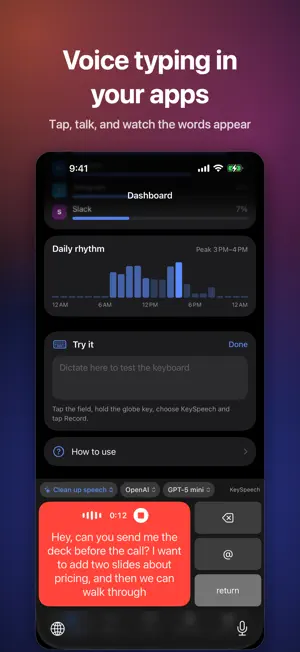
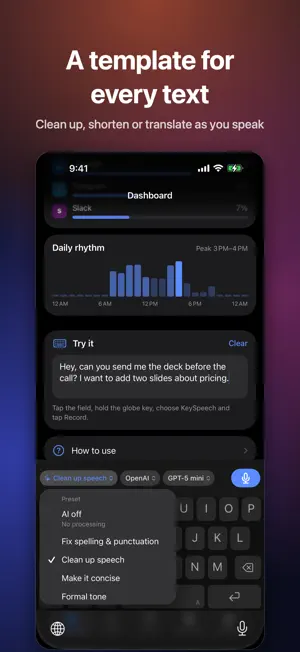
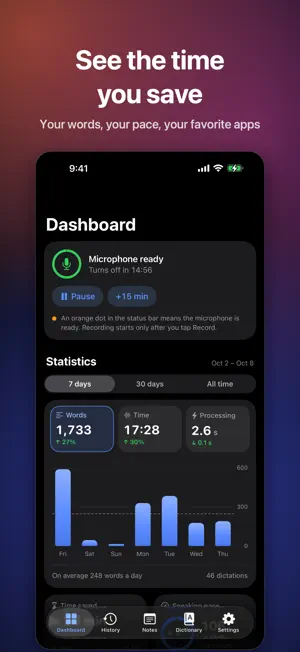
KeySpeech is a voice-typing keyboard for iPhone and a recorder that turns long meetings into transcripts by speaker. TWO KEYBOARDS • Voice keyboard: one big Record key. Tap, talk, tap again, and the text goes into the app you're typing in. • Full keyboard: letters like the iPhone's own, with a dictation bar above. English, Russian, German, French, Spanish, Italian, Dutch and Polish layouts, accents, emoji search, and a space-bar trackpad that moves the cursor left and right. No autocorrect, suggestions or swipe typing. • On both, chips switch the template, AI provider and model. • With the Apple engine or KeySpeech Engine, words appear as you speak; Whisper and OpenAI show them after you stop. • Microphone standby (5 min to 2 hours, with a pause) starts dictation instantly; nothing is recorded until you tap Record. • Not in password fields or apps that block third-party keyboards. TEMPLATES A template tells the AI what to do with your words: fix punctuation, cut filler words, shorten, change the tone, translate to English or Russian, reply to an email, or follow your own prompt. Each has its own provider and model. Without AI, you get the engine's text as is. MEETINGS AND LECTURES • Record up to 4 hours per note with the screen locked and stop from the Lock Screen, or import audio and video files from Files. A call or Siri only pauses the recording. • Speakers are separated on your iPhone; listen to each voice and pick who it is. KeySpeech can remember voices (on this iPhone only) and suggest who's speaking next time; you confirm. Short remarks can get mixed up. • The player's waveform is colored by speaker; tap any line of the transcript to hear it. • Redo a note: recognize it again with another engine or language, separate the speakers again (on your iPhone or through OpenAI), or process it with another template. SUMMARIES AND EXPORT 12 summary templates (Meeting summary, Action items, Formal minutes, Lecture notes…), each with its own AI, or your own request, in the recording's language. Tap a time like [12:40] to hear that moment. Export transcripts with names and timestamps as TXT, Markdown, SRT, WebVTT, RTF, PDF or Word, plus summaries, a full report and the audio. ALSO INSIDE • Dashboard: time saved vs. typing, speaking pace, the apps you dictate in, your busiest hours. • History: every dictation by day, with its app and the raw text. • Dictionary: names, brands and terms spelled your way. SPEECH ENGINES • Apple: built in, no download. Your iPhone's language or another one Apple supports; on-device when iOS can, otherwise on Apple's servers. • KeySpeech Engine: offline after a ~483 MB download. 25 European languages, detected automatically. • Whisper: offline after a ~646 MB download. About 99 languages, including Chinese; best when you mix languages. • OpenAI: your own API key; audio is uploaded to OpenAI. Each engine keeps its own language. English works with all four. The models are optional downloads. AI PROVIDERS (OPTIONAL) Off until you add your own OpenAI, Google Gemini or Anthropic key, or an OpenAI-compatible server, even one on your computer. On an iPhone with 12 GB of memory, notes and summaries can also run on a model on the iPhone (optional 3 GB download). PRIVACY No account, no KeySpeech servers, no analytics, ads or tracking. History, notes and recordings stay on your iPhone; audio or text leaves it only for services you choose, straight to that provider. KeySpeech asks before a summary first sends a transcript to the cloud and before a redo first uploads a recording. Full Access only lets the keyboard talk to the KeySpeech app, which records for it, since iOS doesn't let keyboards use the microphone. What you type is never stored or sent. Ask everyone before you record them. KeySpeech itself is free, with no in-app purchases and no subscription. Cloud providers you connect bill you directly. Requires an iPhone with iOS 17 or later. The app's interface is in English and Russian.
What’s new
Version 1.4.1 · Updated October 20, 2026
KeySpeech 1.4.1 lets you set the voice keyboard's height and fixes the keyboard on iOS 27. • Voice keyboard height: Settings › Keyboard, from half to the standard height. When it is low, delete and @ sit side by side above return. • iOS 27: the keyboard is the system keyboard's height again, with no extra panel above it. • Full keyboard: give the language key a color of its own — Settings › Keyboard › Layouts. • The full keyboard has a space bar in a browser's address bar now. • History: the buttons under a dictation no longer break their words.
App privacy
The developer, Pavel DEMIANOV, reported these privacy practices to Apple.
Data Not Collected
The developer does not collect any data from this app.
Alternatives to KeySpeech: Voice Keyboard
Looking for apps like KeySpeech: Voice Keyboard? Here are 6 similar apps on the App Store. The highest rated is Lanson Flow: AI Voice Keyboard (5.0/5), and all 6 are free to download.
-
 Clavio: Voice to Text Keyboard
-
 Stingwave: AI Voice Keyboard
-
 VoiBoard: AI Voice Keyboard
-
 Lanson Flow: AI Voice Keyboard
5.0
-
 KeySay: Private Dictation
5.0
-
 Stache Social
5.0
| App | Rating | Price | Last updated | Compare |
|---|---|---|---|---|
| KeySpeech: Voice Keyboard | – | Free | October 20, 2026 | |
| Clavio: Voice to Text Keyboard | – | Free | Oct 12, 2026 | Compare |
| Stingwave: AI Voice Keyboard | – | Free | Oct 17, 2026 | Compare |
| VoiBoard: AI Voice Keyboard | – | Free | Oct 15, 2026 | Compare |
| Lanson Flow: AI Voice Keyboard | 5.0 / 5 (2) | Free | Oct 23, 2026 | Compare |
| KeySay: Private Dictation | 5.0 / 5 (2) | Free | Oct 13, 2026 | Compare |
| Stache Social | 5.0 / 5 (4) | Free | Mar 26, 2026 | Compare |