

Voicetation: Voice Dictation
EverGrow Tech Inc. Productivity iPhoneiPadiPod touch
Voicetation: Voice Dictation is a free Productivity app for iPhone and iPad by EverGrow Tech Inc. Rated 1.0/5 from 1 ratings. Requires iOS 18.0.
- Rating
- 1.0
- 1 ratings
- Price
- Free
- on the App Store
- Size
- 172 MB
- Age 4+
- Updated
- Sep 30
- 2026 · v1.06
Screenshots


About Voicetation: Voice Dictation
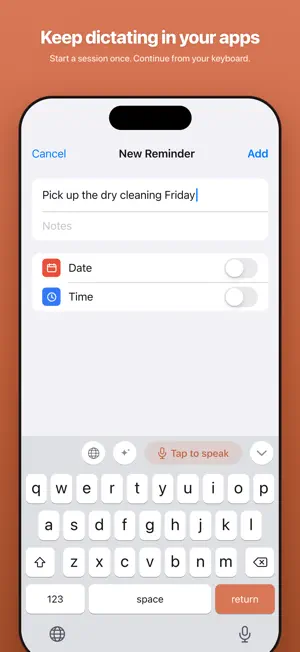
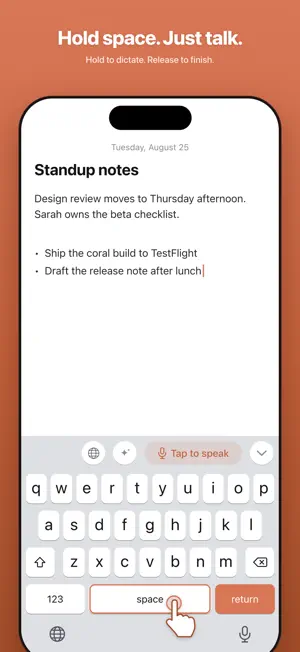
Voicetation turns your voice into text through an iPhone keyboard. Speak to write messages, emails and notes, with live transcription as you talk. WHAT IT DOES • Dictate in your apps. Write directly in text fields that support third-party keyboards, without copying from a separate notes app. • Live transcription. Your words show up while you are still talking, punctuation included, and settle into clean final text when you stop. • Hold space to talk. Press and hold the space bar, speak, and release — the text drops right in. Slide up to cancel. • Keep dictating with fewer switches. Activate a voice session once, return to your app, and continue from the keyboard while the session stays active. End the session from Home. • Teach it your words. Dictionary terms are sent along with your recordings so the speech model knows how to spell your names, brands and jargon. Add a "misheard as" form and that exact wording is fixed on your iPhone, no AI involved. • Rewrite and translate. Tap the spark to polish what you wrote — in a built-in style or one you describe in your own words — or the globe to translate it. You see the result first and decide whether to insert it — nothing is changed behind your back. A JOURNAL, IF YOU WANT ONE • The Home tab counts your dictated words, your streak, and the typing time you saved. • Turn on dictation history and the Journal writes itself: a short AI recap of each day you dictate, next to notes you add by voice or typing. Every card can be edited or deleted — including the AI's. • Ask your journal questions — "what did I decide about the launch?" — and get answers drawn from your own notes. A REAL KEYBOARD, TOO Voicetation is not voice-only. It is a full keyboard you can leave installed: • English autocorrect and word suggestions for everyday typing. • Chinese pinyin with swipe input, whole-sentence conversion, fuzzy pinyin, and a dictionary that learns which candidates you pick. • All of the above runs on your device and works with no connection at all. PRIVACY • No account. Start without signing up. • No ads, no tracking, no data brokers. • Your voice is sent to be turned into text and is not stored by us. If a dictation cannot be returned safely, its latest audio or text stays only on your iPhone for up to 24 hours so you can retry or copy it. • Text in password fields is never sent anywhere, under any setting. • Dictation history is off until you turn it on. Emails and long numbers are stripped before anything is saved, and it lives only on this iPhone for 30 days. Journal recaps and answers are generated on request, and nothing is kept on our servers. • The keyboard connects to the internet only when you tap Rewrite or Translate. Typing, pinyin, swipe input and autocorrect run entirely on your device. We spell out exactly what leaves your device and when, at voicetation.com/privacy. GETTING STARTED Add Voicetation in Settings and turn on Full Access — the app walks you through both steps. Full Access is what lets the keyboard hand recording over to the app, receive your text back, and reach the AI features. Without it the keyboard still types, swipes and autocorrects, fully offline. Third-party keyboards are unavailable in some apps and in secure or phone-number fields. The app interface is currently in English.
What’s new
Version 1.06 · Updated September 30, 2026
• Fixed an issue that could prevent live text from appearing during dictation. • Improved Chinese pinyin suggestions and learned-word ranking. • Added Simplified and Traditional Chinese output options and improved Japanese text handling. • Improved candidate text clarity on iOS 27. • Refined end-of-sentence punctuation in messaging apps.
App privacy
The developer, EverGrow Tech Inc., reported these privacy practices to Apple.
Data Linked to You
The following data, which may be collected and linked to your identity, may be used for the following purposes:
- Identifiers: Device ID
- User Content: Audio Data, Other User Content
Used for: Analytics, App Functionality
Data Not Linked to You
The following data, which may be collected but is not linked to your identity, may be used for the following purposes:
- Usage Data: Product Interaction
Used for: Analytics
Alternatives to Voicetation: Voice Dictation
Looking for apps like Voicetation: Voice Dictation? Here are 6 similar apps on the App Store. The highest rated is Tally :15 (5.0/5), and all 6 are free to download.
-
 Tally :15
5.0
Tally :15
5.0
-
 AKY
AKY
-
 Obius — Notes that evolve
5.0
Obius — Notes that evolve
5.0
-
 HiveMind: Remember & Connect
5.0
HiveMind: Remember & Connect
5.0
-
 Document Generator
5.0
Document Generator
5.0
-
 Skill Atlas
| App | Rating | Price | Last updated | Compare |
|---|---|---|---|---|
| Voicetation: Voice Dictation | 1.0 / 5 (1 rating) | Free | September 30, 2026 | |
| Tally :15 | 5.0 / 5 (1) | Free | Sep 1, 2026 | Compare |
| AKY | – | Free | Apr 17, 2025 | Compare |
| Obius — Notes that evolve | 5.0 / 5 (2) | Free | May 29, 2026 | Compare |
| HiveMind: Remember & Connect | 5.0 / 5 (3) | Free | Oct 6, 2026 | Compare |
| Document Generator | 5.0 / 5 (1) | Free | Aug 11, 2026 | Compare |
| Skill Atlas | – | Free | Mar 4, 2026 | Compare |