

WristJot
Yutaka Tsuhako Productivity iPhoneiPadiPod touchApple Watch
WristJot is a paid Productivity app for iPhone and iPad by Yutaka Tsuhako. Requires iOS 17.0. Updated November 17, 2026.
- Price
- 4.99 USD
- on the App Store
- Size
- 9 MB
- Age 4+
- Updated
- Nov 17
- 2026 · v1.4
Screenshots
Save to Pinterest
About WristJot
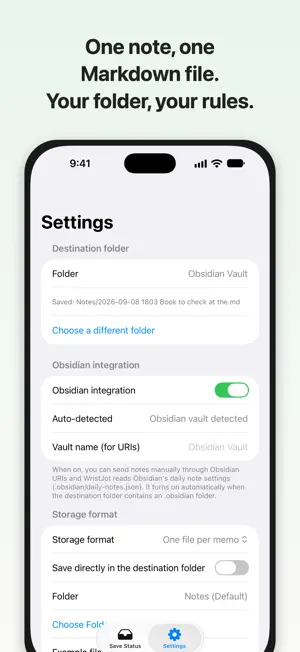
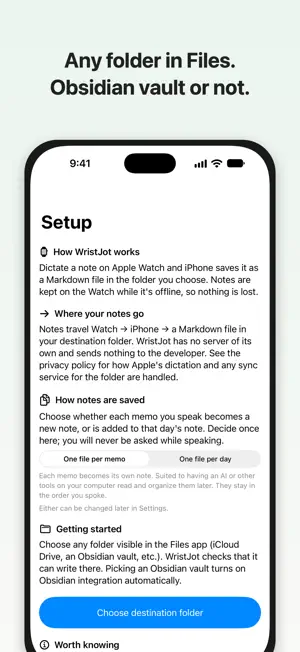
Jot it down from your wrist, right when it comes to you. Notes you make on your Apple Watch are saved as Markdown files in a folder you choose on your iPhone. Note: The main flow needs an iPhone and an Apple Watch. On iPhone alone you can save with Speak a Note (iOS 26 or later) or with Shortcuts. An idea that came to you on a walk. Something to do once you get home. A small annoyance you noticed in the middle of work. You think you'll remember, but sometimes it's gone by the time you look for it. It doesn't need to be polished or fully thought out. Keep it in your own words, and read it again later in your usual notes. Pick an Obsidian vault and each note becomes a page there. ■ Capture from your wrist, in the middle of your day • Start entering a note right away from a watch face complication • Or say "Jot with WristJot" to Siri on the Watch • Use the standard Apple Watch input (such as dictation) for quick, short notes • Notes you've already entered stay queued on the Watch while offline, and are delivered the next time you open WristJot ■ For longer thoughts, record and transcribe Record up to 20 minutes on the Watch, send it to the iPhone, and have it transcribed on the iPhone itself (Transcribe on iPhone; requires an iPhone with iOS 26 or later). For when you want to talk through what you were thinking on a walk. ■ Into your usual notes • One file per note (default), or append to a daily note • Choose an Obsidian vault, or any folder such as iCloud Drive • The files are plain Markdown. They stay in your folder even if you stop using the app ■ You decide whether recordings are kept Whether Transcribe on iPhone recordings are kept as audio files in your folder is up to you: Don't keep (default), Keep selected only, or Keep all. With Keep selected only, you choose which recordings to keep after they're transcribed; the ones you don't choose are held in the iPhone app for 7 days, then deleted. One exception: a recording that still can't be transcribed after a day of retries is saved as an audio file regardless of this setting. Speak a Note on the iPhone does not save audio files. ■ Nothing gets lost • Failed saves stay in Save Status, ready to retry • Notes deleted before they're saved can be restored for 30 days • WristJot never sends your notes or recordings to an external server (with the standard Apple Watch dictation, Apple's dictation turns speech into text; syncing to iCloud Drive or similar is done by that service) • No account needed WristJot is a one-time purchase. No subscription. Turn "I'll write it down later" into a few words, right now. Obsidian is a trademark of Dynalist Inc. WristJot is not affiliated with or endorsed by Dynalist Inc.
What’s new
Version 1.4 · Updated November 17, 2026
• Keep only the Transcribe on iPhone recordings you choose: tap "Keep Recording" on the result screen on the Watch, or "Also save the recording" in Save Status on the iPhone. Recordings you don't choose are held in the iPhone app for 7 days, then deleted ("Keep selected only" under "Keep recordings" in WristJot's Settings; iOS 26 or later) • Choose where audio files go. With the Obsidian integration on, WristJot follows Obsidian's "Default location for new attachments" setting • "Keep recordings as audio files" is now "Keep recordings", with three choices: Don't keep, Keep selected only, and Keep all. If it was on, it is now Keep all • Transcribe on iPhone recordings can now run up to 20 minutes, up from 10 • Tap a saved note in the Smart Stack to see its details. Rows in History on the Watch show the same details
App privacy
The developer, Yutaka Tsuhako, reported these privacy practices to Apple.
Data Not Collected
The developer does not collect any data from this app.
Alternatives to WristJot
Looking for apps like WristJot? Here are 6 similar apps on the App Store. The highest rated is Simple Memo - Obsidian Voice (5.0/5), and 3 of the 6 are free to download.
-
 Watch Voice Memo
-
 with to go
-
 Vox.md: Quick Capture Notes
3.0
-
 Simple Memo - Obsidian Voice
5.0
-
 BTT Mobile
5.0
-
 SideNotes Mobile
4.2
| App | Rating | Price | Last updated | Compare |
|---|---|---|---|---|
| WristJot | – | 4.99 USD | November 17, 2026 | |
| Watch Voice Memo | – | 2.99 USD | Jul 11, 2026 | Compare |
| with to go | – | 2.99 USD | Oct 11, 2026 | Compare |
| Vox.md: Quick Capture Notes | 3.0 / 5 (4) | Free | Nov 21, 2026 | Compare |
| Simple Memo - Obsidian Voice | 5.0 / 5 (1) | Free | Nov 20, 2026 | Compare |
| BTT Mobile | 5.0 / 5 (4) | Free | Nov 20, 2026 | Compare |
| SideNotes Mobile | 4.2 / 5 (29) | 5.99 USD | Sep 8, 2026 | Compare |
Compare WristJot with the top alternatives: ratings, updates, ASO score and keyword gaps →