

DeeeMix: Vocal Remover & Stems
Toshihiko Arai Music iPhoneiPadiPod touch
DeeeMix: Vocal Remover & Stems is a free Music app for iPhone and iPad by Toshihiko Arai. Rated 5.0/5 from 2 ratings. Requires iOS 18.0.
- Rating
- 5.0
- 2 ratings
- Price
- Free
- on the App Store
- Size
- 68 MB
- Age 4+
- Updated
- Nov 9
- 2026 · v26.11.5
Screenshots
Save to Pinterest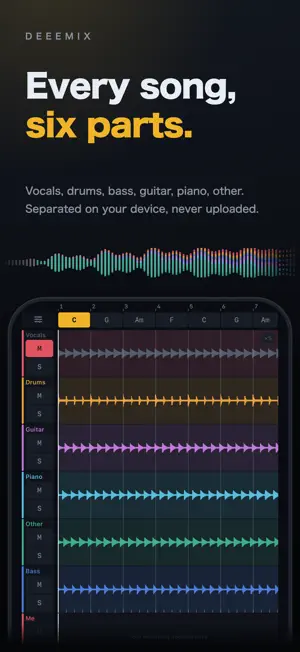


About DeeeMix: Vocal Remover & Stems
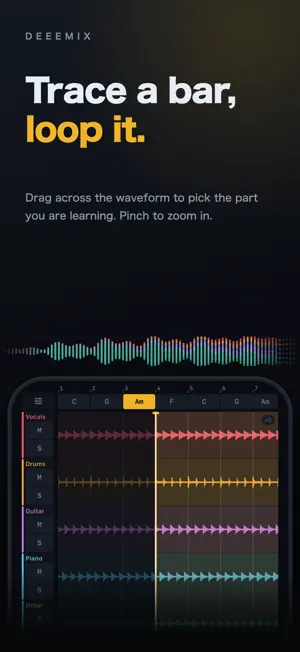
No subscription. Separation is free with no limits, and the extras (slow playback, saved ranges, export) are a one-time purchase. DeeeMix splits a song into six parts — vocals, drums, bass, guitar, piano and other — so you can listen to each one on its own. Mute the vocals for a backing track, or solo the bass or guitar to work out a line by ear. Separation runs entirely on your iPhone. Your music is never uploaded, and the app works with no network at all. A five-minute song takes well under half a minute. WHAT YOU CAN DO - Split a song into 6 parts (vocals / drums / bass / guitar / piano / other) - Import from videos in the Photos app, or from MOV and MP4 files - Change the volume of each part, mute it, or solo it - Mute the vocals and play the song as a backing track - Drag across the waveform to loop just that range - Set the loop points while the music plays, with Set A and Set B - Skip back 5 seconds or forward 5 seconds - Change the key in semitones, up to 6 up or down: fit a backing track to your voice, or learn a song in an easier key - See the song's reference pitch (A=440, A=442 and so on) - See chords and bar lines estimated from the song above the waveform (tap to jump to that bar, press and hold to loop it; during playback the waveform scrolls so you can read the next chords ahead) - Record your own vocals or instrument over the backing track and compare with the original part (recordings never leave your device) BUILT FOR LEARNING BY EAR Working out a song means playing the same few bars over and over, nudging the start a little each time. The range repeat and the 5-second skips are free, with no limits. PRO adds slow playback with the pitch unchanged: tap the speed button to step through 1x, 0.75x and 0.5x, or press and hold it to pick any speed from 0.25x to 1x in 0.05 steps. Passages that were too fast finally come apart. You can also name a range — "chorus", "the two bars before the solo" — and jump straight back to it when you open the app tomorrow. PRO (ONE-TIME PURCHASE) - Slow playback from 0.25x to 1x in 0.05 steps (press and hold the speed button), pitch unchanged - Name ranges and recall them any time, as many per song as you like - Export the parts you chose as a single file, in WAV or M4A - Share all the separated files at once - Export your recording mixed with the backing track, or share your recording alone - No ads Separation itself is free, with no limit on how many songs you separate. PLEASE KNOW - The piano part tends to keep traces of other instruments and does not separate as cleanly as guitar. Anything that is not vocals, drums, bass, guitar or piano — strings, wind instruments, synths — is grouped into "other". - Classical music does not work well. It cannot separate strings from woodwinds from brass, and most of the sound lands in "other". - Every part keeps a faint trace of the others, especially cymbals and long reverb tails. A backing track often has a ghost of the vocal in it. - The reference pitch is only measured within a semitone. A song tuned to 442 is detected, but a whole semitone of difference is not: a baroque recording at A=415 reads as roughly A=440. Audio only reveals the key that is sounding, never the key that was written. - You can shift the key up to 6 semitones either way; the further you go, the more muffled voices sound. Exports stay in the original key. - Chords and tempo are estimates from the song. They can be off for tension-heavy jazz, songs with many key changes, songs without drums, and songs in 3/4 or 6/8. - Songs can be up to 15 minutes. DRM-protected files from streaming services cannot be imported. - Use earphones when recording: on the speaker, the mic picks up the backing track along with you. - Please respect the copyright in the original recording when you use what comes out. REQUIREMENTS iPhone and iPad running iOS 18 or later.
What’s new
Version 26.11.5 · Updated November 9, 2026
• The player now follows the layout of music production software (DAWs): M/S buttons sit to the left of each part's waveform, and spare height goes to the waveforms. Show or hide the volume sliders with the button at the top left. • Record your own vocals or instrument over the song. Press ● in the playback row, then compare with the original using M and S on the Me track. Recordings never leave your device. • Export has moved to the share button at the top right. • The guided tour now matches the current screen and also explains M/S, volume, bar numbers and recording. • Fixed tapping the chord strip sometimes jumping to the wrong chord, chord names disappearing when zoomed all the way out, and audio breaking up while dragging on the waveform.
App privacy
The developer, Toshihiko Arai, reported these privacy practices to Apple.
Data Used to Track You
The following data may be used to track you across apps and websites owned by other companies:
- Location: Coarse Location
- Identifiers: Device ID
- Usage Data: Product Interaction, Advertising Data
Data Linked to You
The following data, which may be collected and linked to your identity, may be used for the following purposes:
- Location: Coarse Location
- Identifiers: Device ID
- Usage Data: Product Interaction, Advertising Data
Used for: Third-Party Advertising, Analytics
Data Not Linked to You
The following data, which may be collected but is not linked to your identity, may be used for the following purposes:
- Diagnostics: Performance Data, Crash Data, Other Diagnostic Data
Used for: Analytics, App Functionality
Alternatives to DeeeMix: Vocal Remover & Stems
Looking for apps like DeeeMix: Vocal Remover & Stems? Here are 6 similar apps on the App Store. The highest rated is Stem Splitter - OffgridStem (5.0/5), and all 6 are free to download.
-
 Stem Splitter - OffgridStem
5.0
-
 Riftone: AI Stem Splitter
-
 MonoBand: AI Stem Splitter
-
 Soniqo Music: Vocal Remover
-
 Vocal Remover - Music Splitter
5.0
-
 VocalErase: Vocal Remover
| App | Rating | Price | Last updated | Compare |
|---|---|---|---|---|
| DeeeMix: Vocal Remover & Stems | 5.0 / 5 (2 ratings) | Free | November 9, 2026 | |
| Stem Splitter - OffgridStem | 5.0 / 5 (2) | Free | Nov 10, 2026 | Compare |
| Riftone: AI Stem Splitter | – | Free | Nov 13, 2026 | Compare |
| MonoBand: AI Stem Splitter | – | Free | Oct 2, 2026 | Compare |
| Soniqo Music: Vocal Remover | – | Free | Nov 9, 2026 | Compare |
| Vocal Remover - Music Splitter | 5.0 / 5 (1) | Free | Aug 24, 2026 | Compare |
| VocalErase: Vocal Remover | – | Free | Nov 9, 2026 | Compare |