

RetroFold: App Blocker
Jeongyun Hur Lifestyle iPhoneiPadiPod touch
RetroFold: App Blocker is a free Lifestyle app for iPhone and iPad by Jeongyun Hur. Requires iOS 17.0. Updated September 15, 2026.
- Price
- Free
- on the App Store
- Size
- 3 MB
- Age 4+
- Updated
- Sep 15
- 2026 · v1.2
Screenshots


About RetroFold: App Blocker
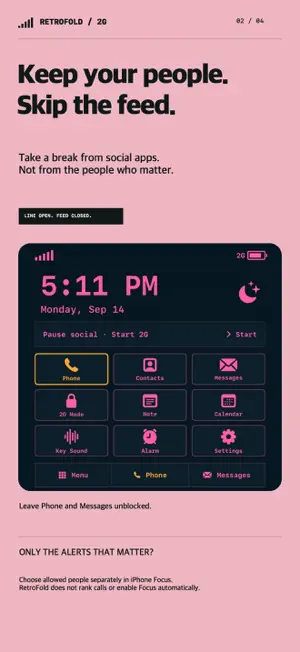
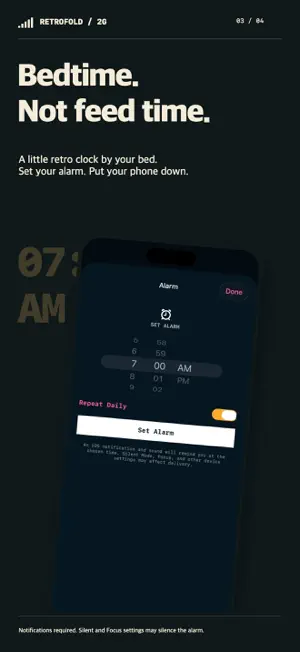
Pause social. Keep calls, texts and a bedside alarm. Need to stay reachable without getting pulled into a feed? RetroFold combines selected-app blocking with a retro phone keypad, clock and local alarm. Use your phone for what you need, then put it down. CHOOSE WHAT TO BLOCK Allow Apple Screen Time access, choose distracting social apps or websites, select a duration and start. Keep Phone and Messages out of your selection if you want to use them. Pick 15 minutes, 1 hour, 2 hours or a custom duration. These are times for the same blocking feature, not separate modes. Shields lift at expiry, and you can end early. KEEP IMPORTANT PEOPLE CLOSE Use the retro keypad, system contact picker and Apple's message composer. To receive alerts only from chosen people, configure allowed people and callers separately in iPhone Focus. RetroFold does not read communications, judge their importance or switch iPhone Focus on or off. A BEDSIDE CLOCK, NOT ANOTHER FEED See a large clock and date. Schedule a local alarm with optional daily repeat. The alarm requires notification permission and follows Silent, Focus and other device settings; it does not behave identically to the built-in Clock alarm. A LITTLE RETRO CHARACTER Choose pink or white LCD styling, tap the keypad with sound and haptics, and keep a private note. A completed focus session earns an in-app letter card you can save or share. Letters are a bonus for any completed duration, not a 15-minute-only feature. No actual SMS is sent as a reward. YOUR PHONE, YOUR CHOICE Screen Time permission is required for app blocking. RetroFold does not replace iOS, the Home Screen, Phone, Messages or incoming-call screens. Phone and message actions finish in Apple system interfaces. iPhone Focus notification filtering must be turned off separately. No account, ads, analytics SDK, subscription or in-app purchase. App settings, notes and session records stay on your device. Sharing is optional and uses the destination you select. App interface languages: English and Korean.
What’s new
Version 1.2 · Updated September 15, 2026
Renamed the Korean app listing to 2G Phone and improved reliability. Added session status and recovery, quick focus durations, completion history, and Japanese interface support.
App privacy
The developer, Jeongyun Hur, reported these privacy practices to Apple.
Data Not Collected
The developer does not collect any data from this app.
Alternatives to RetroFold: App Blocker
Looking for apps like RetroFold: App Blocker? Here are 6 similar apps on the App Store. The highest rated is Good Night Lock(screen time) (5.0/5), and all 6 are free to download.
-
 너의 눈코입
-
 Gantt Planet: Habit Tracker
-
 KAIL 재판게임
-
 AlarMind - Motivation Alarm
-
 Good Night Lock(screen time)
5.0
Good Night Lock(screen time)
5.0
-
 DAYLine - Plan vs Actual
| App | Rating | Price | Last updated | Compare |
|---|---|---|---|---|
| RetroFold: App Blocker | – | Free | September 15, 2026 | |
| 너의 눈코입 | – | Free | Apr 16, 2026 | Compare |
| Gantt Planet: Habit Tracker | – | Free | Aug 11, 2026 | Compare |
| KAIL 재판게임 | – | Free | Apr 16, 2026 | Compare |
| AlarMind - Motivation Alarm | – | Free | Sep 24, 2026 | Compare |
| Good Night Lock(screen time) | 5.0 / 5 (3) | Free | Apr 22, 2026 | Compare |
| DAYLine - Plan vs Actual | – | Free | Oct 5, 2026 | Compare |