

DAYLine - Planner & Time Log
JongEun Lee Lifestyle iPhoneiPadiPod touch
DAYLine - Planner & Time Log is a free Lifestyle app for iPhone and iPad by JongEun Lee. Requires iOS 16.4. Updated October 18, 2026.
- Price
- Free
- on the App Store
- Size
- 41 MB
- Age 4+
- Updated
- Oct 18
- 2026 · v1.3.0
Screenshots


About DAYLine - Planner & Time Log
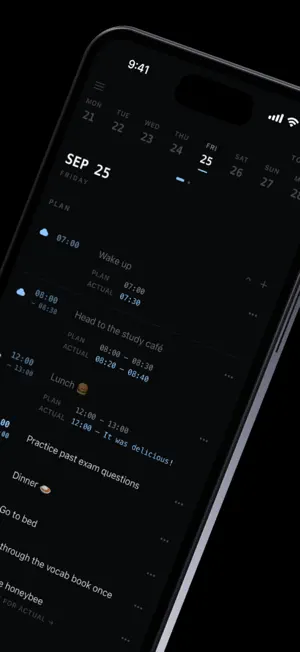
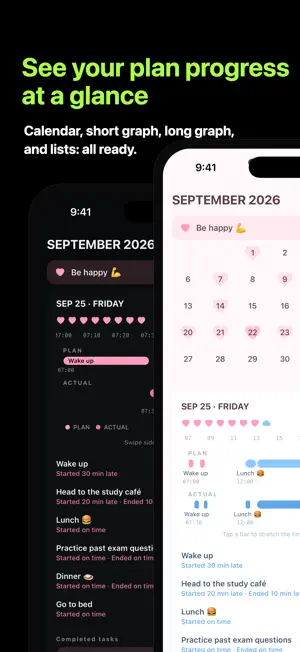
DAYLine is a cute, minimal time-management app that puts your "planned day" and your "real day" side by side. See how the plan you made in the morning actually played out, and where your time went. ฅ^•ω•^ฅ ▪ Plan vs Actual Swipe left and right to move between today's plan (PLAN) and what you really did (ACTUAL). Completing a plan copies it to your actual log with the same time, and adjusting it to the real start and end times compares it to the plan right away. A setting can also log the moment you check a plan as its actual time. ▪ Look Back on the Month with the Calendar The more plans you finish, the deeper each day is colored. You can show how many todos each day has (turn it off in Settings). Tap a day to see its plan and actual as time bars side by side, along with how far they differed, such as "started 10 min late" or "ended 5 min early". Tap a bar to stretch the timeline out to the minute. ▪ Expand a Day and Save It as a Photo Open any day in a larger view to compare plan and actual at a glance, then save it to Photos as a square image to share or keep. ▪ Routines You Can Finish, Not Just Delete Repeat plans on chosen weekdays, add tags like #workout, and plan ahead on any date. When a routine has run its course, mark it Complete to keep it instead of deleting it, with a little celebration. See every routine, in progress or completed, under Routines in the side menu. ▪ Stats for Every Plan Plans with a time get line graphs of start and end times: the gap between planned (dotted) and actual (solid) reveals your own patterns. Plans without a time, like a plain to-do, get a grass-style grid that fills in as you check them off day by day. ▪ Reminders That Build the Habit * Morning start: a nudge at the time of your day's first plan * Routine reminders: turn them on only for the routines you want * Come-back nudge: one gentle reminder if you haven't opened the app for two days Everything runs on your device and you can switch each one off in Settings. ▪ Widgets for Every Need * Today's Plan: check what's left right on your Home Screen * Plan vs Actual: compare planned and actual times side by side * Pinned Goal: your pinned goal on one long, pretty card. It fits on the Lock Screen too * Monthly Goals: your goals and their progress at a glance Widgets follow the colors and shapes of the theme you choose. ▪ Monthly Goals Write several goals for the month and check each one off with a sparkling check when you get there. Pin your most important goal to keep it at the top of the screen. ▪ Live Activities · Dynamic Island See what you're doing right now, and what's next, live on your Lock Screen and Dynamic Island. ▪ Cute Themes Choose from Default, Pink, and Sky. Check marks turn into hearts in Pink and clouds in Sky. Light, Dark, and System modes are supported as well. ▪ Privacy First All your records stay on your device. No sign-up, no server, and no data sent anywhere. Export and import your data to back it up or move to a new phone. ▪ 4 Languages 한국어 · English · 中文 · 日本語 Tired of complicated to-do apps? Plan with DAYLine, record your day just as it flowed, and look back on it.
What’s new
Version 1.3.0 · Updated October 18, 2026
Big update! ฅ^•ω•^ฅ ► Reminders • Morning start: a nudge at the start time of your day's first plan. • Per-routine reminders: turn on "Reminder" in a routine's detail screen to be nudged at its start time on every repeat day. • Come-back nudge: one reminder if you haven't opened the app for two days. • The morning and come-back reminders can be switched on or off in Settings. ► Complete a routine • You can now mark a routine Complete. Completed routines stay available under Routines. • Completed routines no longer appear in Plan stats, but you can check their stats under Routines. ► Routines screen • A new "Routines" item sits below Settings in the side menu. • Every routine you made is in one place, split into In progress and Completed. • Use the "…" button on each routine to edit, complete, or delete it. ► Save a day as a photo • Tap the expand icon on a day in the calendar to see plan and actual side by side in a larger view. • Tap the download icon at the top right to save it to Photos as a square image. The background follows your theme (Default, Pink, Sky, including Dark). ► Todo count on the calendar • Each day's mark on the calendar shows how many todos that day has. • Don't need the number? Turn it off anytime in Settings. ► Grass tracking for plans without a time • Plans with a time get line graphs of start and end times in Plan stats. • Plans without a time (TODO) fill one cell per day like grass to track completion, starting with a month of empty cells and adding a cell per day after that.
App privacy
The developer, JongEun Lee, reported these privacy practices to Apple.
Data Not Linked to You
The following data, which may be collected but is not linked to your identity, may be used for the following purposes:
- Diagnostics: Crash Data, Performance Data, Other Diagnostic Data
Used for: Analytics, App Functionality
Alternatives to DAYLine - Planner & Time Log
Looking for apps like DAYLine - Planner & Time Log? Here are 6 similar apps on the App Store.
-
 하루 영수증: 오늘 하루도 정산 완료!
-
 Dayori: 다이어리, 캘린더, 필기
-
 Life Tyde: Life Timeline
-
 일기곰
일기곰
-
 ノープロ - 怠けタイムトラッカー
-
 AsuPlanner
| App | Rating | Price | Last updated | Compare |
|---|---|---|---|---|
| DAYLine - Planner & Time Log | – | Free | October 18, 2026 | |
| 하루 영수증: 오늘 하루도 정산 완료! | – | Free | Jun 11, 2026 | Compare |
| Dayori: 다이어리, 캘린더, 필기 | – | Free | Jun 1, 2026 | Compare |
| Life Tyde: Life Timeline | – | Free | Oct 22, 2026 | Compare |
| 일기곰 | – | Free | Aug 3, 2026 | Compare |
| ノープロ - 怠けタイムトラッカー | – | Free | May 6, 2026 | Compare |
| AsuPlanner | – | Free | Jul 4, 2026 | Compare |