

OffMemory
良 史 Productivity iPhoneiPadiPod touchApple Watch
OffMemory is a free Productivity app for iPhone and iPad by 良 史. Rated 5.0/5 from 1 ratings. Requires iOS 15.0. Updated October 28, 2026.
- Rating
- 5.0
- 1 ratings
- Price
- Free
- on the App Store
- Size
- 40 MB
- Age 4+
- Updated
- Oct 28
- 2026 · v2.3.0
Screenshots


About OffMemory
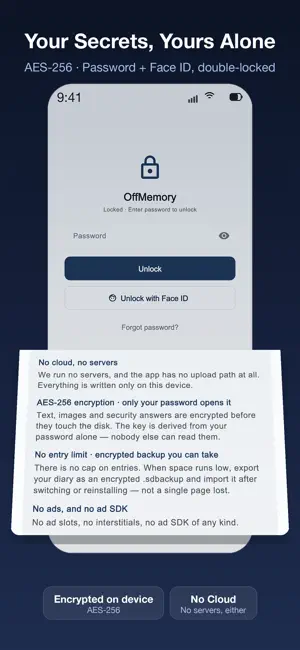
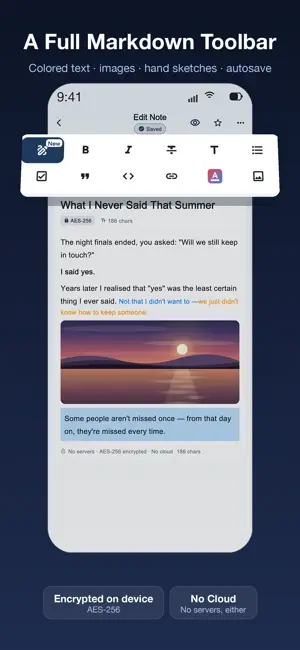
OffMemory is a fully encrypted diary — your words stay on this device. Every note, title, photo and drawing is locked with AES-256, and the password is derived with Argon2id, so guessing it offline is expensive. No cloud, no servers, no ads. It opens and you write Layered materials, a restrained type scale, a hairline border instead of shadows, and light or dark following the system. Every touch target was audited for size and contrast — a journal that does not compete for attention: writing first, features second. Three things worth calling out 1. Second Vault: set a second, decoy password. Unlocking with it opens a separate space where your real journal is not visible — separate database, separate keys, separate media folders, not merely a hidden entrance. 2. Apple Watch: capture from your wrist, entries wait in a sync queue so nothing is lost offline, and you can lock the phone from your wrist. No new permissions, and the watch never keeps note text. 3. On-device summaries on Apple Intelligence devices: summarise, suggest a title or reflect. Nothing leaves the device. Key features 1. Password protection with Face ID; the app locks itself when it leaves the foreground 2. Recovery code: write it down once and your notes stay readable even if you forget the password 3. Per-note lock: one entry behind its own Face ID check, separate from the app lock 4. Time Capsule: a letter to your future self, sealed until the day you choose 5. Full Markdown toolbar with inline sizes and colours, folders, tags, favourites, moods and a writing calendar 6. Event date: date an entry by when it happened, separately from when you wrote it 7. Insights: a year of writing as a heat map, with streaks, active days and average length 8. Year in Review: a year on one page; the optional share card carries statistics only, never note text 9. Optional Spotlight index — titles only, off by default, never locked notes, never note bodies 10. Home-screen widget and Lock Screen control (iOS 18+) 11. Export to PDF, Obsidian-ready Markdown or mood CSV; an encrypted backup restores on a new iPhone Download free — your first three entries are free to write; a one-time purchase then unlocks unlimited writing, forever. iPhone, iPad, Apple Watch, 15 languages.
What’s new
Version 2.3.0 · Updated October 28, 2026
THE SECOND VAULT SAYS IT OUT LOUD — The screen where you set a second password now states it before you type: a forgotten password cannot be recovered, not by us and not by Apple. IMAGES NOTHING POINTS TO CAN BE CLEARED — Settings > Backup & Restore has an image section beside the drawing one: scan, see how many and how much room they take, then delete. Notes in the recycle bin still count as in use, so nothing in use is removed. ANIMATED IMAGES STAY ANIMATED — Large GIFs used to be stored as a single frame while small ones kept moving. Animation is now kept at any size, the app tells you how much room the file takes, and anything too large is refused instead of leaving half an image behind. LONG ENTRIES KNOW WHERE TO STOP — Past 30,000 characters a one-time note suggests splitting the entry; it still saves. Past 100,000 nothing more can be added, but "copy all text" takes everything out in one tap. SHORTCUTS SPEAK YOUR LANGUAGE — The title and description of the "New blank entry" action now follow the system language in all fifteen languages instead of showing English everywhere. A SMALLER DOWNLOAD — The release build no longer carries our test harness, so the download is lighter and takes less room.
App privacy
The developer, 良 史, reported these privacy practices to Apple.
Data Not Collected
The developer does not collect any data from this app.
Alternatives to OffMemory
Looking for apps like OffMemory? Here are 6 similar apps on the App Store. The highest rated is Unlo (5.0/5), and all 6 are free to download.
-
 Bastion Offline Password Mgr
-
 Leaf Note: Markdown Notes
4.0
Leaf Note: Markdown Notes
4.0
-
 Unlo
5.0
Unlo
5.0
-
 Calendar Vertical & Monthly
4.4
Calendar Vertical & Monthly
4.4
-
 Vision: for blind people
5.0
Vision: for blind people
5.0
-
 RiverTodo - Daily Goal Tracker
4.7
RiverTodo - Daily Goal Tracker
4.7
| App | Rating | Price | Last updated | Compare |
|---|---|---|---|---|
| OffMemory | 5.0 / 5 (1 rating) | Free | October 28, 2026 | |
| Bastion Offline Password Mgr | – | Free | Oct 7, 2026 | Compare |
| Leaf Note: Markdown Notes | 4.0 / 5 (1) | Free | Oct 7, 2026 | Compare |
| Unlo | 5.0 / 5 (7) | Free | Oct 20, 2026 | Compare |
| Calendar Vertical & Monthly | 4.4 / 5 (7) | Free | Dec 27, 2025 | Compare |
| Vision: for blind people | 5.0 / 5 (1) | Free | Sep 24, 2026 | Compare |
| RiverTodo - Daily Goal Tracker | 4.7 / 5 (6) | Free | Aug 1, 2026 | Compare |
Compare OffMemory with the top alternatives: ratings, updates, ASO score and keyword gaps →