

Leaf Note: Markdown Notes
守恒 王 Productivity iPhoneiPadiPod touch
Leaf Note: Markdown Notes is a free Productivity app for iPhone and iPad by 守恒 王. Rated 4.0/5 from 1 ratings. Requires iOS 15.0. Updated September 21, 2026.
- Rating
- 4.0
- 1 ratings
- Price
- Free
- on the App Store
- Size
- 43 MB
- Age 4+
- Updated
- Sep 21
- 2026 · v5.3.2
Screenshots
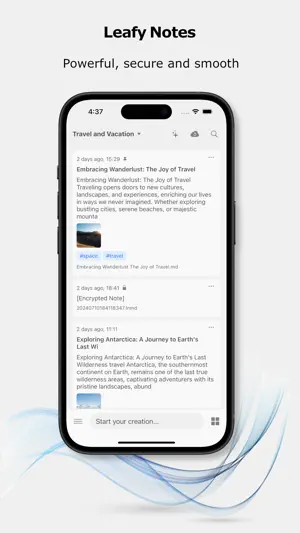


About Leaf Note: Markdown Notes
Welcome to "Leaf Note" — A dual-platform app focused on Markdown note-taking and knowledge management, supporting WebDAV / iCloud sync, end-to-end encryption, and fully offline functionality. 1. Elegant Design & Personalized Themes Upon opening "Leaf Note" for the first time, you'll be immediately drawn to its minimalist and elegant interface—from smooth interactive animations to delicate card-based layouts, every detail is meticulously polished. We offer multiple themes, whether it's the eye-protecting mode for late-night creation or the bright theme for daytime work, all designed to create an immersive note-taking experience. 2. Bank-Level Security: Dual Encryption for Notes & App Security is at the core of our design philosophy: - Note Encryption: Uses AES 256-bit encryption algorithm with user-defined passwords to protect your private content from prying eyes; - App Lock: Lock the app with biometric verification to prevent unauthorized access. Even if your phone is lost, your knowledge assets are fully protected. 3. Multi-Device Sync: Access Your Note Universe Anytime, Anywhere Break free from device limitations with support for two major cloud services: - iCloud: Automatic syncing, perfect for users accustomed to iCloud storage; - WebDAV: Supports private clouds (e.g., Synology, Nextcloud) to meet advanced user needs. All sync processes use TLS encrypted transmission to ensure secure flow of notes between the cloud and local devices. 4. All-Type Notes: Boundless Recording Methods Whether for text creation or multimedia inspiration capture, "Leaf Note" has you covered: - Markdown Notes: Supports basic syntax like headers, tables, and code blocks, with built-in MathJax formula editing (ideal for science students writing papers) and Mermaid flowcharts/mind maps (efficiently organize logic); - Multimedia Notes: Directly insert images, audio recordings, and hand-drawn sketches; - Web-to-Markdown: One-tap parsing of copied web links, making it easier to save online articles. 5. From Personal Knowledge Base to Flashcard Notes: Flexibly Adapt to Learning Scenarios - Knowledge Base Mode: Build your exclusive knowledge tree with infinite hierarchical directories + tag systems; - Flashcard Note Mode: Single notes support "quick recording," allowing fragmented ideas to spark creative insights. Whether organizing postgraduate exam materials, writing reading notes, or recording entrepreneurial ideas, find the perfect recording method for every need. 6. Powerful Search: Locate Any Note Content in 3 Seconds Enter keywords to quickly and accurately locate notes among vast collections, significantly improving search efficiency. 7. AI-Assisted Writing: Elevate Creative Efficiency Built-in intelligent writing assistant helps break through creative blocks, polishing sentences, distilling key points, and expanding content—say goodbye to writer's block. -------------------- Start Your Creative Journey Now Tap the "New Note" button to begin your first record! For any questions, tap "Help Center" to access detailed tutorials or contact customer service. Build your knowledge palace with "Leaf Note"—let every record be a stepping stone to growth.
What’s new
Version 5.3.2 · Updated September 21, 2026
Version 5.3.2 improves security guidance and feedback experience. Added optional mnemonic prompt during password setup, with visual export status indicator for encrypted backup info (excluding actual password). Fixed non-member access to multi-data-source feature. Updated localization and UI for missing key prompts. Enhanced feedback flow: added reply notifications on home screen, empty-state messaging in chat, and resolved API error handling.
App privacy
The developer, 守恒 王, reported these privacy practices to Apple.
Data Not Linked to You
The following data, which may be collected but is not linked to your identity, may be used for the following purposes:
- Contact Info: Email Address
Used for: App Functionality
Alternatives to Leaf Note: Markdown Notes
Looking for apps like Leaf Note: Markdown Notes? Here are 6 similar apps on the App Store. The highest rated is Enter: Take Notes, Shape Ideas (5.0/5), and 5 of the 6 are free to download.
-
 Enter: Take Notes, Shape Ideas
5.0
Enter: Take Notes, Shape Ideas
5.0
-
 Collected Notes
4.7
Collected Notes
4.7
-
 Print(Notes)
4.0
Print(Notes)
4.0
-
 Notable - Text Editor
3.0
Notable - Text Editor
3.0
-
 Metanote-notes,docs,agenda
4.3
Metanote-notes,docs,agenda
4.3
-
 Strflow: Text Yourself Notes
5.0
Strflow: Text Yourself Notes
5.0
| App | Rating | Price | Last updated | Compare |
|---|---|---|---|---|
| Leaf Note: Markdown Notes | 4.0 / 5 (1 rating) | Free | September 21, 2026 | |
| Enter: Take Notes, Shape Ideas | 5.0 / 5 (6) | Free | Apr 23, 2024 | Compare |
| Collected Notes | 4.7 / 5 (43) | Free | Jul 14, 2025 | Compare |
| Print(Notes) | 4.0 / 5 (4) | Free | May 11, 2026 | Compare |
| Notable - Text Editor | 3.0 / 5 (2) | 0.99 USD | Jan 27, 2026 | Compare |
| Metanote-notes,docs,agenda | 4.3 / 5 (15) | Free | Jul 16, 2025 | Compare |
| Strflow: Text Yourself Notes | 5.0 / 5 (49) | Free | Sep 9, 2026 | Compare |