

Vinylock
Alexandr Garlock Development House LLC Music iPhoneiPadiPod touch
Vinylock is a free Music app for iPhone and iPad by Alexandr Garlock Development House LLC. Rated 5.0/5 from 1 ratings. Requires iOS 17.6.
- Rating
- 5.0
- 1 ratings
- Price
- Free
- on the App Store
- Size
- 5 MB
- Age 4+
- Updated
- Oct 2
- 2026 · v1.0.3
Screenshots
About Vinylock
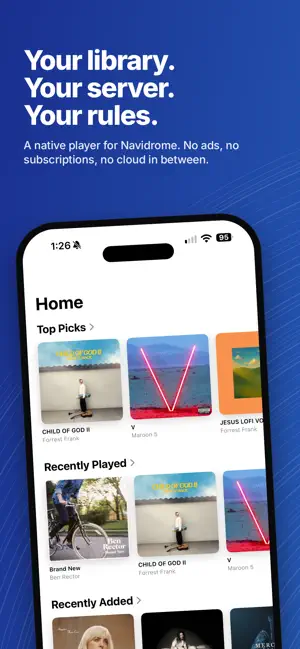
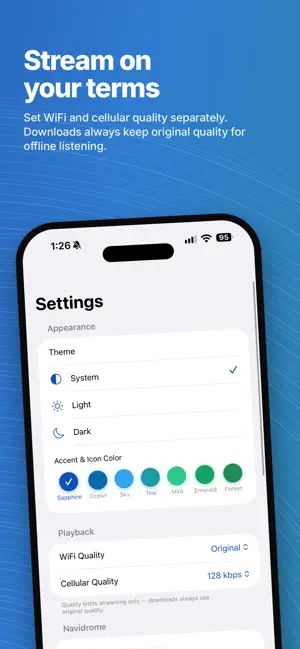
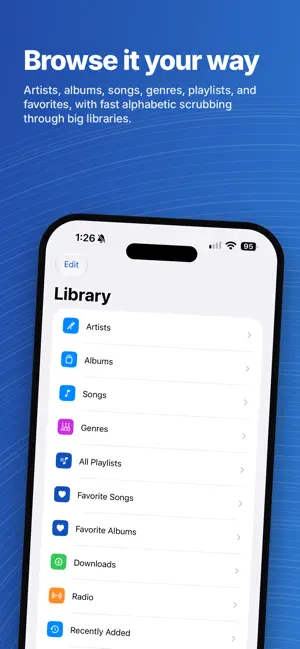
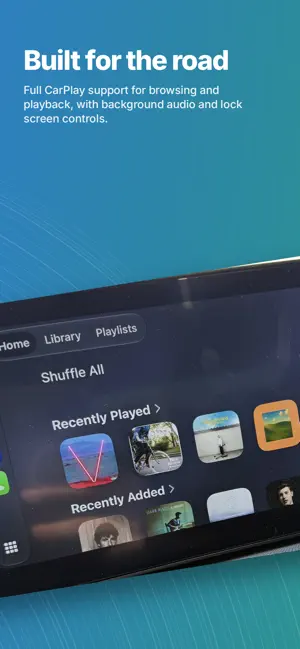
Vinylock is a native music player for your own Navidrome server. If you self-host your music library with Navidrome, Vinylock gives you a fast, fully native way to browse and stream it on iPhone, iPad, and Mac — no ads, no subscriptions, no third-party cloud in between. Just your library, your rules. Your library, properly organized Browse by artist, album, song, genre, or playlist, with fast alphabetic scrubbing through large libraries. Mark favorites, build playlists, and pick up recently played or recently added albums right from Home. Take it offline Download albums and songs for offline listening — perfect for flights, commutes, or spotty connections. Original quality is always preserved for downloads, with adjustable streaming quality for WiFi and cellular separately. A real equalizer Vinylock includes a full parametric EQ — Bass Booster, Vocal Booster, Small Speakers, Loudness, and more — off by default, on when you want it. Built for how you actually listen • Full CarPlay support for browsing and playback on the road • Background audio with lock screen and Control Center controls • Internet radio stations • Sleep timer, shuffle, repeat, and a persistent play queue • Animated cover art playback for albums with animated artwork Discover what's missing (optional) Connect a Lidarr instance to browse and request albums you don't have yet, right alongside your existing library. Make it yours Choose from a wide range of accent colors, each with a matching alternate app icon, and switch between light, dark, or system appearance. Vinylock is fully localized in English, Spanish, French, German, Simplified Chinese, and Japanese. Requirements Vinylock connects to a Navidrome server (or any Subsonic/OpenSubsonic-compatible server) that you or someone you trust runs. It does not include or provide any music itself.
What’s new
Version 1.0.3 · Updated October 2, 2026
Full-screen player • Swiping down to dismiss no longer causes any icons, artwork, or scroll content to shift/slide — everything is locked in place except the intended drag-to-dismiss and the progress/volume sliders. • The down-arrow button to collapse back to the mini player works as before (tap it, or swipe down near it). Album → Artist navigation • Tapping the artist's name on an album's detail page now takes you to that artist's page, showing all of their albums. Home screen customization • You can now add up to 2 extra rows of albums at the bottom of Home. • Each row can be sourced from: All Albums, Favorite Albums, Downloaded albums, any Genre, or a Smart Playlist (Unplayed This Year, or by decade). • Each row has a menu (⋯) to change its source or remove it.
App privacy
The developer, Alexandr Garlock Development House LLC, reported these privacy practices to Apple.
Data Not Collected
The developer does not collect any data from this app.
Alternatives to Vinylock
Looking for apps like Vinylock? Here are 6 similar apps on the App Store. The highest rated is Armpit (5.0/5), and all 6 are free to download.
-
 RoadSonic: Navidrome Player
-
 OneMusic: Offline Player
-
 Armpit
5.0
Armpit
5.0
-
 Minidisc - Navidrome & Lidarr
4.0
Minidisc - Navidrome & Lidarr
4.0
-
 LiveTune Radio
-
 Dromio
| App | Rating | Price | Last updated | Compare |
|---|---|---|---|---|
| Vinylock | 5.0 / 5 (1 rating) | Free | October 2, 2026 | |
| RoadSonic: Navidrome Player | – | Free | Sep 22, 2026 | Compare |
| OneMusic: Offline Player | – | Free | Aug 20, 2026 | Compare |
| Armpit | 5.0 / 5 (4) | Free | Sep 28, 2026 | Compare |
| Minidisc - Navidrome & Lidarr | 4.0 / 5 (3) | Free | Sep 15, 2026 | Compare |
| LiveTune Radio | – | Free | Sep 26, 2026 | Compare |
| Dromio | – | Free | Jun 28, 2026 | Compare |
Compare Vinylock with the top alternatives: ratings, updates, ASO score and keyword gaps →