

OneMusic: Offline Player
Freedom Dimension (shenzhen) Technology Co., Ltd Music iPhoneiPadiPod touchApple Watch
OneMusic: Offline Player is a free Music app for iPhone and iPad by Freedom Dimension (shenzhen) Technology Co., Ltd. Requires iOS 17.0.
- Price
- Free
- on the App Store
- Size
- 46 MB
- Age 4+
- Updated
- Nov 5
- 2026 · v1.3.0
Screenshots
Save to Pinterest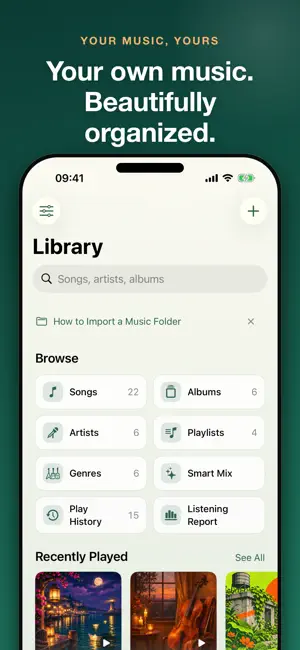
About OneMusic: Offline Player
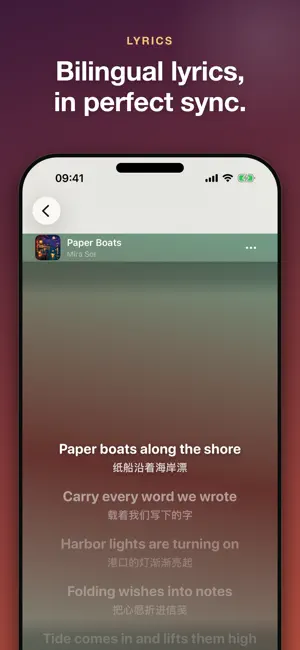
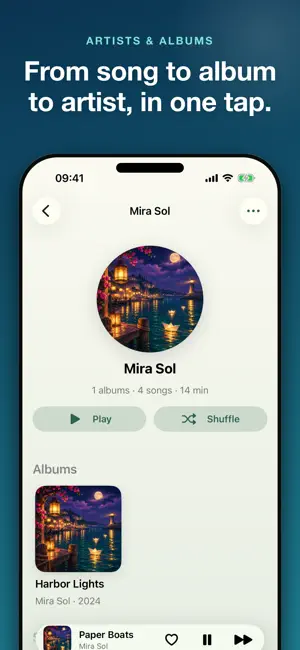
Bring together the music you already own, without ads or a required OneMusic account. IMPORT & CLOUD MUSIC Import DRM-free audio from Files, Finder, folders, or ZIP archives. Read embedded tags and artwork, and match sidecar LRC lyrics. Connect a WebDAV server, browse and search folders, select songs, and download them to My Music for offline listening. WebDAV uses download-before-playback. WebDAV presets include Nutstore and common overseas services. Experimental Quark web sign-in and downloads are marked Beta and may stop working when the service changes. Baidu, Alipan, Google Drive, OneDrive, and Dropbox have no direct sign-in; use an available Files provider or a WebDAV gateway you configure. Import Guide in the + menu explains audio formats, same-name LRC lyrics, embedded covers, and a downloadable sample ZIP. NAVIDROME & OPEN SUBSONIC Connect your own compatible server for streaming, offline downloads, server playlists, radio, jukebox, scrobbling, ReplayGain, gapless playback, crossfade, and synchronized lyrics. LISTEN & ORGANIZE Browse songs, albums, artists, genres, and composers, with artist pages that gather top songs and albums, pinyin search, and bilingual lyrics. Create playlists, mark favorites, rate tracks, edit song information, manage the queue, adjust playback speed, and set a sleep timer. Use background playback, Lock Screen controls, AirPlay, EQ, and visualizers. Build rules-based Smart Mixes on device. Share songs, albums or playlists as a OneMusic ZIP, filter songs by playlist, lyrics or favorites, and find duplicate songs. OPTIONAL PRIVATE ICLOUD SYNC When enabled, OneMusic syncs library metadata and then each song’s audio, artwork, and LRC through your private CloudKit database on the same Apple ID. Your Navidrome cache and WebDAV connections remain separate. One-time ZIP and AirDrop imports are also free. OPTIONAL MEMBERSHIP Core playback, imports, cloud downloads, lyrics, playlists, EQ, visualizers, private iCloud sync, and JSON export are free. Annual and lifetime membership unlock Lock Screen and Dynamic Island lyrics, the Listening Report (your top songs, artists, albums and genres, with a shareable summary), lyric styles with immersive lyrics, extra theme choices, and readable Markdown library reports. Lyrics themselves stay free. Verified existing lifetime supporters retain lifetime access. Annual membership renews automatically unless you cancel renewal; eligible customers may receive a 14-day introductory trial. Your local price and eligibility appear before purchase. Lifetime is a one-time purchase. PRIVATE BY DESIGN No OneMusic account, ads, or third-party tracking SDKs. WebDAV credentials and Quark sign-in sessions stay in this device’s Keychain and are excluded from iCloud sync and exports. Downloads connect directly to the server you configure. No sample songs or commercial music catalog are bundled. Import or connect only music you have the right to use. Terms of Use: https://oneapps.studio/terms Privacy Policy: https://oneapps.studio/privacy CARPLAY & NEW LIBRARY TOOLS Browse imported songs, folders, playlists and favorites with CarPlay, and use its Now Playing controls. Set up your music on iPhone before driving. Keep imported folder categories, transfer files over your local Wi-Fi network, and add multiple songs to playlists. Restore the last song, queue and position in a paused state after reopening. Use listening bookmarks, lyric timing adjustments, playlist search and ordering, M3U/M3U8 references and batch information/cover editing. Now Playing widgets and an Apple Watch iPhone remote use the same visual style. Apple Watch requires a connected iPhone and does not store audio for offline playback.
What’s new
Version 1.3.0 · Updated November 5, 2026
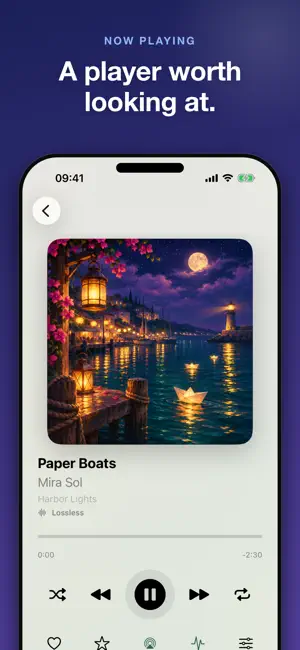
A tidier Library you can arrange yourself, a redesigned Now Playing and lyrics, new artist pages and the Listening Report. • Now Playing opens like any other page: swipe from the left edge to go back. A slimmer progress bar you can drag. • Redesigned lyrics: centered lines of even size, with playback controls underneath. • New artist pages with top songs, albums and every song. Tap the artist or album in Now Playing, or use Go to Album / Go to Artist in song menus. • Queue whole albums, artists and playlists with Play Next or Play Last; select several songs for batch actions; choose your own playlist cover. • Bilingual lyrics with translations, and pinyin or initial-letter search for Chinese titles and artists. • Swipe right anywhere to go back; the sleep timer fades out at the end. • Customize Library: show, hide and reorder home sections and Browse categories. Featured Album is now off by default. • Playlists as a cover grid with 2×2 collages; swipe left on songs for Play Next and Favorite. • Up Next uses one menu and asks before clearing. • Membership adds Lock Screen and Dynamic Island lyrics, the Listening Report and lyric styles with immersive lyrics, on a redesigned membership page (same prices). • Redesigned Wi-Fi Transfer, Widgets & Apple Watch, About and iCloud pages; clearer iPad and Apple Watch layouts. • New Update Log in Settings. • New languages: Traditional Chinese, Japanese, Korean, Spanish, French, German, Portuguese (Brazil), Russian and Italian. • Songs without a cover now show a clean placeholder in the Dynamic Island and on the Lock Screen. • Clearer playlist reordering, a Favorites menu and a redesigned Import Guide. • Share songs, albums, playlists or favorites as a OneMusic ZIP; friends open it in OneMusic with folders, covers and lyrics intact. • Smarter imports: covers from cover.jpg, titles and artists from file names, and lyrics can be added from the lyrics page. • Find duplicate songs in Settings. • Songs: filter by “Not in Any Playlist”, favorites, lyrics and more, with new sort options and a Reverse Order switch.
App privacy
The developer, Freedom Dimension (shenzhen) Technology Co., Ltd, reported these privacy practices to Apple.
Data Not Collected
The developer does not collect any data from this app.
Alternatives to OneMusic: Offline Player
Looking for apps like OneMusic: Offline Player? Here are 6 similar apps on the App Store. The highest rated is Sonio - Retro Classic Player (5.0/5), and 4 of the 6 are free to download.
-
 Sonio - Retro Classic Player
5.0
-
 CroMusic: Offline Music Player
5.0
-
 WaveWhale Audio & Music Editor
-
 Minidisc - Navidrome & Lidarr
4.0
-
 Stemio: Music & Vocal Remover
4.6
-
 Primuse: Self-Hosted Music
5.0
| App | Rating | Price | Last updated | Compare |
|---|---|---|---|---|
| OneMusic: Offline Player | – | Free | November 5, 2026 | |
| Sonio - Retro Classic Player | 5.0 / 5 (8) | 2.99 USD | Nov 4, 2026 | Compare |
| CroMusic: Offline Music Player | 5.0 / 5 (2) | 1.99 USD | Oct 27, 2026 | Compare |
| WaveWhale Audio & Music Editor | – | Free | Oct 7, 2026 | Compare |
| Minidisc - Navidrome & Lidarr | 4.0 / 5 (5) | Free | Sep 15, 2026 | Compare |
| Stemio: Music & Vocal Remover | 4.6 / 5 (11) | Free | Oct 27, 2026 | Compare |
| Primuse: Self-Hosted Music | 5.0 / 5 (41) | Free | Nov 5, 2026 | Compare |