

Cue: Teleprompter & Captions
Juan Antonio Veloz Gutierrez Photo & Video iPhoneiPadiPod touch
Cue: Teleprompter & Captions is a free Photo & Video app for iPhone and iPad by Juan Antonio Veloz Gutierrez. Requires iOS 16.4. Updated September 13, 2026.
- Price
- Free
- on the App Store
- Size
- 81 MB
- Age 4+
- Updated
- Sep 13
- 2026 · v1.0
Screenshots



About Cue: Teleprompter & Captions
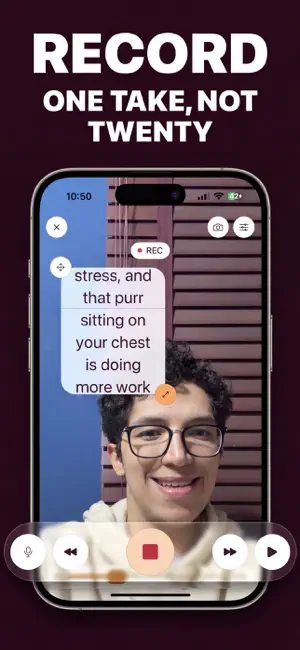
You know your lines. Then the camera turns on. Cue puts your script over the lens, so you can read every word and still look people in the eye. No notes taped under the camera. No twentieth take. SPEAK — AND IT FOLLOWS YOUR VOICE Most teleprompter apps scroll at a fixed speed and leave you chasing them. Cue listens and keeps pace with you. Pause to think, it waits. Go off script, it finds you again. Eight languages — English, Spanish, French, German, Italian, Portuguese, Chinese and Hebrew — and it keeps working offline once a language is downloaded. RECORD — ONE TAKE, NOT TWENTY Record video straight from the prompter, front camera or rear. Drag the reading area anywhere and size it to sit right under the lens, so your eyeline never drifts. Every take is saved and waiting in your library, so you can shoot three and keep the best one. READ IT YOUR WAY Set the scroll speed in words per minute, then tune the font, size, weight, line and letter spacing, alignment, and the blur behind the text until it is comfortable. Mirror the text for a beam-splitter rig, or turn the phone sideways for a landscape prompter mounted over the lens. WRITE SCRIPTS BUILT FOR SPEAKING Paste anything, import a file, or start from a blank page — then hand it to the script tools. Sharpen weak lines. Rewrite stiff sentences into ones that sound natural out loud. Cut a script to a target running time. Get five opening hooks that earn the first three seconds, or five closing calls to action. Split a long script into sections you can record one at a time. Every tool shows you the result first, and nothing changes until you say so. EXPORT CAPTIONS IN YOUR WORDS Your captions come from the script you wrote, timed to the take — spelled and punctuated your way, not the way a transcriber heard you. Export an .srt file, or burn the subtitles into the video for TikTok, Reels and Shorts, positioned clear of each platform's own buttons. FINISH IT HERE Trim the take, join several takes into one video, and export at 9:16, 1:1, 4:5, or exactly as shot. Pick your resolution and codec. Save straight to your photo library and post. MADE FOR Creators filming Reels, TikToks, Shorts and YouTube videos. Founders and marketers recording promos. Coaches, real estate agents and sales teams sending video that has to land the first time. Anyone who talks to a camera and would rather not do it twenty times. FREE AND PRO The free plan gives you 200-word scripts and 60-second exports, with the full prompter and recording. Cue Pro lifts both limits and adds voice tracking on every recording, captions in your script's exact words, joining takes, every export ratio, mirror and landscape rig modes, and a monthly allowance of stars for the AI script tools. Sign in and your scripts sync to your account, ready on any device you sign in to. Your recordings stay on your phone. A subscription is needed to unlock PRO features including Captions, Voice Tracking and AI Enhancement. Payment will be charged to your Apple ID account upon confirming the purchase. Subscriptions automatically renew unless canceled at least 24 hours before the end of the current period. Your account will be charged for renewal within 24 hours prior to the end of the current period. You can manage or cancel your subscription at any time from your account settings in the App Store. Read the EULA Terms in the following link https://www.apple.com/legal/internet-services/itunes/dev/stdeula/
App privacy
The developer, Juan Antonio Veloz Gutierrez, reported these privacy practices to Apple.
Data Not Linked to You
The following data, which may be collected but is not linked to your identity, may be used for the following purposes:
- Diagnostics: Crash Data
- Contact Info: Email Address
- Identifiers: User ID, Device ID
Used for: Analytics, App Functionality
Alternatives to Cue: Teleprompter & Captions
Looking for apps like Cue: Teleprompter & Captions? Here are 6 similar apps on the App Store.
-
 PromptTake: Teleprompter
-
 Teleprompter: CueRoll
-
 ScriptLens: Teleprompter
-
 Simple Teleprompter: Reels
-
 Teleprompter Kit
-
 Gazecue: Teleprompter
| App | Rating | Price | Last updated | Compare |
|---|---|---|---|---|
| Cue: Teleprompter & Captions | – | Free | September 13, 2026 | |
| PromptTake: Teleprompter | – | Free | Oct 15, 2026 | Compare |
| Teleprompter: CueRoll | – | Free | Sep 11, 2026 | Compare |
| ScriptLens: Teleprompter | – | Free | Mar 30, 2026 | Compare |
| Simple Teleprompter: Reels | – | Free | Oct 19, 2026 | Compare |
| Teleprompter Kit | – | Free | Oct 23, 2026 | Compare |
| Gazecue: Teleprompter | – | Free | Oct 5, 2026 | Compare |