

Gazecue: Teleprompter
Eduard Bruch Photo & Video iPhoneiPadiPod touch
Gazecue: Teleprompter is a free Photo & Video app for iPhone and iPad by Eduard Bruch. Requires iOS 17.0. Updated October 5, 2026.
- Price
- Free
- on the App Store
- Size
- 18 MB
- Age 4+
- Updated
- Oct 5
- 2026 · v2.0
Screenshots


About Gazecue: Teleprompter
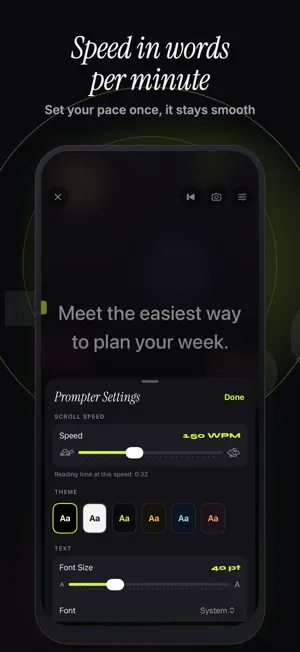
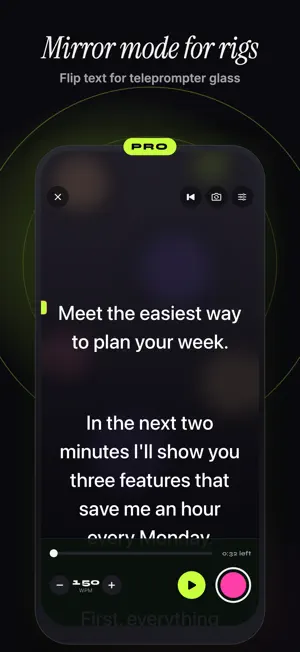
Gazecue puts your script right next to the lens, so you can look into the camera and speak naturally. Write or import your text, set the speed in words per minute, and record video while the words scroll smoothly. Made for creators, presenters, teachers, podcasters and anyone who wants to speak clearly on camera without memorizing every line. FREE FOREVER • Unlimited scripts: write, paste or import (.txt, .md, .rtf, .pdf) • The full prompter: speed in words per minute, font size, 4 fonts, margins, line spacing, reading line, countdown • Prompter-only mode, no camera needed • Record with the front or back camera in 1080p, up to 1 minute per take (shared videos carry a small Gazecue mark) • Recordings library: play back, share and save to Photos GAZECUE PRO • Unlimited recording length • No watermark on anything you share, including takes you already recorded • Mirror text horizontally or vertically for beam-splitter glass rigs • Split layouts and adjustable text and background opacity • All six themes • 1080p60 and 4K recording • Keyboard and Bluetooth page-turner control PRICING Pro is available as a yearly subscription with a 7-day free trial, a monthly subscription, or a one-time lifetime purchase. The app shows the price in your currency before you buy. If you allow notifications, we remind you the day before your free trial ends. Payment is charged to your Apple Account when you confirm the purchase; for the yearly plan with a free trial, when the trial ends. Subscriptions renew automatically unless cancelled at least 24 hours before the end of the current period. Manage or cancel them any time in Settings > [your name] > Subscriptions. Terms of Use (EULA): https://www.apple.com/legal/internet-services/itunes/dev/stdeula/ Privacy Policy: https://gazecue.com/privacy
What’s new
Version 2.0 · Updated October 5, 2026
Stability improvements, a fresh redesign and a new name: welcome to Gazecue.
App privacy
The developer, Eduard Bruch, reported these privacy practices to Apple.
Data Not Linked to You
The following data, which may be collected but is not linked to your identity, may be used for the following purposes:
- Purchases: Purchase History
- Usage Data: Product Interaction
- Identifiers: Device ID
Used for: Analytics, App Functionality
Alternatives to Gazecue: Teleprompter
Looking for apps like Gazecue: Teleprompter? Here are 6 similar apps on the App Store. The highest rated is Teleprompter: Read & Film (5.0/5), and all 6 are free to download.
-
 Teleprompter: CueRoll
-
 Cue: Teleprompter & Captions
-
 PromptTake: Teleprompter
-
 Luma: Teleprompter
-
 Teleprompter: Read & Film
5.0
-
 SteadyEye Teleprompter Subs AI
| App | Rating | Price | Last updated | Compare |
|---|---|---|---|---|
| Gazecue: Teleprompter | – | Free | October 5, 2026 | |
| Teleprompter: CueRoll | – | Free | Sep 11, 2026 | Compare |
| Cue: Teleprompter & Captions | – | Free | Sep 13, 2026 | Compare |
| PromptTake: Teleprompter | – | Free | Oct 15, 2026 | Compare |
| Luma: Teleprompter | – | Free | Sep 24, 2026 | Compare |
| Teleprompter: Read & Film | 5.0 / 5 (1) | Free | Oct 21, 2026 | Compare |
| SteadyEye Teleprompter Subs AI | – | Free | Oct 27, 2026 | Compare |