

VOID: Storage Cleaner
Przemyslaw Skowronek Utilities iPhoneiPadiPod touch
VOID: Storage Cleaner is a free Utilities app for iPhone and iPad by Przemyslaw Skowronek. Requires iOS 18.0. Updated October 20, 2026.
- Price
- Free
- on the App Store
- Size
- 13 MB
- Age 4+
- Updated
- Oct 20
- 2026 · v1.3.0
Screenshots


About VOID: Storage Cleaner
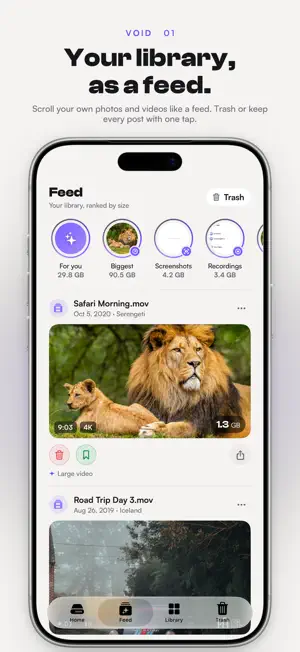
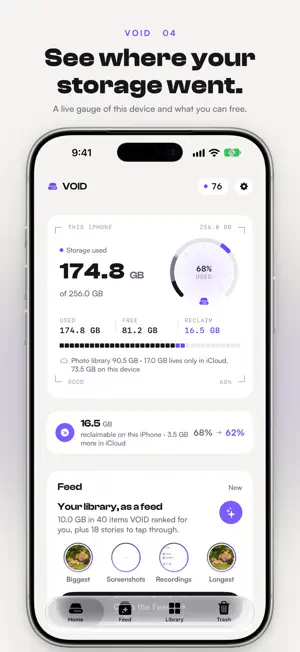
Have your storage under control. VOID shows what is using space on this iPhone and lets you free it up on your terms, in a way that feels like scrolling a feed instead of doing chores. VOID reads the Photos library on your iPhone and shows what is taking up room: large and long videos, 4K clips, screen recordings, screenshots, similar and duplicate photos, Live Photos and oversized images. Everything runs on your device. Nothing is uploaded. Nothing is deleted without your confirmation. YOUR LIBRARY, AS A FEED Open the Feed and your own photos and videos appear as posts, ranked by how much space they take and how little you are likely to miss them. Each post shows the size, the duration and why VOID picked it. Tap Trash or Keep, double-tap to keep, and move on. There is nobody else here: no accounts, no ads, no followers, just your library. STORIES YOU TAP THROUGH At the top of the Feed, stories group your library the way you would want to review it: Biggest, Screenshots, Recordings, Longest, Similar, Duplicates, Blurry, what is stored on this device, and one story for every year. Tap through a story like you do everywhere else, swipe to the next one, and decide as you go. ONE TRASH, EMPTIED WHEN YOU SAY Everything you trash lands in the Trash tab and waits there, like on a Mac. Put anything back with one tap or empty the whole bin when you are ready. Deletions go through the standard iOS confirmation and stay in Recently Deleted for 30 days. LIBRARY GRID Photos and videos in one grid, with size and duration on every tile. Pinch or tap to change the grid size, filter by videos, photos, screenshots or what is stored on this device, and sort by date, size or length. A LIVE DRIVE GAUGE AND SECTOR MAP Home shows how much of this device is used, how much is free, and how much you could get back right now. Every cell in the storage map stands for a slice of your device: videos, photos, screenshots, apps and system, free space. ICLOUD VS THIS DEVICE Many libraries live mostly in iCloud. VOID shows what is stored on this iPhone and what only lives in the cloud, so you know which deletions actually free space here. PLACES AND A MAP Photos carry the place they were taken. VOID groups them into the trips and spots you remember and puts them on a map, so you can clear a whole weekend away in one pass instead of hunting for it in a grid. SIMILAR AND DUPLICATE PHOTOS VOID groups shots that look alike and suggests the sharpest one to keep. Prefer to choose yourself? One switch clears the suggestions so you pick the ones to trash. You make the final call either way. WHAT TO EXPECT • Photos and videos never leave your iPhone • No ads, no tracking, no accounts • Nothing is deleted until you empty the Trash, and iOS asks once more • Deleted items stay in Recently Deleted for 30 days • The free tier includes the full scan and 500 MB of cleanup VOID PRO VOID Pro removes the cleanup limit. Pay yearly, or once for lifetime access. Privacy policy: https://www.skylarks.io/apps/void/privacy-policy Terms of service: https://www.skylarks.io/apps/void/terms-of-service
What’s new
Version 1.3.0 · Updated October 20, 2026
PLACES Your photos grouped by where you took them, on a map. Open a trip or a spot and clear everything you shot there in one pass. Locations are read from the photos themselves, and your photos and videos still never leave your device. COLLECTIONS ON THE LIBRARY TAB Large videos, screenshots, similar photos and the rest are now one tap away from Library, not just from Home. PICK YOUR OWN PHOTOS TO DELETE Similar Photos used to mark every shot except the best one for you. A new switch turns that off so you start from nothing and choose the ones to trash yourself. VOID remembers which way you like it. SEVEN LANGUAGES VOID now speaks English, German, Spanish, French, Italian, Polish and Brazilian Portuguese. ALSO Full-size previews no longer show two loading spinners at once. Similar Photos now marks the right shots when you open it mid-scan.
App privacy
The developer, Przemyslaw Skowronek, reported these privacy practices to Apple.
Data Not Linked to You
The following data, which may be collected but is not linked to your identity, may be used for the following purposes:
- Usage Data: Advertising Data, Product Interaction, Other Usage Data
Used for: Developer’s Advertising or Marketing, Analytics
Alternatives to VOID: Storage Cleaner
Looking for apps like VOID: Storage Cleaner? Here are 6 similar apps on the App Store. The highest rated is NetScanPro: Network Scanner (5.0/5), and all 6 are free to download.
-
 NetScanPro: Network Scanner
5.0
NetScanPro: Network Scanner
5.0
-
 Spawn - Power Listing App
3.7
Spawn - Power Listing App
3.7
-
 Live Timers on Lock Screen
5.0
Live Timers on Lock Screen
5.0
-
 Clucky - Loud Alarm Clock
2.4
Clucky - Loud Alarm Clock
2.4
-
 TimeWave: Timer Chains
4.6
TimeWave: Timer Chains
4.6
-
 Acute Calculator
4.9
Acute Calculator
4.9
| App | Rating | Price | Last updated | Compare |
|---|---|---|---|---|
| VOID: Storage Cleaner | – | Free | October 20, 2026 | |
| NetScanPro: Network Scanner | 5.0 / 5 (3) | Free | Oct 21, 2026 | Compare |
| Spawn - Power Listing App | 3.7 / 5 (3) | Free | Sep 2, 2025 | Compare |
| Live Timers on Lock Screen | 5.0 / 5 (5) | Free | Oct 1, 2026 | Compare |
| Clucky - Loud Alarm Clock | 2.4 / 5 (12) | Free | Oct 19, 2026 | Compare |
| TimeWave: Timer Chains | 4.6 / 5 (25) | Free | Oct 19, 2026 | Compare |
| Acute Calculator | 4.9 / 5 (117) | Free | Mar 24, 2024 | Compare |