

Reachbeam
Selim Saygi Productivity iPhoneiPadiPod touch
Reachbeam is a free Productivity app for iPhone and iPad by Selim Saygi. Requires iOS 16.0. Updated October 21, 2026.
- Price
- Free
- on the App Store
- Size
- 27 MB
- Age 4+
- Updated
- Oct 21
- 2026 · v1.5.0
Screenshots
About Reachbeam
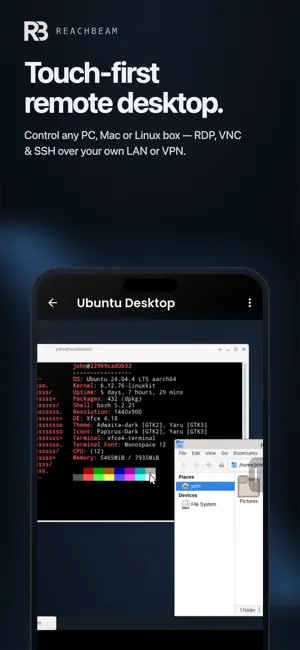
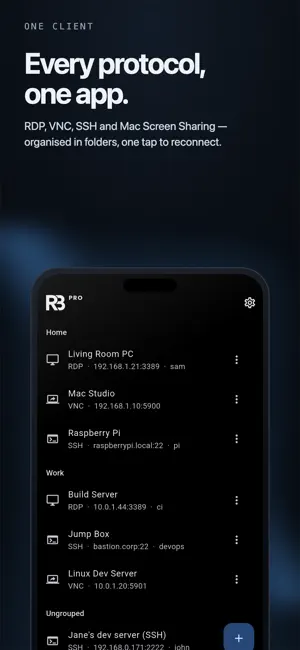
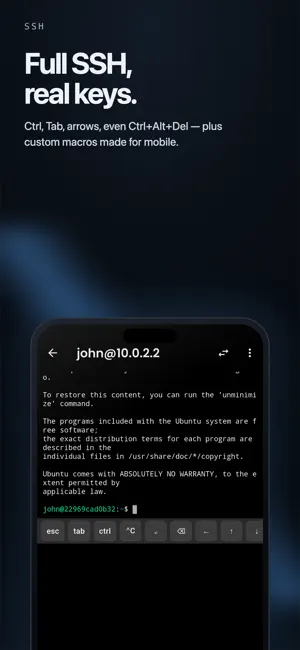
Reachbeam puts your computers within reach. Most remote-desktop apps just shrink a mouse-and-keyboard screen onto glass. Reachbeam is built for touch from the ground up — a purpose-built gesture engine turns natural taps, drags, and pinches into precise remote control. Reach any machine • RDP — control a Windows PC's full desktop, with Network Level Authentication (NLA) • VNC / RFB — connect to TigerVNC, x11vnc, RealVNC, UltraVNC, and more • macOS Screen Sharing — connects to any Mac out of the box (Apple Remote Desktop auth) • SSH terminal — a real shell with the native keyboard, password or private-key login, TOFU host-key verification, and local port-forwarding • VNC-over-SSH — route a VNC session through an SSH host in one tap Touch that feels right • Three input modes: Trackpad (relative cursor), Touchscreen (tap where you touch), Stylus • Pinch-to-zoom anchored to your fingers, two-finger pan, edge auto-pan • Scroll anywhere with iOS-style flick momentum • Quick-actions menu from the screen edge: Copy, Paste, Esc, Tab, Ctrl+Alt+Del, and more • Tap = click, long-press = right-click — no fumbling A keyboard that actually works • Your native iOS keyboard, plus a special-keys bar: Esc, Tab, Ctrl/Alt/Cmd/AltGr, arrows, F1–F12, Home/End/PgUp/PgDn, one-tap Ctrl+Alt+Del and Alt+Tab • Real X11 keysyms — the modifiers and function keys other clients get wrong Live Text on the remote screen (Pro) • Copy any text on the remote screen — error dialogs, images, locked pages • Tap a link, number, or address to open it; translate the screen in place • "Type on PC" sends text back where clipboard sync is blocked — all on-device Draw on your PC (Pro) • iPad and Apple Pencil become a pressure-sensitive drawing tablet over RDP — nothing to install on the PC • Photoshop & Krita shortcut keys, two-finger undo, three-finger redo, Pencil double-tap eraser Apple Pencil • Hover support for true remote mouse-hover — tooltips and menus without clicking • Squeeze to open the edge quick-actions menu (Pro) • Auto-switches to stylus mode the moment you touch with a Pencil Built for real use • Saved connections with folders, per-connection quality and input settings • Credentials stored in the device Keychain/Keystore, optional Face ID / Touch ID unlock • Auto-reconnect, clipboard sync, adaptive quality • LAN device discovery — scans your network and fills the connection form in one tap Reachbeam Pro • Open several remote machines at once and switch between live tabs — sessions stay connected in the background • Jump between individual monitors on the remote machine in one tap • Custom keyboard shortcuts and macros — define your own key combos and text snippets, fired from the quick-actions menu • Apple Pencil Pro squeeze → edge quick-actions menu (Pro only) $4.99/month or $49.99/year — cancel any time. No accounts. No tracking. Your credentials stay on your device. Not affiliated with or endorsed by Microsoft, Apple, or RealVNC. RDP, Windows, VNC, and Screen Sharing are trademarks of their respective owners. Reachbeam Pro is an auto-renewable subscription that renews unless cancelled at least 24 hours before the current period ends. Manage or cancel any time in your Apple Account settings. Terms of Use (EULA): https://www.apple.com/legal/internet-services/itunes/dev/stdeula/ Privacy Policy: https://dividedbits.com/apps/reachbeam/privacy
What’s new
Version 1.5.0 · Updated October 21, 2026
• Live Text: copy, translate, or tap any text on the remote screen (Pro) • Draw on your PC: Photoshop & Krita shortcut keys, two-finger undo / three-finger redo (Pro) • Move the side menu: hold the tab and drag it to any spot on either edge • Edit the quick menu: reorder or hide actions • Recent connections, swipe to edit or delete, online/offline dot on each host
App privacy
The developer, Selim Saygi, reported these privacy practices to Apple.
Data Not Collected
The developer does not collect any data from this app.
Alternatives to Reachbeam
Looking for apps like Reachbeam? Here are 6 similar apps on the App Store. The highest rated is SSHPanel: SSH & Server Admin (5.0/5), and all 6 are free to download.
-
 Prompt AI: Create & organize
-
 Family Organizer: FamHead
-
 GitMe Fast
-
 Nivlok - Remote Desktop
-
 SSHPanel: SSH & Server Admin
5.0
SSHPanel: SSH & Server Admin
5.0
-
 Remote Desktop: RDP & VNC
4.0
Remote Desktop: RDP & VNC
4.0
| App | Rating | Price | Last updated | Compare |
|---|---|---|---|---|
| Reachbeam | – | Free | October 21, 2026 | |
| Prompt AI: Create & organize | – | Free | Oct 22, 2026 | Compare |
| Family Organizer: FamHead | – | Free | Sep 12, 2026 | Compare |
| GitMe Fast | – | Free | Oct 22, 2026 | Compare |
| Nivlok - Remote Desktop | – | Free | Jul 28, 2026 | Compare |
| SSHPanel: SSH & Server Admin | 5.0 / 5 (1) | Free | Mar 23, 2026 | Compare |
| Remote Desktop: RDP & VNC | 4.0 / 5 (3) | Free | Oct 21, 2026 | Compare |
Compare Reachbeam with the top alternatives: ratings, updates, ASO score and keyword gaps →