

SSHPanel: SSH & Server Admin
koji ozono Productivity iPhoneiPadiPod touch
SSHPanel: SSH & Server Admin is a free Productivity app for iPhone and iPad by koji ozono. Rated 5.0/5 from 1 ratings. Requires iOS 18.6.
- Rating
- 5.0
- 1 ratings
- Price
- Free
- on the App Store
- Size
- 22 MB
- Age 4+
- Updated
- Mar 23
- 2026 · v1.0.9
Screenshots



About SSHPanel: SSH & Server Admin
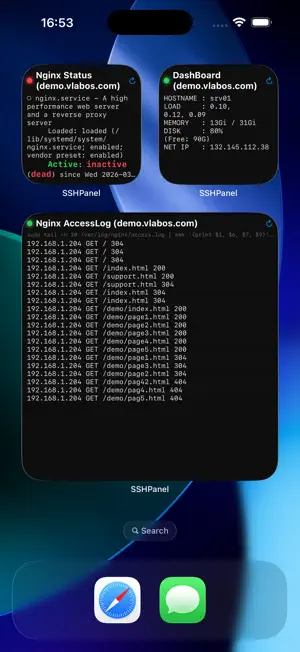
SSHPanel turns your iPhone into a dedicated server control panel, allowing you to manage servers without opening a terminal. Structure your SSH operations into three core axes: Execute, Reference, and Tools, and trigger tasks instantly with a single tap. ◆ EXECUTE & REFERENCE PANELS ・Execute Commands: Turn commands (systemctl, custom scripts) into one-tap panels. ・Exit Status: Visual indicators (green/red) instantly display success or failure. ・Data Reference: Display command outputs (e.g., cat) as panels with built-in keyword search (grep) for quick information extraction. ◆ INTERACTIVE "TOOLS" Real-time, in-depth server analysis tools: ・Directory Analyzer: Drill-down to identify disk space bottlenecks. ・Process Analyzer: List processes by CPU/MEM usage to find heavy loads. ・Memory Analyzer: Visualize true memory usage using PSS, and drill down into swap usage and OOM risks. ・Listening Ports: View active ports and associated connections/processes. ・Config Browser: Cleanly display configuration files by excluding comments and blank lines. ・Log Browser: Efficiently tail and grep server logs via a native UI. ◆ PANEL OPTIMIZATION ・Auto-close: Closes logs upon successful execution to minimize visual noise. ・Always Expanded: Fixes results on-screen, turning your device into a monitoring display. ・Expand on Tap: Keeps layouts slim, expanding only when detailed logs are needed. ◆ ADVANCED FEATURES ・SSH Multi-Hop (Jump Host): Automatically handles bastion host connection sequences. ・Robust Security: Passwords and keys (RSA, Ed25519) are stored securely in the iOS Keychain. Credentials are fetched only at execution time with no in-app caching. ・iOS Integration: Trigger tasks directly from Widgets or Control Center. Automatic iCloud sync keeps panels updated across all your devices. ・67 Templates: Built-in presets for system monitoring, web, and database management. ※ IMPORTANT DISCLAIMER SSHPanel is a "command execution (non-TTY)" tool optimized for iOS. ・No interactive sessions (e.g., vim or commands requiring real-time input). ・Designed specifically for executing pre-registered commands with a single tap.
What’s new
Version 1.0.9 · Updated March 23, 2026
Added a memory usage analysis feature to the Tools tab. You can now check the accurate memory usage of processes using PSS (Proportional Set Size) and drill down into details about swap and OOM risks. Fixed an issue where server settings were not carried over in Server Common Management support (1.0.8). After the update, they will be automatically re-migrated on startup.
App privacy
The developer, koji ozono, reported these privacy practices to Apple.
Data Not Collected
The developer does not collect any data from this app.
Alternatives to SSHPanel: SSH & Server Admin
Looking for apps like SSHPanel: SSH & Server Admin? Here are 6 similar apps on the App Store. The highest rated is WriteFlow: AI Writing Keyboard (5.0/5), and 5 of the 6 are free to download.
-
 Teco Smart Panel
-
 WriteFlow: AI Writing Keyboard
5.0
WriteFlow: AI Writing Keyboard
5.0
-
 FormulaFX Pro
-
 FocusAnchor
-
 B-16 Panel
-
 Server Monitor
| App | Rating | Price | Last updated | Compare |
|---|---|---|---|---|
| SSHPanel: SSH & Server Admin | 5.0 / 5 (1 rating) | Free | March 23, 2026 | |
| Teco Smart Panel | – | Free | Aug 29, 2024 | Compare |
| WriteFlow: AI Writing Keyboard | 5.0 / 5 (2) | Free | Aug 20, 2026 | Compare |
| FormulaFX Pro | – | Free | Sep 24, 2026 | Compare |
| FocusAnchor | – | 3.99 USD | Apr 9, 2026 | Compare |
| B-16 Panel | – | Free | Mar 13, 2026 | Compare |
| Server Monitor | – | Free | Mar 5, 2026 | Compare |