

PayShift
Jasper Ebus Finance iPhoneiPadiPod touchApple Watch
PayShift is a free Finance app for iPhone and iPad by Jasper Ebus. Requires iOS 17.0. Updated October 15, 2026.
- Price
- Free
- on the App Store
- Size
- 4 MB
- Age 4+
- Updated
- Oct 15
- 2026 · v1.3
Screenshots


About PayShift
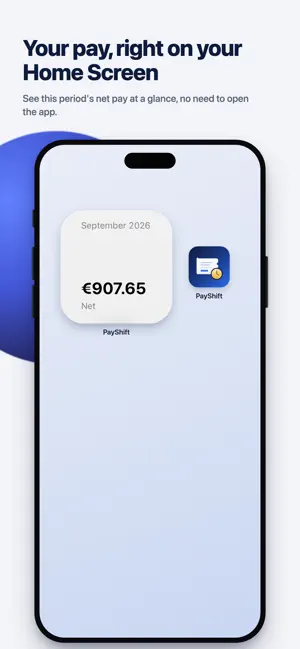
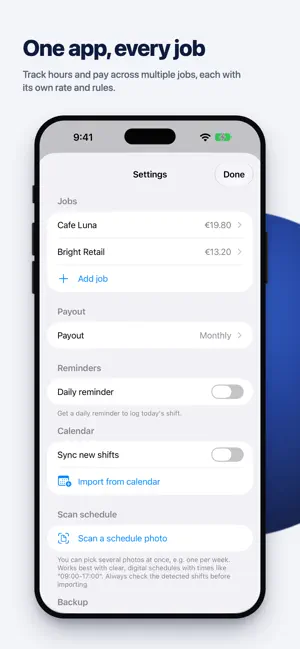
PayShift turns your work schedule into your actual take-home pay — automatically. Add a shift with a start time, end time and break, and PayShift instantly works out your gross and net pay, including tax. No spreadsheets, no manual math. SHIFTS & PAY • Add shifts in seconds, with typeable break minutes • Gross and net pay calculated instantly, including tax/contributions • Evening, night, weekend and holiday surcharges, suggested automatically based on the date and time • Track tips per shift — they count toward your net pay, not your tax • Multiple jobs, each with its own rate, tax percentage and surcharges (Pro) ON YOUR WRIST AND HOME SCREEN • Apple Watch app — start, pause and stop a shift right from your wrist • Home Screen widget — see this period's net pay at a glance, no need to open the app • Live Activity on the Lock Screen and Dynamic Island — watch your pay grow while your shift is running SCAN A SCHEDULE PHOTO (Pro) Take a photo of your printed or digital work schedule and PayShift reads out the dates, times — and even the break, if your schedule shows worked hours separately. Review and adjust before importing. Everything is processed on your device; your photo is never uploaded anywhere. SEE THE BIGGER PICTURE • Weekly, 4-weekly or monthly pay periods, aligned to your actual payday • A full year overview with monthly breakdowns and insights • Export any period as a CSV file for your own records STAY IN SYNC • Two-way calendar sync: export shifts to your calendar, or import shifts from any calendar as a starting point (Pro) • Back up and restore your data as a file, any time — for free • iCloud sync across your devices (Pro) BUILT TO RESPECT YOUR DATA PayShift doesn't require an account, doesn't track you, and doesn't run ads. Your shifts and settings stay on your device unless you choose to sync them via your own iCloud account. Available in English, Dutch, German, Spanish, French, Italian, Portuguese and Polish.
What’s new
Version 1.3 · Updated October 15, 2026
New: payday • Set when you get paid (for example Tuesday of the 2nd week after your period, or a fixed day of the month) and see when your pay arrives for every period. • Payday landed on a different day, for example because of a holiday? Tap the payday and enter the date yourself. Also • The privacy policy is now one tap away in Settings, in your own language. • The app anonymously measures which features are used, with no amounts, hours or names, so we can keep improving PayShift. • A clearer name for your period's start date.
App privacy
The developer, Jasper Ebus, reported these privacy practices to Apple.
Data Not Linked to You
The following data, which may be collected but is not linked to your identity, may be used for the following purposes:
- Purchases: Purchase History
- Identifiers: Device ID
- Usage Data: Product Interaction, Other Usage Data
Used for: Analytics
Alternatives to PayShift
Looking for apps like PayShift? Here are 6 similar apps on the App Store. The highest rated is ShiftPay: Calendar Tracker (5.0/5), and all 6 are free to download.
-
 Utandir - Debt Tracker
-
 DebtErasr
3.7
DebtErasr
3.7
-
 HouseDepositHero: Money Saver
-
 ShiftPay: Calendar Tracker
5.0
ShiftPay: Calendar Tracker
5.0
-
 Payday: Paycheck Planner
-
 BillWise: Bill Payment Tracker
| App | Rating | Price | Last updated | Compare |
|---|---|---|---|---|
| PayShift | – | Free | October 15, 2026 | |
| Utandir - Debt Tracker | – | Free | Feb 19, 2026 | Compare |
| DebtErasr | 3.7 / 5 (3) | Free | Jan 9, 2026 | Compare |
| HouseDepositHero: Money Saver | – | Free | Nov 24, 2025 | Compare |
| ShiftPay: Calendar Tracker | 5.0 / 5 (1) | Free | Sep 18, 2026 | Compare |
| Payday: Paycheck Planner | – | Free | Jul 13, 2026 | Compare |
| BillWise: Bill Payment Tracker | – | Free | Oct 14, 2026 | Compare |
Compare PayShift with the top alternatives: ratings, updates, ASO score and keyword gaps →