

Budget Scroll
Alessandro Aiello Finance iPhoneiPadiPod touch
Budget Scroll is a free Finance app for iPhone and iPad by Alessandro Aiello. Requires iOS 18.0. Updated October 3, 2026.
- Price
- Free
- on the App Store
- Size
- 5 MB
- Age 4+
- Updated
- Oct 3
- 2026 · v1.3.2
Screenshots

About Budget Scroll
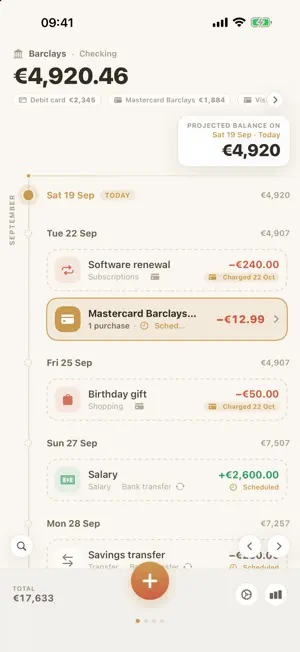
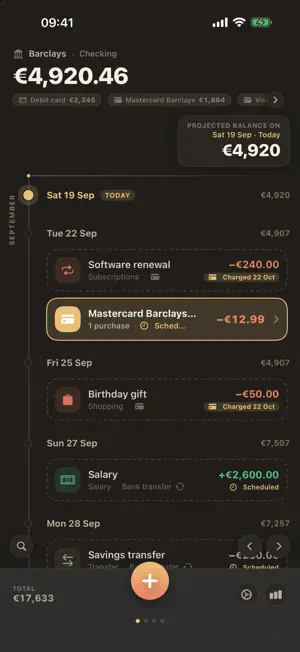
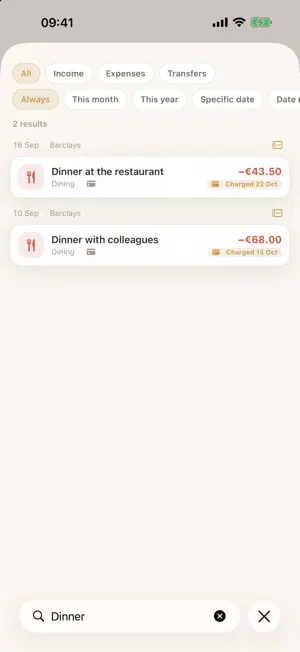
Today’s balance doesn’t tell you much. What matters is how much you’ll have on the day the mortgage payment lands, or the week before payday. BudgetScroll shows your account as a vertical timeline: today at the top, scroll into the future, and a fixed reading line shows the projected balance for the day it crosses. Past and scheduled entries sit on the same line. WHAT IT DOES • Projected-balance timeline. Income and expenses, recurring and one-off, with the balance updating day by day as you scroll. • Multiple accounts and cards. Current accounts, cash and prepaid cards, each with its own page and currency, plus the overall total. Transfers are recorded once, not twice. • Credit cards behave like real credit cards. A credit purchase doesn’t move cash on the day you make it: the month’s purchases are pooled into a statement charged the following month. The available credit limit resets on the first. • Recurring entries. Salary, rent, subscriptions, bills. Any single occurrence can be edited or skipped without breaking the series. • Summary by category. Income and expenses aggregated over a period, with the option to exclude entries that would skew the statistics. • Home Screen widget. Upcoming entries for the account you choose, in medium and large sizes. • Ten languages. Italian, English, German, Spanish, French, Portuguese, Russian, Japanese, Simplified and Traditional Chinese. • Export and import. Your data comes out as a readable JSON file whenever you want. No lock-in. PRIVACY Your data stays on your device and in your private iCloud. No account to create, no server in between, no data collection. You can lock the app with Face ID or your device passcode. Requires iPhone with iOS 18 or later.
What’s new
Version 1.3.2 · Updated October 3, 2026
The projected balance and the day headers show the year when it isn’t the current one. Fixes to editing recurring transfer series. Other minor fixes.
App privacy
The developer, Alessandro Aiello, reported these privacy practices to Apple.
Data Not Collected
The developer does not collect any data from this app.
Alternatives to Budget Scroll
Looking for apps like Budget Scroll? Here are 6 similar apps on the App Store. The highest rated is Franklin: Expense Tracker (5.0/5), and all 6 are free to download.
-
 Finerva
-
 millio - money manager
-
 Franklin: Expense Tracker
5.0
Franklin: Expense Tracker
5.0
-
 eply: daily budget planner
-
 FlexFlow Pro - Smart Budget
-
 Tenra: Budget, Expense Tracker
| App | Rating | Price | Last updated | Compare |
|---|---|---|---|---|
| Budget Scroll | – | Free | October 3, 2026 | |
| Finerva | – | Free | Oct 4, 2026 | Compare |
| millio - money manager | – | Free | Sep 29, 2026 | Compare |
| Franklin: Expense Tracker | 5.0 / 5 (1) | Free | Aug 30, 2026 | Compare |
| eply: daily budget planner | – | Free | Sep 26, 2026 | Compare |
| FlexFlow Pro - Smart Budget | – | Free | Jul 8, 2026 | Compare |
| Tenra: Budget, Expense Tracker | – | Free | Oct 6, 2026 | Compare |
Compare Budget Scroll with the top alternatives: ratings, updates, ASO score and keyword gaps →