

millio - money manager
Aleksei Kochetov Finance iPhoneiPadiPod touch
millio - money manager is a free Finance app for iPhone and iPad by Aleksei Kochetov. Requires iOS 18.6. Updated September 29, 2026.
- Price
- Free
- on the App Store
- Size
- 54 MB
- Age 4+
- Updated
- Sep 29
- 2026 · v2.1
Screenshots

About millio - money manager
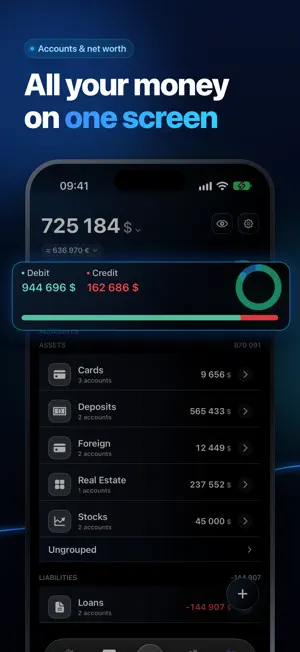
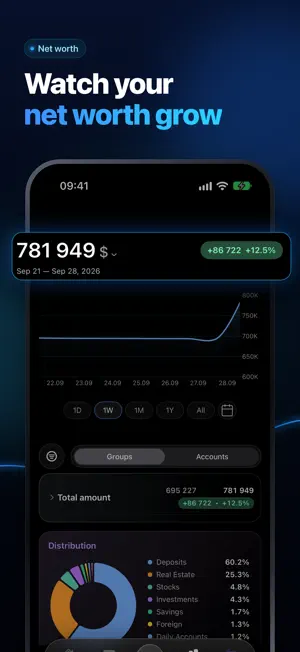
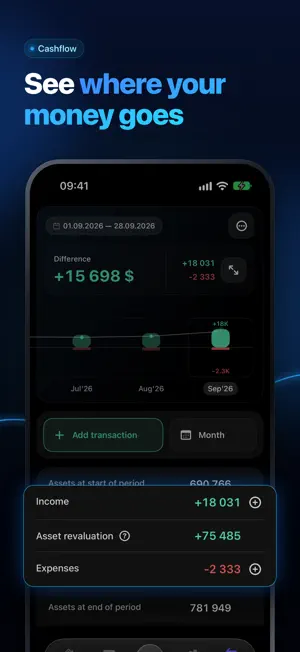
Know exactly where your money goes. Private by design. No account needed. millio brings your accounts, cashflow, cashback, investments, and currency converter into one place — private, offline-first, no account required. DASHBOARD Total balance, recent transactions, portfolio performance, cashback overview, and live exchange rates — all on one customizable screen. Add the widgets that matter most to you. Home screen widget — live exchange rates at a glance, without opening the app. ACCOUNTS & FINANCES Cards, bank accounts, credits, savings, investments, and real estate — all tracked together. The Accounts screen separates assets from liabilities, breaks down each balance, and groups accounts your way. Credit cards support full operations and payments. Assign a custom icon and color to each account for instant recognition. Multi-currency. Your real net worth, always up to date. CASHFLOW Log income and expenses by category. See exactly where your money goes each month. An Upcoming section shows payments and income ahead of time. Quick entry panel for fast logging on the go. CASHBACK Which card should you swipe? millio compares your cards' cashback rates by spending category so you always choose the best option. Never leave money on the table. INVESTMENTS Stocks, ETFs, crypto, and other assets — tracked in real time. Total portfolio value in any currency. CURRENCY CONVERTER 170+ fiat currencies plus crypto. Live rates, no ads, no extra apps needed. YOUR DATA. YOUR DEVICE. No account required. Everything is stored locally on your iPhone. Optional iCloud backup with end-to-end encryption — you choose when it runs and which passphrase protects it: device key (automatic) or your own password (portable across devices). WHAT'S FREE Accounts, cashflow tracking, cashback (10 categories/month), currency converter, dashboard, encrypted backup. WHAT PRO UNLOCKS • Unlimited accounts, cards, and investments • Financial dynamics charts and deep analytics • Unlimited cashback categories • Early access to new features PROMO: 90 DAYS PRO FREE Follow our Telegram @millio_app and get a promo code for 90 days of PRO. New App Store subscribers only. Details: t.me/millio_promo_bot Start free — no account, no sign-up. — millio. Your money. Your rules. Terms of Use: https://www.apple.com/legal/internet-services/itunes/dev/stdeula/
What’s new
Version 2.1 · Updated September 29, 2026
2.1: delete your account right from the app, updated cash and loan account screens, and new account and group icons with cleaner badge styling. Accounts no longer disappear from the screen when you have no groups, and expanding a group now feels smoother. Plus general stability fixes.
App privacy
The developer, Aleksei Kochetov, reported these privacy practices to Apple.
Data Linked to You
The following data, which may be collected and linked to your identity, may be used for the following purposes:
- Financial Info: Other Financial Info
- Contact Info: Email Address, Name
- User Content: Other User Content
- Identifiers: User ID, Device ID
- Diagnostics: Crash Data
Used for: App Functionality
Alternatives to millio - money manager
Looking for apps like millio - money manager? Here are 6 similar apps on the App Store. The highest rated is Kazna: Budget & Expenses (5.0/5), and 5 of the 6 are free to download.
-
 Finoria — финансы и бюджет
-
 Kazna: Budget & Expenses
5.0
-
 Kopibara: all banks & spending
-
 Tally: Cash Flow
-
 iShareBudget
-
 Lleno App
| App | Rating | Price | Last updated | Compare |
|---|---|---|---|---|
| millio - money manager | – | Free | September 29, 2026 | |
| Finoria — финансы и бюджет | – | Free | Sep 17, 2026 | Compare |
| Kazna: Budget & Expenses | 5.0 / 5 (2) | Free | Jun 30, 2026 | Compare |
| Kopibara: all banks & spending | – | Free | Oct 20, 2026 | Compare |
| Tally: Cash Flow | – | Free | Oct 10, 2026 | Compare |
| iShareBudget | – | 0.99 USD | Sep 24, 2026 | Compare |
| Lleno App | – | Free | Jun 12, 2026 | Compare |