

uPush: Push Up Counter
Volodymyr Dmytriiyenko Health & Fitness iPhoneiPadiPod touch
uPush: Push Up Counter is a free Health & Fitness app for iPhone and iPad by Volodymyr Dmytriiyenko. Requires iOS 16.4. Updated October 6, 2026.
- Price
- Free
- on the App Store
- Size
- 50 MB
- Age 4+
- Updated
- Oct 6
- 2026 · v1.2
Screenshots


About uPush: Push Up Counter
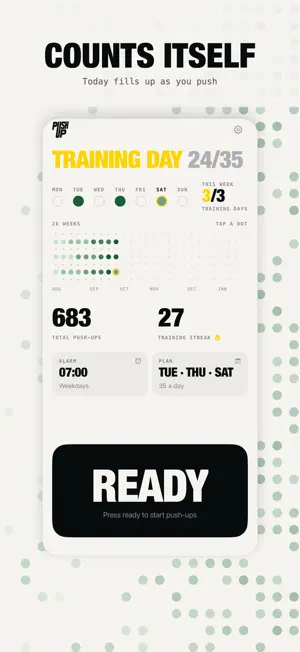
Put the phone on the floor. Get over it. Push. uPush counts every rep with the front TrueDepth camera, the same sensor that unlocks your phone. No wearable, no tapping the screen between sets, no account to make. You look at the floor and it does the counting. WHAT IT DOES • Counts reps by measuring how far your chest is from the phone • Ignores partial reps — going all the way down is what registers • Pauses when the phone is picked up or knocked, because a moving phone cannot tell your movement from its own • Turns every workout into a receipt: each set, the rest between them, the depth of every rep — and keeps a journal of the last 200 • Follows a training plan — the days you choose, every other day, or your own pace — and counts a streak of training days, so rest days never break it • Keeps a calendar of every day you trained, one dot a day, darker the more you did • Reminds you on training days only, at most once a day • Push-up alarm on iOS 26: it rings at your time, even on Silent. Stop only quiets it for 30 seconds; a couple of push-ups switch it off for the day • A Home Screen widget, light and dark themes, iPhone and iPad WHAT IT DOES NOT DO There is no account, no sign-in, no email, and no cloud. The app has no analytics, no advertising, and no tracking of any kind. It works with your phone in airplane mode, because there is nothing for it to talk to. Depth readings become a number of reps and are thrown away. No photo or video is ever written to storage or sent anywhere. What the app keeps — your days, your workouts and your plan — stays in its own storage on your device. Delete the app, or use Start over in Settings, and your history is gone. REQUIREMENTS An iPhone with Face ID, or an iPad Pro. The counter uses the TrueDepth camera, so models that unlock with a fingerprint cannot run it — the app says so plainly rather than letting you start a set that could never work. The push-up alarm needs iOS 26 or later. Somewhere to put the phone flat on the floor beneath you.
What’s new
Version 1.2 · Updated October 6, 2026
New in 1.2 • Push-up alarm (iOS 26): rings at your time, even on Silent. Stop only quiets it for 30 seconds; a couple of push-ups switch it off for the day. • Training plan: choose your days, every other day, or your own pace. Your streak counts training days, so rest days never break it. • Reminders on training days only, at most once a day. • A new home screen built around today: your progress, the week, your plan and your alarm at a glance. • Journal: open a workout to see every set, its wave and the rest in between. Fix a miscounted set, or add one you did away from your phone. • Home Screen widget. • iPad, in portrait and landscape.
App privacy
The developer, Volodymyr Dmytriiyenko, reported these privacy practices to Apple.
Data Not Collected
The developer does not collect any data from this app.
Alternatives to uPush: Push Up Counter
Looking for apps like uPush: Push Up Counter? Here are 6 similar apps on the App Store. The highest rated is Longevity Deck (4.8/5), and all 6 are free to download.
-
 Sleep - Relax Dream
-
 hitt - AI Personal Trainer
-
 Pet Health Tracker: Petfetti
4.7
-
 Longevity Deck
4.8
-
 Spaurt
-
 Methealth Namibia
| App | Rating | Price | Last updated | Compare |
|---|---|---|---|---|
| uPush: Push Up Counter | – | Free | October 6, 2026 | |
| Sleep - Relax Dream | – | Free | Jul 23, 2025 | Compare |
| hitt - AI Personal Trainer | – | Free | Feb 5, 2025 | Compare |
| Pet Health Tracker: Petfetti | 4.7 / 5 (32) | Free | Oct 19, 2026 | Compare |
| Longevity Deck | 4.8 / 5 (10) | Free | Oct 1, 2026 | Compare |
| Spaurt | – | Free | Oct 24, 2026 | Compare |
| Methealth Namibia | – | Free | Jan 21, 2024 | Compare |