

Blurfold: Face Blur & Mosaic
YOTEZIC LTD Photo & Video iPhoneiPadiPod touch
Blurfold: Face Blur & Mosaic is a free Photo & Video app for iPhone and iPad by YOTEZIC LTD. Requires iOS 17.0. Updated October 15, 2026.
- Price
- Free
- on the App Store
- Size
- 95 MB
- Age 4+
- Updated
- Oct 15
- 2026 · v1.2.0
Screenshots


About Blurfold: Face Blur & Mosaic
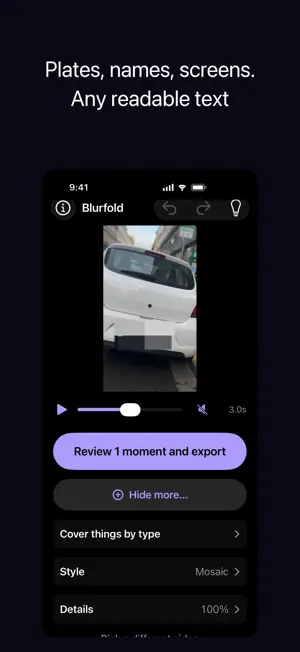
Blurfold finds every face in your video and covers it, automatically. Pick a video. Blurfold checks every frame, finds the faces, and follows each person through the whole clip — then mosaics, blurs or blocks them out. Export back to your camera roll. Blurring happens entirely on your iPhone, and there is no account. Nothing is uploaded unless you choose Share link: then only the finished, blurred copy goes to our servers for 30 days, and you can delete it any time. WHAT IT COVERS • Faces — found automatically, followed through the whole clip • People whose face was missed — turned away, too far, motion-blurred • Readable text — licence plates, name badges, addresses, screens, documents • Anything else — draw your own cover and put it where you want it • Things that move — draw one box over an object and Blurfold covers it on every frame (Blurfold Pro) • Whole kinds of things — pets, cars, phones and screens, bottles and cups, bags (Blurfold Pro) BUILT SO YOU CAN CHECK IT Most blur apps ask you to trust them. Blurfold shows you its working. A coverage bar along the clip marks every moment: green where a face was actually detected, amber where the detector dropped out and the cover was bridged across the gap. Tap anywhere on it to jump there. Before you export, Blurfold lists every moment it is least sure about — every stretch nothing is covering, and every guess long enough to be worth your eyes — each with a thumbnail of the real output and a one-tap fix. It tells you when it found readable text and is not covering it, rather than deciding quietly. CHOOSE WHO Tap a face to leave that person uncovered, and tap again to put it back. The choice follows them through the whole clip, because it is keyed to the person the detector is already tracking, not to a box you drew. FULL UNDO Every change is undoable, and a whole drag is one undo — not thirty. YOUR VIDEO COMES BACK THE SIZE YOU GAVE IT Blurfold encodes at your video's own bitrate instead of a fixed preset, so the export is about the size of the original rather than three or four times it. Duration, resolution, frame rate and audio all come back untouched — the audio is copied, not re-encoded. MY VIDEOS Every export goes into a Blurfold album in Photos and is listed in the app, ready to play or share. HONEST ABOUT THE LIMITS Crowd scenes, where people repeatedly cross in front of each other, are where face tracking is hardest and Blurfold is weakest. The coverage bar and the pre-export review will show you exactly where — please check them before you publish anything that matters. Faces, plates and text are free, with no limit. Blurfold Pro is a one-time purchase that unlocks the object tools, and your first 3 exports with an object covered are free. No subscription, no advertising, no account.
What’s new
Version 1.2.0 · Updated October 15, 2026
New: Share link. Every video in My Videos has a link button: tap it, agree once, and Blurfold uploads only the blurred copy, checks it, and copies a short link that works for 30 days. Tap again to copy the same link. Delete the link from the list any time, and the video is removed from our servers.
App privacy
The developer, YOTEZIC LTD, reported these privacy practices to Apple.
Data Linked to You
The following data, which may be collected and linked to your identity, may be used for the following purposes:
- Identifiers: Device ID
- Contact Info: Email Address
- User Content: Photos or Videos, Other User Content
- Diagnostics: Other Diagnostic Data
Used for: Analytics, App Functionality
Data Not Linked to You
The following data, which may be collected but is not linked to your identity, may be used for the following purposes:
- Usage Data: Product Interaction
Used for: Analytics
Alternatives to Blurfold: Face Blur & Mosaic
Looking for apps like Blurfold: Face Blur & Mosaic? Here are 6 similar apps on the App Store. The highest rated is Mosaic Blur: Video Editor (4.7/5), and all 6 are free to download.
-
 BlurFold: Blur Photos & Video
-
 Blur Video: Face & Plate
-
 Mosaic Letter: Photo Mosaics
-
 Weejistick: Sticker Maker
-
 Mosaic Blur: Video Editor
4.7
Mosaic Blur: Video Editor
4.7
-
 Blur It: Face Blur & Censor
| App | Rating | Price | Last updated | Compare |
|---|---|---|---|---|
| Blurfold: Face Blur & Mosaic | – | Free | October 15, 2026 | |
| BlurFold: Blur Photos & Video | – | Free | Oct 24, 2026 | Compare |
| Blur Video: Face & Plate | – | Free | Aug 21, 2026 | Compare |
| Mosaic Letter: Photo Mosaics | – | Free | Oct 29, 2026 | Compare |
| Weejistick: Sticker Maker | – | Free | Aug 13, 2026 | Compare |
| Mosaic Blur: Video Editor | 4.7 / 5 (3) | Free | Aug 19, 2026 | Compare |
| Blur It: Face Blur & Censor | – | Free | Oct 27, 2026 | Compare |