

Mosaic Letter: Photo Mosaics
TechRaccoon Photo & Video iPhoneiPadiPod touch
Mosaic Letter: Photo Mosaics is a free Photo & Video app for iPhone and iPad by TechRaccoon. Requires iOS 17.0. Updated September 24, 2026.
- Price
- Free
- on the App Store
- Size
- 11 MB
- Age 4+
- Updated
- Sep 24
- 2026 · v1.0.2
Screenshots


About Mosaic Letter: Photo Mosaics
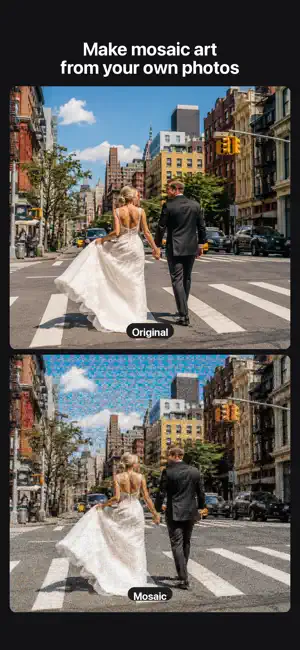
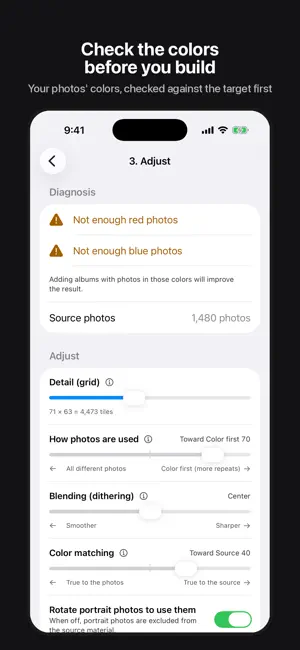
Mosaic Letter builds one large mosaic artwork out of the photos already in your album. From a distance it reads as a picture. Up close, every tile is an untouched photo of your own. ◎ No color is painted over your photos Most mosaic apps tint each tile to match the target image. Mosaic Letter applies no color correction and no filters at all. Zoom in and nothing looks muddy — you see the shot exactly as you took it. Photos are never cropped into pieces either: each photo is used whole, as one tile. ◎ The same photo never clusters Identical photos are kept a set number of cells apart. A slider lets you choose between "use as many different photos as possible" and "prioritize color accuracy", so you decide the trade-off yourself. ◎ See the outcome before you build Mosaic Letter compares the colors of your selected photos against the target image and tells you what is missing before generating — for example, "not enough blues". You can add more photos right there, so there is no build-and-retry loop. ◎ Everything stays on your device Mosaics are generated entirely on your iPhone. No account is required, and your photos are never uploaded anywhere. [Great for] • A surprise gift for a birthday or anniversary • A poster celebrating your favorite artist or team • A wedding welcome board • A year in review, or a record of a child growing up [How it works] 1. Pick the single image you want to recreate (the target) 2. Pick the albums to use as material (multiple albums, plus manual add and exclude) 3. Adjust detail and repetition, then generate 4. Save, share or print [Free] Unlimited generating and previewing. Exports are saved at 2048 px on the long edge with a watermark. [Pro — one-time purchase] • High-resolution export • Maximum-size export, made for printing • No watermark Buy once and keep it. There is no subscription. Terms of Use: https://mosaicletter.techraccoon.net/terms.html Privacy Policy: https://mosaicletter.techraccoon.net/privacy.html
What’s new
Version 1.0.2 · Updated September 24, 2026
We improved the accuracy of the source photo check. • The check now looks at how many photos can cover each color, not just whether a matching color exists. If a color is in short supply, you are told before generating — so the mosaic no longer repeats the same photo to fill a gap. • Adding photos to a selected album now re-runs the check right away, so newly added photos are reflected immediately. We welcome your feedback from the form in Settings.
App privacy
The developer, TechRaccoon, reported these privacy practices to Apple.
Data Not Linked to You
The following data, which may be collected but is not linked to your identity, may be used for the following purposes:
- Usage Data: Other Usage Data
- Diagnostics: Crash Data
Used for: Analytics
Alternatives to Mosaic Letter: Photo Mosaics
Looking for apps like Mosaic Letter: Photo Mosaics? Here are 6 similar apps on the App Store.
-
 EveryMosaic - Photo Mosaic Art
-
 Blurfold: Face Blur & Mosaic
-
 Mozary
-
 Mosaic Art Studio
-
 Photo Mosaic Art Maker
-
 Ez-Photomosaic
| App | Rating | Price | Last updated | Compare |
|---|---|---|---|---|
| Mosaic Letter: Photo Mosaics | – | Free | September 24, 2026 | |
| EveryMosaic - Photo Mosaic Art | – | Free | Sep 23, 2026 | Compare |
| Blurfold: Face Blur & Mosaic | – | Free | Oct 15, 2026 | Compare |
| Mozary | – | Free | Jul 6, 2026 | Compare |
| Mosaic Art Studio | – | Free | Sep 23, 2026 | Compare |
| Photo Mosaic Art Maker | – | Free | Aug 17, 2026 | Compare |
| Ez-Photomosaic | – | Free | Sep 5, 2025 | Compare |