

Pennli: Budget Planner
Piotr Mol Finance iPhoneiPadiPod touch
Pennli: Budget Planner is a free Finance app for iPhone and iPad by Piotr Mol. Requires iOS 18.0. Updated September 30, 2026.
- Price
- Free
- on the App Store
- Size
- 47 MB
- Age 4+
- Updated
- Sep 30
- 2026 · v1.2.5
Screenshots

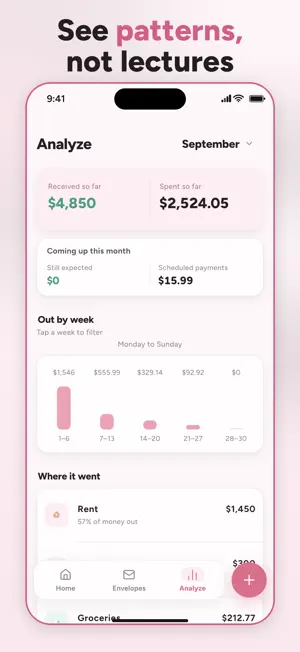

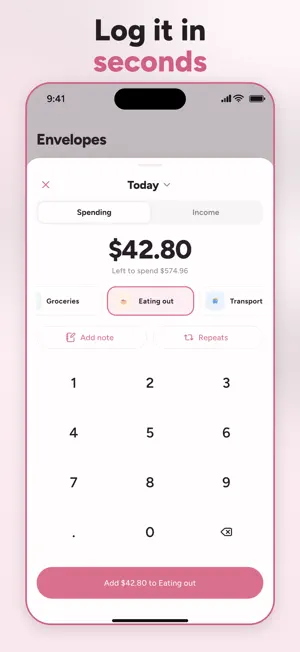
About Pennli: Budget Planner
Most budgeting apps wait until the end of the month to tell you what you did wrong. Pennli does the opposite. You decide where your money goes at the start, and one number tells you what is genuinely left to spend today. It is the envelope method, without the cash or the shoebox. HOW IT WORKS 1. Add what is coming in — a salary, a side income, the money that arrives whenever it arrives. 2. Divide it into envelopes: groceries, rent, going out, the things you actually spend on. 3. Log spending as it happens. Every envelope shows what is left, not what you have burned through. No spreadsheet to maintain. No category system to learn. About two minutes to set up. WHAT IS INSIDE • Envelopes you name yourself, with budgets you can change any month • Savings goals with a monthly amount, so "one day" finally gets a date • Repeating bills entered once and handled from then on • A weekly view of where the money went, tappable down to the single expense • Month-by-month history you can page back through • CSV export, so your records stay yours • Six languages and six currencies PRIVATE BY DEFAULT Pennli never asks for a bank login, because it never connects to one. There is no account, no sign-up, and no email address to hand over. Your budget is stored on your iPhone and stays there. We cannot read it and we cannot recover it. That is the trade, and we think it is the right one. QUIET BY DESIGN Pennli sends exactly one notification: a heads-up two days before a free trial ends. No daily reminders. No streaks to protect. No nudges asking you to log a coffee. BUILT FOR THE MONTH YOU ARE ALREADY IN Forgot to write something down yesterday? Change the date. Spent more than the envelope held? It says so plainly and moves on. Nothing here is designed to make you feel behind. PENNLI PREMIUM Full access to Pennli requires a subscription. Choose an annual plan, or a one-time lifetime purchase. Current prices are shown in the app before you confirm anything. A free trial is available on the annual plan. Terms of Use: https://newdevway.com/pennli/terms Privacy Policy: https://newdevway.com/pennli/privacy
What’s new
Version 1.2.5 · Updated September 30, 2026
Fixed issues at the start of a new month so your budget updates correctly.
App privacy
The developer, Piotr Mol, reported these privacy practices to Apple.
Data Linked to You
The following data, which may be collected and linked to your identity, may be used for the following purposes:
- Usage Data: Product Interaction
- Diagnostics: Crash Data
Used for: Analytics, App Functionality
Data Not Linked to You
The following data, which may be collected but is not linked to your identity, may be used for the following purposes:
- Purchases: Purchase History
Used for: Analytics, App Functionality
Alternatives to Pennli: Budget Planner
Looking for apps like Pennli: Budget Planner? Here are 6 similar apps on the App Store. The highest rated is Thor: Budget & Expenses (5.0/5), and all 6 are free to download.
-
 dividi: Shared Expenses
-
 Em Dia - Finanças Pessoais
-
 Budget Planner and Tracker +
-
 Thor: Budget & Expenses
5.0
Thor: Budget & Expenses
5.0
-
 PocketPal Budget
-
 Kelo: Expense Tracker & Budget
5.0
Kelo: Expense Tracker & Budget
5.0
| App | Rating | Price | Last updated | Compare |
|---|---|---|---|---|
| Pennli: Budget Planner | – | Free | September 30, 2026 | |
| dividi: Shared Expenses | – | Free | Oct 2, 2026 | Compare |
| Em Dia - Finanças Pessoais | – | Free | Jul 14, 2026 | Compare |
| Budget Planner and Tracker + | – | Free | Aug 19, 2026 | Compare |
| Thor: Budget & Expenses | 5.0 / 5 (1) | Free | Sep 28, 2026 | Compare |
| PocketPal Budget | – | Free | Sep 30, 2026 | Compare |
| Kelo: Expense Tracker & Budget | 5.0 / 5 (8) | Free | Oct 6, 2026 | Compare |