

Onymera
Convoya Education iPhoneiPadiPod touch
Onymera is a free Education app for iPhone and iPad by Convoya. Rated 5.0/5 from 3 ratings. Requires iOS 17.0. Updated September 28, 2026.
- Rating
- 5.0
- 3 ratings
- Price
- Free
- on the App Store
- Size
- 2 MB
- Age 4+
- Updated
- Sep 28
- 2026 · v1.2.1
Screenshots

About Onymera
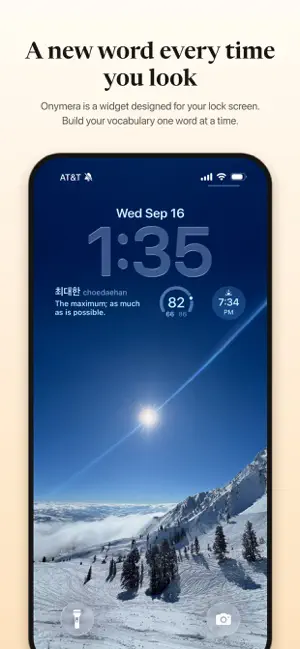
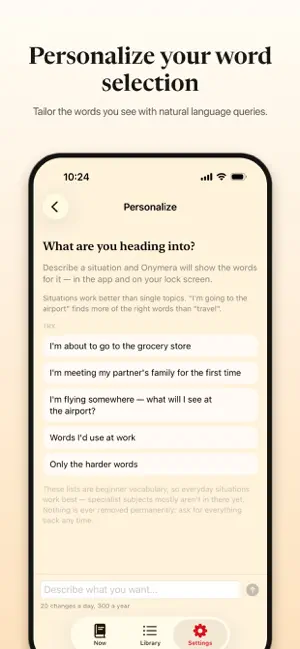
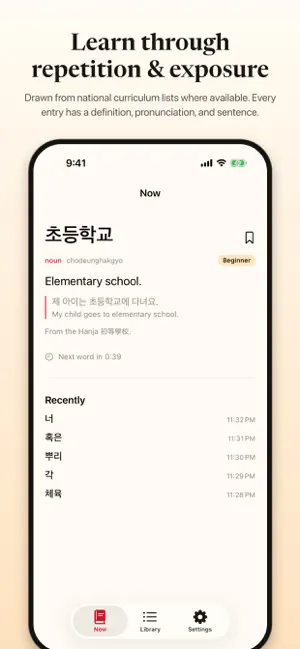
A new word, where you already look. Onymera puts a word on your lock screen and changes it about once a minute, so you meet a different one almost every time you glance at your phone. Not a notification. Not a feed. Nothing to open, nothing to remember, no streak to keep alive. NINE LANGUAGES, 32,000 WORDS AND COUNTING, ALL FREE • Korean - 5,965 words: the complete National Institute of Korean Language learner list, beginner through advanced, with Hanja origins where they help. • Japanese - 3,984 words: JLPT N5 and N4, and N3 well under way. Every entry carries its kana reading and romaji. • Chinese - 4,571 words: HSK 1 to 5, and the start of HSK 6, with pinyin. Simplified characters. • English - 4,295 words across four tiers, from everyday to genuinely rare. • Spanish - 2,709 words: CEFR A1, A2 and B1, with IPA so you know where the stress falls. • Portuguese - 2,592 words: A1, A2 and B1. Brazilian: ônibus, trem, celular, você. • French - 2,708 words: CEFR A1, A2 and B1, with IPA for everything the spelling hides. • German - 2,699 words: CEFR A1, A2 and B1, from the Goethe-Institut's own examination lists. • Italian - 2,697 words: CEFR A1, A2 and B1, with open and closed vowels marked. The word lists follow the official curriculum for each language where one exists, and every entry passes the same validator before it ships. Pick a language and the whole rotation follows; your history and saved words are kept separately for each one. EVERY ENTRY HAS A SENTENCE A definition in plain English, under 140 characters. An example sentence where the meaning is obvious from context, with a translation. Tap the widget for the pronunciation, the definition and the sentence, with the last five words you were shown underneath, so a word you half caught is never lost. TELL IT WHAT YOU'RE HEADING INTO Say, in plain English, what words you want to see: "a week in Seoul", "my first job in a Berlin office", "nothing beginner" - and the rotation follows. Thousands of words per language means even a very specific request comes back with a real list. This is the one optional purchase; everything else is free and complete without it. DOWNLOADS ONCE, THEN WORKS WITH NO SIGNAL A language is fetched the first time you pick it - a few hundred kilobytes - and from then on it lives on your phone. No account, no sign-up, nothing to fetch on a plane. The lists keep growing, and each language updates itself the next time you use it: new words arrive without an app update. A LIBRARY THAT FILLS ITSELF Your history is rebuilt from the rotation itself, so it is complete whether or not you opened the app. Save the ones you want to keep. Search by the word, by how it sounds, or by what it means in English. Accents and umlauts are optional: "manana" finds mañana, "schon" finds schön. LOCK SCREEN AND HOME SCREEN A rectangular and an inline widget for the lock screen. Small and medium widgets for the home screen: the small one is a glance, the medium one brings the example sentence with it. All free, and the app shows you how to add them the first time you open it. OPTIONAL: PERSONALIZATION - $2.99, ONCE The steering described above, plus the pace: slow the widget down to one word an hour, or one a day to sit with, rather than a new one every look. Your selection follows you to any device you sign in on. One payment. No subscription, ever. Nothing recurring anywhere in the app. — iPhone, iOS 17 or later. Privacy: onymera.app/privacy
What’s new
Version 1.2.1 · Updated September 28, 2026
If you've personalized your words in chat, they now stay right when a word list is updated. Before, an update could leave your selection pointing at the wrong words until the app was next restarted. Now Onymera notices the change straight away and chooses your words again from the new list, on the lock screen too. French, German and Italian have grown to about 2,700 words each - level with Spanish, and into B1. Like every list update, the new words arrive on their own.
App privacy
The developer, Convoya, reported these privacy practices to Apple.
Data Not Linked to You
The following data, which may be collected but is not linked to your identity, may be used for the following purposes:
- User Content: Other User Content
- Identifiers: User ID
Used for: Product Personalization
Alternatives to Onymera
Looking for apps like Onymera? Here are 6 similar apps on the App Store. The highest rated is WordWake: Learn Languages (5.0/5), and all 6 are free to download.
-
 Kapi: Learn Japanese Kanji
-
 LingLock: Language Learning
-
 Lock&Learn Korean: TOPIK Words
-
 Inkuntri
-
 WordWake: Learn Languages
5.0
WordWake: Learn Languages
5.0
-
 HangulQuest: Learn Korean
| App | Rating | Price | Last updated | Compare |
|---|---|---|---|---|
| Onymera | 5.0 / 5 (3 ratings) | Free | September 28, 2026 | |
| Kapi: Learn Japanese Kanji | – | Free | Sep 21, 2026 | Compare |
| LingLock: Language Learning | – | Free | Sep 30, 2026 | Compare |
| Lock&Learn Korean: TOPIK Words | – | Free | Oct 5, 2026 | Compare |
| Inkuntri | – | Free | Sep 21, 2026 | Compare |
| WordWake: Learn Languages | 5.0 / 5 (3) | Free | Sep 17, 2026 | Compare |
| HangulQuest: Learn Korean | – | Free | Oct 5, 2026 | Compare |
Compare Onymera with the top alternatives: ratings, updates, ASO score and keyword gaps →