

Panoramika: Film Photo Editor
Anton Bakaliar Photo & Video iPhoneiPadiPod touch
Panoramika: Film Photo Editor is a free Photo & Video app for iPhone and iPad by Anton Bakaliar. Requires iOS 17.0. Updated November 11, 2026.
- Price
- Free
- on the App Store
- Size
- 305 MB
- Age 4+
- Updated
- Nov 11
- 2026 · v1.2.35
Screenshots



About Panoramika: Film Photo Editor
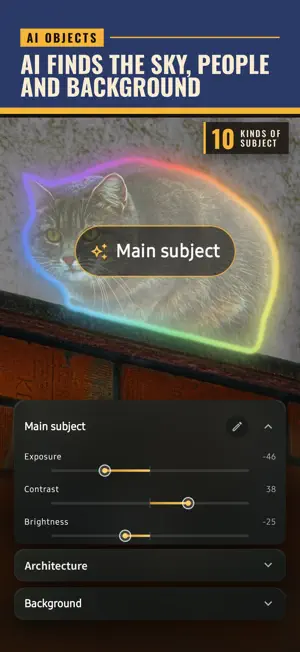
Turn everyday photos into cinematic images with the character of film. Choose from 96 film-inspired looks, recreate the style of any photo, add depth with vintage lens effects and give portraits real studio light. From subtle analog colors to bold cinematic moods, create a look that feels uniquely yours. No ads. No account required. Just your photos and your creativity. FILM LOOKS, NOT ORDINARY FILTERS 96 ready-made looks in themed collections on the AuraWheel. Slide your finger around the wheel, blend styles together and set their strength. Each look changes more than color: light, contrast and texture too, for a true analog or cinematic feel. LOOKMATCH – RECREATE THE STYLE OF ANY PHOTO Found a photo with the perfect colors and mood? Choose it as a reference and Panoramika recreates its style on your photo. Fine-tune the result, save your favorite looks and apply them to a whole photo series. VINTAGE LENS – BEAUTIFUL BOKEH AFTER THE SHOT Blur the background after you've taken the photo and tap to change the focus. Six vintage lens characters give distinctive bokeh, from soft circles to dreamy swirls and cat's-eye shapes. AI MASKS – EDIT WHAT MATTERS AI finds the sky, people, trees, water and buildings for you. Make the sky deeper, brighten faces or calm the background – each on its own, no brushing by hand. PORTRAIT STUDIO – STUDIO LIGHT FOR ANY PORTRAIT Turn a photo of a person into a studio portrait, no studio needed. Pick a ready-made light – Rembrandt, Cinema, Noir, two-color neon and more – then move each light around the face, darken, recolor or blur the background, and finish with natural retouching: smoother skin, fewer blemishes, brighter eyes and whiter teeth. RELIGHT – CHANGE THE LIGHT AFTER THE SHOT Add side sun, a warm sunset, evening glow, neon or a flash to any photo – portraits, streets or landscapes. Start from ten ready-made scenes, or place your own lights where you want them and choose how far they reach. CINEMATIC EFFECTS Haze, soft glow around highlights, dreamy diffusion, anamorphic light streaks, film grain, motion blur and vignette – add atmosphere and depth in a few taps. COLLAGES & CREATIVE TOOLS • Recolor: select an object and change its color • Collages with frames, text, stickers and comic bubbles • Censor: hide faces, license plates and documents before you share • Apply one look to many photos at once • Your own watermark; location removed from saved photos by default • Short in-app lessons PROFESSIONAL PHOTO EDITING When you want full control: light and color, curves, HSL, masks, crop and perspective, sharpening and noise reduction. RAW from smartphones and cameras, including Sony, Canon, Nikon, Fujifilm, Panasonic, Olympus and Pentax. FREE & PREMIUM Free: light and color editing with curves and HSL, crop, gradient masks, film grain, collages, Censor, a set of free looks and up to 10 saves a day. Premium: all 96 looks, LookMatch, vintage lens blur, AI masks, Portrait studio with retouching, Relight, Recolor, RAW editing, batch editing and unlimited saving. Try Premium on your own photos first – you'll see the result with a watermark before you buy. Start with a free trial, then subscribe or buy once for life. For everyone who loves film photography, cinematic color and vintage aesthetics. Create with character. Terms of Use: https://plivka-legal.netlify.app/terms.html
What’s new
Version 1.2.35 · Updated November 11, 2026
• New Portrait studio: studio light for any portrait in one tap – Rembrandt, Cinema, Noir, two-color neon and more. Move each light around the face, then darken, recolor or blur the background • Retouch is now part of Portrait studio: smooth skin, clear blemishes, brighten eyes and whiten teeth • New Relight in Effects: add side sun, a sunset, evening glow, neon or a flash to any photo – ten ready-made scenes or your own lights • Onboarding and lessons now show the new tools • If plans don’t load, the subscription screen lets you try again
App privacy
The developer, Anton Bakaliar, reported these privacy practices to Apple.
Data Not Linked to You
The following data, which may be collected but is not linked to your identity, may be used for the following purposes:
- Purchases: Purchase History
Used for: App Functionality
Alternatives to Panoramika: Film Photo Editor
Looking for apps like Panoramika: Film Photo Editor? Here are 6 similar apps on the App Store. The highest rated is OptiPixel: Compress & Resize (5.0/5), and all 6 are free to download.
-
 Life Film: Vlog Diary
-
 CinemaKit
-
 OptiPixel: Compress & Resize
5.0
-
 LightEditor RAW
4.5
-
 Tonely: Film Camera & Editor
-
 Swipe & Delete Photos
| App | Rating | Price | Last updated | Compare |
|---|---|---|---|---|
| Panoramika: Film Photo Editor | – | Free | November 11, 2026 | |
| Life Film: Vlog Diary | – | Free | Sep 24, 2026 | Compare |
| CinemaKit | – | Free | Oct 30, 2026 | Compare |
| OptiPixel: Compress & Resize | 5.0 / 5 (1) | Free | Nov 16, 2026 | Compare |
| LightEditor RAW | 4.5 / 5 (2) | Free | Nov 11, 2026 | Compare |
| Tonely: Film Camera & Editor | – | Free | Nov 8, 2026 | Compare |
| Swipe & Delete Photos | – | Free | Oct 6, 2025 | Compare |