

OptiPixel: Compress & Resize
TO TU SIEU Photo & Video iPhoneiPadiPod touch
OptiPixel: Compress & Resize is a free Photo & Video app for iPhone and iPad by TO TU SIEU. Requires iOS 17.0. Updated October 27, 2026.
- Price
- Free
- on the App Store
- Size
- 190 MB
- Age 4+
- Updated
- Oct 27
- 2026 · v1.4.2
Screenshots


About OptiPixel: Compress & Resize
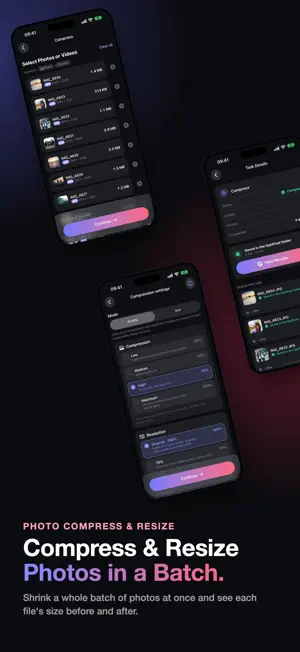
OptiPixel shrinks photos and videos to a fraction of their size — one file or a whole batch — and runs every tool right on your iPhone or iPad. Your photos and videos are never uploaded, and no account is needed. Convert HEIC to JPG or PDF, watermark, clean up storage, back up to any folder, and turn photos into 23 AI styles. AI TOOLS • AI Transform: turn photos into anime, 3D cartoon, watercolor, sketch, comic and painting styles. 23 styles to choose from. • Cutout: lift the subject off its background in one tap. • Face Blur: find faces automatically and blur them before you share. • Text Extractor: copy text from photos and documents. • Remove Object: brush, tap or Lasso anything away, or tap Remove people to clear every person at once. COMPRESS & FREE UP SPACE • Compress photos and videos to a fraction of their size, or resize to exact pixels — one file or a whole batch. • Storage: find the heaviest videos, largest photos, duplicates, screenshots and QR codes, and clear them. EDIT & CREATE • Color Filter: film looks with Fade and Grain, for photos and videos. • Crop, Shape Crop and Collage. • Watermark photos and videos with your text or logo; Time Marker stamps the date, place and contact details. • Doc Scanner: scan paper documents and receipts with automatic edge detection. CONVERT & PRIVACY • Convert HEIC, JPEG, PNG, MP4, MOV and more; trim and resize videos. Audio convert and trim are included too. • Metadata: view or remove location and camera details from photos and videos. Share to OptiPixel from Photos or any other app. Every job runs in a background queue, so you can keep working while it finishes. Free for up to 3 photos or 1 video per task. A short video unlocks a task of up to 10 photos or 3 videos, or an option marked with a crown, up to 3 times a day. OptiPixel Premium (monthly, annual, or a one-time Lifetime purchase) removes ads and limits, and adds every AI style and original-resolution AI exports. Terms of Use: https://optipixel.nightaris.com/terms/ Privacy Policy: https://optipixel.nightaris.com/privacy/
What’s new
Version 1.4.2 · Updated October 27, 2026
- Already on Monthly or Yearly? Lifetime now costs less: what's left of your paid plan is taken off, and the app helps you turn off renewal so you're never charged twice. - Files only in iCloud now count: each storage shows how much is on the device and how much only in iCloud, with a Location filter; iCloud Drive folders show their progress while they scan. - Backups are much faster and stay smooth with thousands of files, keep a folder's subfolders, and say how much is downloaded from iCloud first. - Every folder you add now has search, filters, selection and tools, like Photos, and Back Up sits right under Analyze. - Exact duplicates are free: find byte-for-byte copies in Storage › Analyze or on Home, and delete them without an ad. - A file that is only in iCloud opens a tool at once and downloads on the selection screen. - The Premium screen shows how much a batch would free, as an estimate. - Video Fit under a size warns you when a size is too small for a clean picture.
App privacy
The developer, TO TU SIEU, reported these privacy practices to Apple.
Data Used to Track You
The following data may be used to track you across apps and websites owned by other companies:
- Identifiers: Device ID
Data Linked to You
The following data, which may be collected and linked to your identity, may be used for the following purposes:
- Location: Coarse Location
- Identifiers: Device ID
- Usage Data: Product Interaction, Advertising Data
Used for: Third-Party Advertising, Developer’s Advertising or Marketing, Analytics, App Functionality
Data Not Linked to You
The following data, which may be collected but is not linked to your identity, may be used for the following purposes:
- Diagnostics: Performance Data, Other Diagnostic Data, Crash Data
- Purchases: Purchase History
Used for: Third-Party Advertising, Developer’s Advertising or Marketing, Analytics, App Functionality
Alternatives to OptiPixel: Compress & Resize
Looking for apps like OptiPixel: Compress & Resize? Here are 6 similar apps on the App Store. The highest rated is Tonalier: RAW Photo Editor (5.0/5), and all 6 are free to download.
-
 4分割カメラ
-
 Tonalier: RAW Photo Editor
5.0
-
 Kelvin Camera: Manual Pro RAW
-
 Compress Image - MB to KB
-
 Frame Grabber: Video to JPG
-
 Compressify
| App | Rating | Price | Last updated | Compare |
|---|---|---|---|---|
| OptiPixel: Compress & Resize | – | Free | October 27, 2026 | |
| 4分割カメラ | – | Free | Aug 24, 2026 | Compare |
| Tonalier: RAW Photo Editor | 5.0 / 5 (1) | Free | Oct 26, 2026 | Compare |
| Kelvin Camera: Manual Pro RAW | – | Free | Jul 19, 2026 | Compare |
| Compress Image - MB to KB | – | Free | Oct 13, 2026 | Compare |
| Frame Grabber: Video to JPG | – | Free | Aug 17, 2026 | Compare |
| Compressify | – | Free | Feb 17, 2025 | Compare |