

PulseClean-Speaker Clean
SeaMoon Link Tech Limited Utilities iPhoneiPadiPod touch
PulseClean-Speaker Clean is a free Utilities app for iPhone and iPad by SeaMoon Link Tech Limited. Rated 2.3/5 from 9 ratings. Requires iOS 15.0.
- Rating
- 2.3
- 9 ratings
- Price
- Free
- on the App Store
- Size
- 60 MB
- Age 4+
- Updated
- Oct 16
- 2026 · v1.0.5
Screenshots


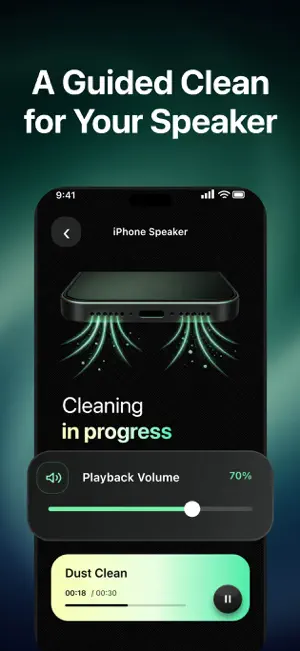
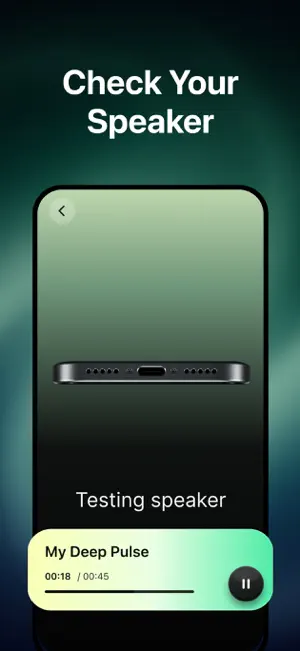
About PulseClean-Speaker Clean
Changes in your phone’s sound are not always obvious at first. Maybe you used your phone in the rain, accidentally splashed it with water, or spent the day in a dusty environment. Then, at some point, you notice that familiar music and phone calls no longer sound as clear as they used to. When that happens, we want you to have a simple place to start. That is why we created PulseClean. Open PulseClean, select a cleaning option, and position your phone as shown before playing the cleaning audio. During playback, you can adjust the volume, check the remaining time, or pause whenever you need to. When the session ends, you can record how the sound feels to you. If the speaker still sounds muffled, you may run the cleaning cycle a few more times based on your situation. You can also use Sound Check to listen more closely to your speaker and microphone performance. You can save frequently used steps as your own Routine. Arrange cleaning audio, low-frequency water-eject audio, and sound checks in the order that works for you. The next time you encounter a similar situation, your preferred sequence will be ready to play. PulseClean also includes white, pink, and brown noise for observing how your speaker performs across different sound ranges. By listening to each type of noise, you may notice distortion, uneven volume, unwanted noise, or unusual behavior within certain frequency ranges. This gives you another way to understand how your speaker responds under different playback conditions. We want PulseClean to do one thing well: when your speaker does not sound quite right, give you a simple and understandable way to respond. It may not be an app you open every day. But when familiar sounds suddenly become muffled, we hope PulseClean will be the tool you choose to open. Results may vary depending on the device and its condition. PulseClean provides sound-based assistance and is not intended to diagnose or repair hardware. Privacy Policy: http://www.seamoonwell.com/website-cfg/policy Terms of Use: http://www.seamoonwell.com/website-cfg/service Contact Us: [email protected]
Ratings & reviews
2.3
9 ratings
What’s new
Version 1.0.5 · Updated October 16, 2026
fix known issues
App privacy
The developer, SeaMoon Link Tech Limited, reported these privacy practices to Apple.
Data Used to Track You
The following data may be used to track you across apps and websites owned by other companies:
- Identifiers: User ID, Device ID
Data Linked to You
The following data, which may be collected and linked to your identity, may be used for the following purposes:
- Identifiers: User ID, Device ID
Used for: Analytics, Product Personalization
Alternatives to PulseClean-Speaker Clean
Looking for apps like PulseClean-Speaker Clean? Here are 6 similar apps on the App Store. The highest rated is Onclear: Cleaner Assistant (5.0/5), and all 6 are free to download.
-
 FlashClean: Boost & Clear Junk
4.6
FlashClean: Boost & Clear Junk
4.6
-
 Clean Ninja: Storage Cleaner
4.5
Clean Ninja: Storage Cleaner
4.5
-
 Sortica Clean: Storage Cleaner
3.7
Sortica Clean: Storage Cleaner
3.7
-
 Bee Cleaner - Storage Cleanup
4.0
Bee Cleaner - Storage Cleanup
4.0
-
 Clean Guard: Speaker Pulse
1.4
Clean Guard: Speaker Pulse
1.4
-
 Onclear: Cleaner Assistant
5.0
Onclear: Cleaner Assistant
5.0
| App | Rating | Price | Last updated | Compare |
|---|---|---|---|---|
| PulseClean-Speaker Clean | 2.3 / 5 (9 ratings) | Free | October 16, 2026 | |
| FlashClean: Boost & Clear Junk | 4.6 / 5 (14) | Free | Oct 13, 2026 | Compare |
| Clean Ninja: Storage Cleaner | 4.5 / 5 (4) | Free | Oct 10, 2026 | Compare |
| Sortica Clean: Storage Cleaner | 3.7 / 5 (3) | Free | Sep 22, 2026 | Compare |
| Bee Cleaner - Storage Cleanup | 4.0 / 5 (14) | Free | Oct 15, 2026 | Compare |
| Clean Guard: Speaker Pulse | 1.4 / 5 (47) | Free | Aug 27, 2026 | Compare |
| Onclear: Cleaner Assistant | 5.0 / 5 (1) | Free | Sep 8, 2026 | Compare |