

Clean Ninja: Storage Cleaner
Orvanta Digital Limited Utilities iPhoneiPadiPod touch
Clean Ninja: Storage Cleaner is a free Utilities app for iPhone and iPad by Orvanta Digital Limited. Rated 5.0/5 from 3 ratings. Requires iOS 16.0.
- Rating
- 5.0
- 3 ratings
- Price
- Free
- on the App Store
- Size
- 58 MB
- Age 17+
- Updated
- Oct 10
- 2026 · v1.0.1
Screenshots


About Clean Ninja: Storage Cleaner
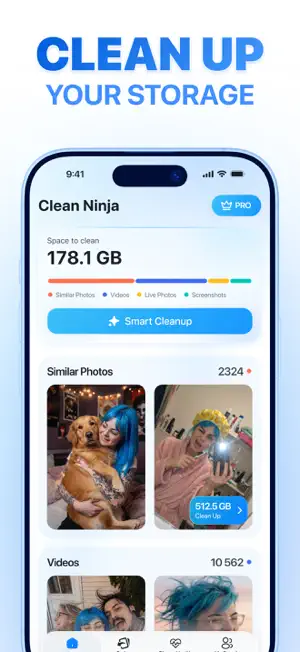
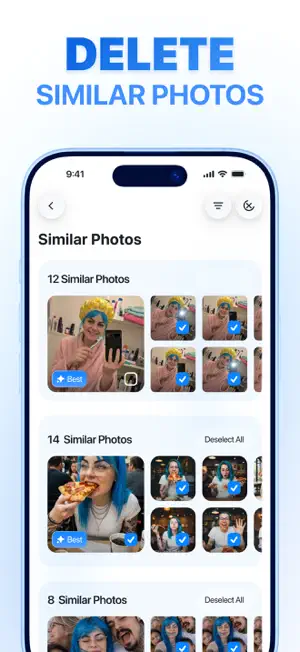
Clean Ninja is a storage cleaner for iPhone. It frees up space by clearing out your camera roll — similar photos, Live Photos, screenshots and large videos — and shows exactly how much you get back from each one. Clean Ninja does more than delete. A Health Score tells you the current state of your device and predicts when your free space will run out. My People groups your library by the people in your photos, so the ones you keep are the ones that matter, and it runs entirely on your device. Nothing is deleted until you review it and confirm. PHONE HEALTH CHECK A single unique Health Score for your iPhone, with the readings behind it: storage in use, memory in use, current thermal state and CPU load. Clean Ninja also projects when your free space is likely to run out at your current rate, and can alert you when storage becomes critical. Re-analyze at any time to see what has changed. MY PEOPLE When you are clearing out thousands of photos, the ones worth keeping are usually the ones with people in them. My People groups your library by the person who appears in each photo, so you can go through everything with your family, your partner or a close friend in one place — and decide what to keep by who is in the shot, not just by how sharp it is. Face grouping runs on your device using Apple MediaIntelligence on iOS 27. The app does not identify anyone and does not attach names: it only groups photos that show the same face. The analysis and the groups it creates are stored in the app's own index on your iPhone. SMART CLEANUP One scan gathers similar photos, Live Photos, screenshots and large videos from your library into a single review screen. Each group shows how much storage it takes, so you can start with whatever frees up the most space. SIMILAR PHOTOS Burst shots and near-identical retakes are grouped together, with the sharpest frame of each group marked. Keep that one and remove the rest, or clear whole groups at once. LIVE PHOTOS AND SCREENSHOTS Every Live Photo and every screenshot in your library, each in its own list with the space it takes. Live Photos carry a short video alongside the still, and screenshots pile up unnoticed — both are easy to clear once you can see them in one place. SWIPE PHOTO CLEANER Go through your camera roll one photo at a time. Swipe left to add a photo to the delete pile, swipe right to keep it. Nothing leaves your library until you confirm. VIDEO COMPRESSOR Long videos are usually the largest single items in a full library. Compress them on your iPhone to reduce file size and keep the video where it is. WHAT YOU GET BACK After each cleanup Clean Ninja shows exactly how many gigabytes you freed up, so you can see the result instead of guessing. Deleted items go to Recently Deleted in Photos, where iOS keeps them for 30 days in case you change your mind. YOUR LIBRARY STAYS YOURS No account and no sign-up. Photo analysis happens on your iPhone, and nothing is deleted or compressed without your confirmation. SUBSCRIPTION INFO Clean Ninja offers auto-renewing subscription plans. Payment will be charged to your Apple ID account at confirmation of purchase. Subscription automatically renews unless canceled at least 24 hours before the end of the current period. Manage or cancel anytime in your App Store account settings. Privacy Policy: https://cleanninja.app/hub/legal/privacy-policy-ios Terms of Use: https://cleanninja.app/hub/legal/terms-of-use-ios Terms of Subscription: https://cleanninja.app/hub/legal/terms-of-subscription-ios Support: https://mail.orvanta.limited?app=ioscleanninja
What’s new
Version 1.0.1 · Updated October 10, 2026
Hey there! Our ninjas have a new cleanup mission: to tidy up your inbox. The new Email Cleanup feature groups emails you may no longer need, shows how many are ready for review, and lets you check them before deleting in bulk. You can also hide unwanted senders, so their emails no longer clutter your inbox. A few bugs disappeared along the way, too. Mission complete. Our ninjas are already working on what’s next.
App privacy
The developer, Orvanta Digital Limited, reported these privacy practices to Apple.
Data Used to Track You
The following data may be used to track you across apps and websites owned by other companies:
- Identifiers: Device ID
- Usage Data: Advertising Data
Data Linked to You
The following data, which may be collected and linked to your identity, may be used for the following purposes:
- Usage Data: Advertising Data, Product Interaction
- Purchases: Purchase History
- Location: Coarse Location
- Identifiers: User ID, Device ID
- Diagnostics: Crash Data, Performance Data, Other Diagnostic Data
Used for: Third-Party Advertising, Analytics, App Functionality
Alternatives to Clean Ninja: Storage Cleaner
Looking for apps like Clean Ninja: Storage Cleaner? Here are 6 similar apps on the App Store. The highest rated is Clean Kit: Photo Cleaner (5.0/5), and all 6 are free to download.
-
 Swipe, VIA! – Photo Cleanup
4.2
Swipe, VIA! – Photo Cleanup
4.2
-
 AlbumGenie AI: Photo Assistant
4.6
AlbumGenie AI: Photo Assistant
4.6
-
 Clear Clean Master
4.3
Clear Clean Master
4.3
-
 Clean Kit: Photo Cleaner
5.0
Clean Kit: Photo Cleaner
5.0
-
 Onclear: Cleaner Assistant
5.0
Onclear: Cleaner Assistant
5.0
-
 Mix Cleaner:Clean Up Storage
4.4
Mix Cleaner:Clean Up Storage
4.4
| App | Rating | Price | Last updated | Compare |
|---|---|---|---|---|
| Clean Ninja: Storage Cleaner | 5.0 / 5 (3 ratings) | Free | October 10, 2026 | |
| Swipe, VIA! – Photo Cleanup | 4.3 / 5 (28) | Free | Sep 24, 2026 | Compare |
| AlbumGenie AI: Photo Assistant | 4.6 / 5 (15) | Free | Oct 12, 2026 | Compare |
| Clear Clean Master | 4.3 / 5 (7) | Free | Sep 23, 2026 | Compare |
| Clean Kit: Photo Cleaner | 5.0 / 5 (3) | Free | Oct 13, 2026 | Compare |
| Onclear: Cleaner Assistant | 5.0 / 5 (1) | Free | Sep 8, 2026 | Compare |
| Mix Cleaner:Clean Up Storage | 4.4 / 5 (51) | Free | Oct 9, 2026 | Compare |