

PoseSync: Remote Pose Camera
Shenzhen Quanjing Digital Intelligence Technology Co., Ltd. Photo & Video iPhoneiPadiPod touch
PoseSync: Remote Pose Camera is a free Photo & Video app for iPhone and iPad by Shenzhen Quanjing Digital Intelligence Technology Co., Ltd.
- Price
- Free
- on the App Store
- Size
- 19 MB
- Age 4+
- Updated
- Oct 3
- 2026 · v1.3.1
Screenshots



About PoseSync: Remote Pose Camera
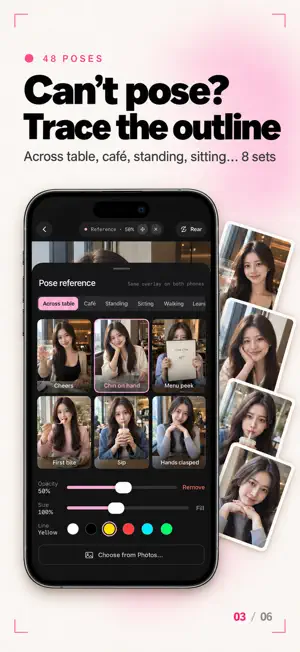
Two iPhones. One shoots, one watches. The person being photographed sees themselves through the other phone's lens in real time — and decides when to press the shutter, how far to zoom, where to stand. The model is the director. HOW IT WORKS 1. Open PoseSync on both iPhones: one picks "I'm the model", the other "I'm the photographer" 2. The model's phone finds the other one automatically — tap to connect 3. The model sees the live viewfinder. Both phones share the exact same controls: zoom, focus, shutter, countdown, exposure lock, pose reference WHY IT'S DIFFERENT · Truly low latency: over Wi‑Fi or direct peer‑to‑peer, end‑to‑end latency is usually under 100 ms — you can pose to it · Works offline: both phones just need Wi‑Fi switched on. No router, no data used · Two‑way controls: zoom, shutter or exposure changed on either side shows up instantly on the other, with a "remote" cue · Standing mark: the model drags on the picture; the photographer sees "They'll stand here" at the same spot · 48 built‑in poses in 8 sets — across the table, café, standing, sitting, walking, leaning, half‑body, crouching — each with a real photo and a line outline you overlay on the viewfinder, in 6 line colours · Your own reference: overlay a photo from your library — same image on both phones, with adjustable opacity, size and position · Composition guides: rule of thirds plus a headroom line · Exposure lock: stop brightness from jumping while you check your pose · Countdown: 3 / 5 / 10 seconds, counted down on both screens · Solo mode: pose outlines, grid and countdown work with a single phone too · Full‑quality photos stay on the photographer's phone; the model gets a preview instantly · Latency check: median and p95 in one tap, so you know whether to find a better Wi‑Fi FREE & PRO Take 20 photos free, with every pose and feature. PoseSync Pro (monthly, yearly or a one‑time purchase) removes the limit. Only one of the two phones needs Pro, and Family Sharing is supported. PRIVACY Video travels directly between the two phones. No servers, no uploads, no data collected. Requires two iPhones running iOS 17 or later with Wi‑Fi switched on. Allow "Local Network" access on first launch. Terms of Use: https://www.apple.com/legal/internet-services/itunes/dev/stdeula/ Privacy Policy: https://pose.pdg.red/en/privacy
What’s new
Version 1.3.1 · Updated October 3, 2026
• New pricing: take 20 photos free with every pose, your own reference and all line colours. Pro removes the limit — one purchase covers both phones • Mirror is now a simple on/off switch (off by default) • Focus and exposure are fully automatic like the Camera app: tap to focus, and it refocuses by itself when the scene changes • A clear notice with a shortcut to Settings when Local Network access is off • Swipe right to go back from the search and camera screens
App privacy
The developer, Shenzhen Quanjing Digital Intelligence Technology Co., Ltd., reported these privacy practices to Apple.
Data Not Collected
The developer does not collect any data from this app.
Alternatives to PoseSync: Remote Pose Camera
Looking for apps like PoseSync: Remote Pose Camera? Here are 6 similar apps on the App Store.
-
 Pixfy: AI Photo Editor
-
 ShutterVoice
-
 Copycat Cam: Pose Guide Camera
-
 PairCam - Browser Remote Cam
-
 totte - Watch & Shoot Camera
-
 MyTwinLens: Remote Camera
| App | Rating | Price | Last updated | Compare |
|---|---|---|---|---|
| PoseSync: Remote Pose Camera | – | Free | October 3, 2026 | |
| Pixfy: AI Photo Editor | – | Free | Sep 22, 2026 | Compare |
| ShutterVoice | – | Free | Oct 12, 2026 | Compare |
| Copycat Cam: Pose Guide Camera | – | Free | Sep 21, 2026 | Compare |
| PairCam - Browser Remote Cam | – | Free | Oct 16, 2026 | Compare |
| totte - Watch & Shoot Camera | – | Free | Oct 23, 2026 | Compare |
| MyTwinLens: Remote Camera | – | Free | Sep 25, 2026 | Compare |