

PairCam - Browser Remote Cam
yukio nagatomo Photo & Video iPhoneiPadiPod touch
PairCam - Browser Remote Cam is a free Photo & Video app for iPhone and iPad by yukio nagatomo. Requires iOS 16.0. Updated October 27, 2026.
- Price
- Free
- on the App Store
- Size
- 49 MB
- Age 4+
- Updated
- Oct 27
- 2026 · v1.3.0
Screenshots

About PairCam - Browser Remote Cam
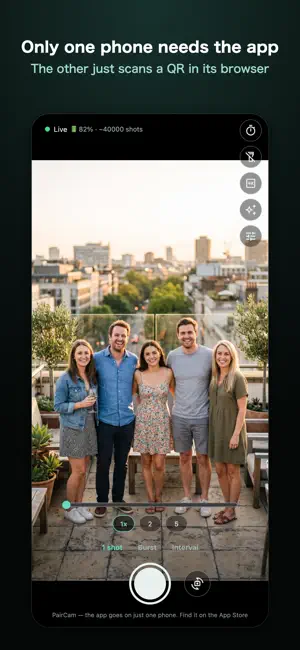
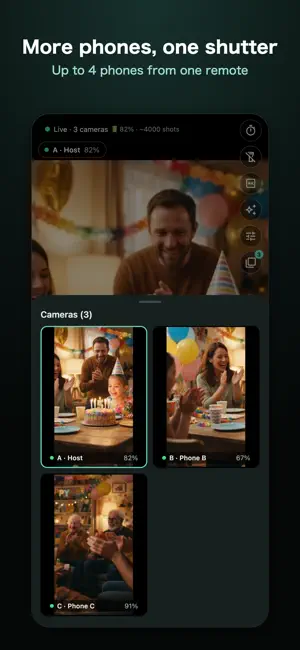
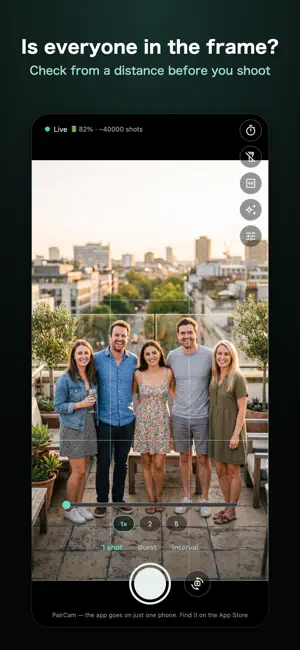
When you use two phones, only the one that shoots needs the app. Scan a QR code with the other phone's browser and it becomes a live monitor and remote control. The two devices don't have to be the same kind. Operate your phone on a tripod from a distance, or check that everyone is in the frame before taking a group photo. ■ No app on the second device Show a QR code on the camera phone and scan it with the other device's browser (Safari / Chrome). No app install for the other person, no account sign-up. A computer's browser works too. ■ More phones, one shutter (group shooting) Bring together up to 4 phones with PairCam, and shoot them all from one remote. Gather family and friends' phones to capture every angle at once, or shoot them one after another. ・Choose how to shoot: Together, Individually, or In turn ・On one phone choose "Be the host"; on the others choose "Join a group" and pick the host nearby, or scan its QR code ・Phones that join don't need a purchase ・Without Unlock, the host can use group shooting twice for free, then once for each video ad watched ・Open the remote in a browser, or inside one of the group's phones ■ Video flows directly between your devices Within the same Wi-Fi, video and controls travel directly between the devices. Nothing goes through a relay server and nothing is uploaded. No accounts, and your photos and video are never sent to us. ■ What you can do ・Shoot while watching the live view ・Self timer ・Zoom, front/back camera switch, light ・Grid lines and a level ・Photos are saved to the camera phone's gallery (PairCam album) ・If the connection fails, the likely cause is shown on screen ■ With Unlock (one-time purchase) ・Unlimited remote shots (free version includes 30 shots total; after that, watch a video ad to get 10 more) ・Host group shooting as often as you like ・No ads (in the free version, an ad plays only when you choose to watch one for more shots or a group session) ・Video recording with sound (1080p), which you can also start and stop from the remote ・4K photos up to 3840x2160 (on supported devices), switchable from the remote too ・Burst and interval shooting, and shot preview ・Lens switching (0.5x ultra-wide / telephoto, on supported devices) ・Color filters ・1080p high-quality streaming ・Hand off original photos to the remote device ■ Designed so subjects can tell Remote shooting can be hard for subjects to notice. To prevent misuse, the following cannot be changed: ・The OS camera sound plays when a photo is taken. The app has no setting or feature to silence it ・On devices sold for the Japanese market, this sound is forced by the device even in silent mode (on other devices it may not play, depending on volume and silent settings) ・While a remote is connected, a frame and an indicator cover the camera phone's screen (in a group, on every phone) ・Connecting requires the URL shown on the camera phone, and works only on the same network while the app is open ・On first launch, the app asks you to agree not to photograph anyone without their consent ■ Before you use it ・Both devices must be on the same network. Wi-Fi that blocks device-to-device traffic (public Wi-Fi and the like) may not work ・For group shooting, every phone and the remote must be on the same Wi-Fi (the same network name) ・Original photos are saved on the camera phone. They are never sent to the remote side automatically ・While 4K photos are on, the preview and stream run at 15fps (the quality reaching the remote is unchanged)
What’s new
Version 1.3.0 · Updated October 27, 2026
・Video recording: switch Photo / Video above the shutter to record video with sound (1080p). You can start and stop recording from the remote too. Available with Unlock ・Video is not available during group shooting ・Minor improvements
App privacy
The developer, yukio nagatomo, reported these privacy practices to Apple.
Data Used to Track You
The following data may be used to track you across apps and websites owned by other companies:
- Identifiers: Device ID
Data Linked to You
The following data, which may be collected and linked to your identity, may be used for the following purposes:
- Location: Coarse Location
- Identifiers: Device ID
- Usage Data: Product Interaction, Advertising Data
- Diagnostics: Performance Data
Used for: Third-Party Advertising, Developer’s Advertising or Marketing, Analytics, App Functionality
Data Not Linked to You
The following data, which may be collected but is not linked to your identity, may be used for the following purposes:
- Diagnostics: Other Diagnostic Data, Crash Data
- Purchases: Purchase History
Used for: Third-Party Advertising, Developer’s Advertising or Marketing, Analytics, App Functionality
Alternatives to PairCam - Browser Remote Cam
Looking for apps like PairCam - Browser Remote Cam? Here are 6 similar apps on the App Store. The highest rated is Carousel: 1min+ Video Splits (4.0/5), and all 6 are free to download.
-
 NetCam: Camera Control
-
 PoseSync: Remote Pose Camera
-
 Pocket Director: Creator Suite
-
 Carousel: 1min+ Video Splits
4.0
-
 PeerCam Live Monitor
-
 MyTwinLens: Remote Camera
| App | Rating | Price | Last updated | Compare |
|---|---|---|---|---|
| PairCam - Browser Remote Cam | – | Free | October 27, 2026 | |
| NetCam: Camera Control | – | Free | Oct 6, 2026 | Compare |
| PoseSync: Remote Pose Camera | – | Free | Oct 3, 2026 | Compare |
| Pocket Director: Creator Suite | – | Free | Oct 19, 2026 | Compare |
| Carousel: 1min+ Video Splits | 4.0 / 5 (6) | Free | Oct 9, 2026 | Compare |
| PeerCam Live Monitor | – | Free | Oct 21, 2026 | Compare |
| MyTwinLens: Remote Camera | – | Free | Sep 25, 2026 | Compare |