

PicStow: Private Photo Backup
Priyanshu Maurya Photo & Video iPhoneiPadiPod touch
PicStow: Private Photo Backup is a free Photo & Video app for iPhone and iPad by Priyanshu Maurya. Rated 5.0/5 from 1 ratings. Requires iOS 15.0.
- Rating
- 5.0
- 1 ratings
- Price
- Free
- on the App Store
- Size
- 43 MB
- Age 4+
- Updated
- Sep 26
- 2026 · v30
Screenshots


About PicStow: Private Photo Backup
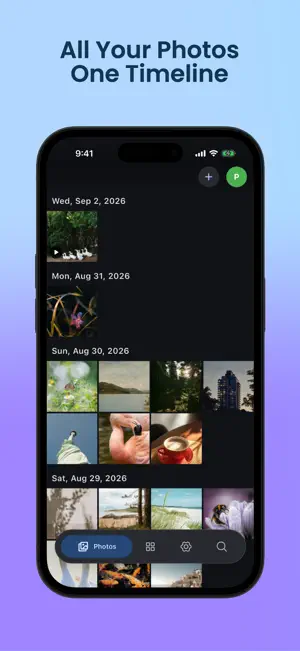
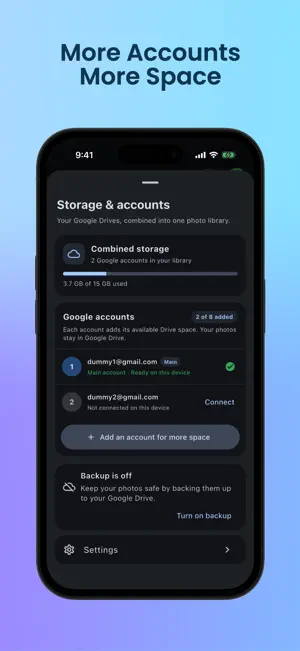
PicStow brings photos and videos from your iPhone and connected Google Drive accounts into one simple, chronological library. Your media is transferred directly between your device and your Google Drive. PicStow does not upload your photos or videos to a separate PicStow media server. KEY FEATURES • Browse device and cloud media in one timeline • Connect up to eight Google Drive accounts • Preserve photos and videos in original quality • Choose which accounts participate in backup • Select device albums for photo and video backup • Organize memories with Favorites, Albums, Documents, Places, and Moments • Search and browse your photo library • Monitor combined storage across connected accounts • View, download, share, and manage your media • Keep control of files stored in your Google Drive PRIVATE BY DESIGN PicStow requests access only when required for features you choose. Your photos and videos remain in Google Drive accounts you control. Google credentials are protected using platform-secure storage, including the iOS Keychain. You can disconnect Google accounts, clear local PicStow data, or revoke access at any time. Disconnecting PicStow does not automatically delete your photos from Google Drive. A Google account and Google Drive storage are required. Available storage, network behavior, and retention remain subject to your Google account and Google’s terms.
What’s new
Version 30 · Updated September 26, 2026
- Connect more Google accounts to grow your available storage, with smarter account reconnection and low-storage reminders. - Enjoy a redesigned storage journey with animated success states and quick automatic-backup setup. - Improved navigation, distraction-free search, and cleaner user-friendly notifications.
App privacy
The developer, Priyanshu Maurya, reported these privacy practices to Apple.
Data Linked to You
The following data, which may be collected and linked to your identity, may be used for the following purposes:
- Contact Info: Email Address
- User Content: Photos or Videos
- Identifiers: User ID
Used for: App Functionality
Data Not Linked to You
The following data, which may be collected but is not linked to your identity, may be used for the following purposes:
- Identifiers: Device ID
- Usage Data: Product Interaction, Other Usage Data
- Diagnostics: Performance Data, Other Diagnostic Data
Used for: Analytics, App Functionality
Alternatives to PicStow: Private Photo Backup
Looking for apps like PicStow: Private Photo Backup? Here are 6 similar apps on the App Store. The highest rated is ChronoCast AI (5.0/5), and all 6 are free to download.
-
 ChronoCast AI
5.0
ChronoCast AI
5.0
-
 XMediaa
-
 Album Shield
5.0
Album Shield
5.0
-
 FolderView - Photo Gallery
-
 SnapText - Image to Text
-
 Secret Calculator Vault - Lock
3.0
Secret Calculator Vault - Lock
3.0
| App | Rating | Price | Last updated | Compare |
|---|---|---|---|---|
| PicStow: Private Photo Backup | 5.0 / 5 (1 rating) | Free | September 26, 2026 | |
| ChronoCast AI | 5.0 / 5 (4) | Free | Aug 26, 2026 | Compare |
| XMediaa | – | Free | Jun 3, 2026 | Compare |
| Album Shield | 5.0 / 5 (2) | Free | Oct 22, 2026 | Compare |
| FolderView - Photo Gallery | – | Free | Oct 1, 2026 | Compare |
| SnapText - Image to Text | – | Free | Sep 15, 2026 | Compare |
| Secret Calculator Vault - Lock | 3.0 / 5 (1) | Free | Dec 19, 2024 | Compare |