

XMediaa
Mohammad Dawud Ansari Photo & Video iPhoneiPadiPod touch
XMediaa is a free Photo & Video app for iPhone and iPad by Mohammad Dawud Ansari. Requires iOS 18.5. Updated June 3, 2026.
- Price
- Free
- on the App Store
- Size
- 9 MB
- Age 4+
- Updated
- Jun 3
- 2026 · v1.10.9
Screenshots
About XMediaa
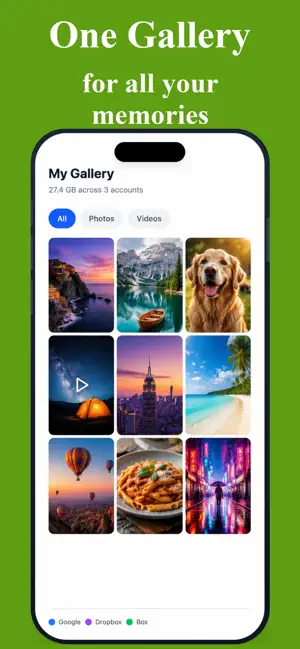
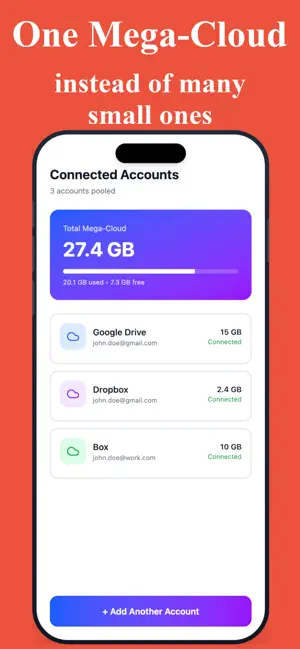
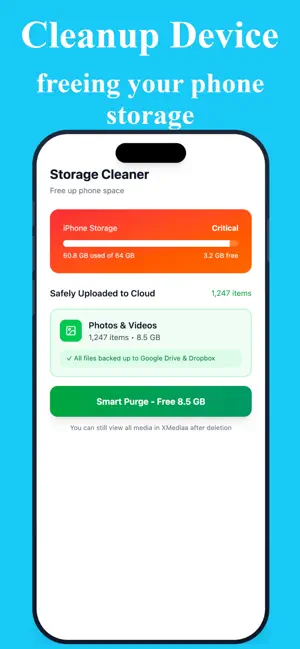
XMediaa gives you an unified experience for all your photos and videos present locally and in most popular cloud storages, all in one single place. Uploading and freeing device memory has never been easier and more reliable. You focus on your memories and we off-load the file management for you. All the cloud media is available to be accessed anytime like local media files. Your photos and videos are everywhere — on your phone, in Google Drive, scattered across Dropbox, buried in Box. Sound familiar? XMediaa brings everything together into one beautiful, unified gallery. Browse, search, upload and manage all your media — local and cloud — without ever switching apps. ONE GALLERY FOR EVERYTHING • See all your photos and videos in a single grid — device, Google Drive, Dropbox, and Box combined • Filter by media type (photos, videos, or both) and source (device or cloud) • Sort by date, size, name, or type • Search across all your files instantly • Pull to refresh cloud media anytime CONNECT UP TO 3 CLOUD PROVIDERS • Google Drive (15 GB free) • Dropbox (2 GB free) • Box (10 GB free) • Connect multiple accounts per provider — up to 10 each • See combined storage stats across all accounts at a glance • Per-account storage breakdown with usage warnings SMART, RELIABLE UPLOADS • Upload to any connected cloud account — or all of them at once • Background uploads continue even when the app is closed • Automatic retry with smart backoff if anything goes wrong (3 attempts) • MD5 checksum verification ensures every file arrives intact • Duplicate detection avoids uploading the same file twice • Built-in upload queue with per-file progress tracking • Upload history with session-by-session logs • WiFi and cellular network awareness — get warned before using mobile data FULL-FEATURED MEDIA PLAYER • Pinch to zoom on photos with smooth pan navigation • Video playback with scrubber, skip ±10s, and volume control • Swipe left/right to browse through your media • Swipe down to dismiss • Auto-play videos (configurable) • Brightness gesture — swipe on the left edge to adjust • Scrollable thumbnail strip for quick navigation • Fullscreen landscape mode SHARE ANYTHING, ANYWHERE • Share local files through the native iOS share sheet • Download and share cloud files with one tap • Select and share multiple files at once SECURE BY DESIGN • Sign in with Apple or email • Face ID, Touch ID, and Optic ID for quick auto-login • All credentials stored securely in the iOS Keychain • Cloud tokens refresh silently — you never see "session expired" • Profile editing through secure, time-limited links BUILT FOR YOUR PRIVACY • Full App Tracking Transparency support — your choice is respected • Analytics collection follows your ATT preference • No third-party ad networks • Your media stays between you and your cloud providers XMediaa is designed to give you peace of mind. Stop worrying about where your photos are. Stop switching between five different cloud apps. Just open XMediaa, and everything is right there. Free to download. Works with your existing cloud storage accounts. Terms of Use https://www.apple.com/legal/internet-services/itunes/dev/stdeula/.
What’s new
Version 1.10.9 · Updated June 3, 2026
Notification with details guide.
App privacy
The developer, Mohammad Dawud Ansari, reported these privacy practices to Apple.
Data Used to Track You
The following data may be used to track you across apps and websites owned by other companies:
- Identifiers: Device ID
Data Linked to You
The following data, which may be collected and linked to your identity, may be used for the following purposes:
- User Content: Customer Support
- Usage Data: Product Interaction
- Diagnostics: Crash Data
Used for: Analytics, App Functionality, Other Purposes
Data Not Linked to You
The following data, which may be collected but is not linked to your identity, may be used for the following purposes:
- Identifiers: Device ID
- Usage Data: Other Usage Data
- Diagnostics: Performance Data
Used for: Third-Party Advertising, Analytics, App Functionality, Other Purposes
Alternatives to XMediaa
Looking for apps like XMediaa? Here are 6 similar apps on the App Store. The highest rated is PicStow: Private Photo Backup (5.0/5), and all 6 are free to download.
-
 PicStow: Private Photo Backup
5.0
-
 Culla: Photo Organizer
-
 FolderView - Photo Gallery
-
 TorchPhoto - NAS Gallery
-
 Auto Captions Studio
4.3
-
 Bonsai Studio by PrismML
5.0
| App | Rating | Price | Last updated | Compare |
|---|---|---|---|---|
| XMediaa | – | Free | June 3, 2026 | |
| PicStow: Private Photo Backup | 5.0 / 5 (1) | Free | Sep 26, 2026 | Compare |
| Culla: Photo Organizer | – | Free | Jul 14, 2026 | Compare |
| FolderView - Photo Gallery | – | Free | Oct 1, 2026 | Compare |
| TorchPhoto - NAS Gallery | – | Free | Oct 28, 2026 | Compare |
| Auto Captions Studio | 4.3 / 5 (33) | Free | Mar 4, 2025 | Compare |
| Bonsai Studio by PrismML | 5.0 / 5 (7) | Free | May 28, 2026 | Compare |
Compare XMediaa with the top alternatives: ratings, updates, ASO score and keyword gaps →