

NOCTA — Ultra Pro Flashlight
Furkan Ozgurluk Utilities iPhoneiPadiPod touch
NOCTA — Ultra Pro Flashlight is a free Utilities app for iPhone and iPad by Furkan Ozgurluk. Requires iOS 16.4. Updated October 17, 2026.
- Price
- Free
- on the App Store
- Size
- 35 MB
- Age 4+
- Updated
- Oct 17
- 2026 · v1.1.0
Screenshots
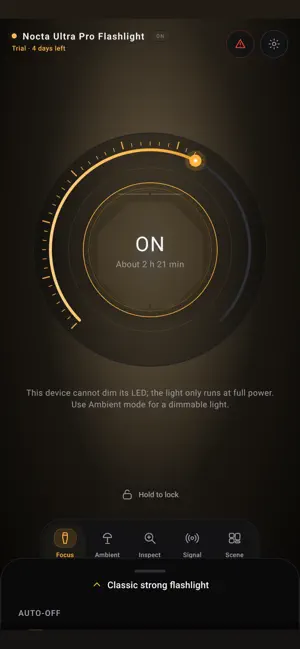
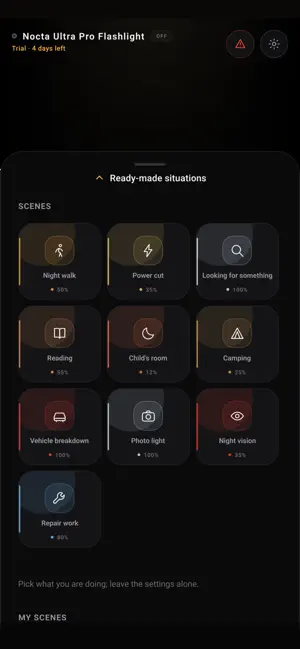


About NOCTA — Ultra Pro Flashlight
5-DAY FREE TRIAL Install the app and use every feature for five days. After that, a single one-time purchase unlocks it for good — there is no subscription. SOS and the emergency panel stay free forever, trial or not. NOCTA does not just switch a light on. It gives you control over it. PRECISE BRIGHTNESS If your phone's LED supports levels, NOCTA genuinely dims it. The percentage on screen is the value going to the hardware, not a decorative slider. If your device cannot dim, the app says so plainly instead of pretending. When the phone warms up, NOCTA reads the operating system's own thermal state and lowers the output. Measured, not guessed. FIVE MODES Focus — A classic, strong flashlight. Turn the dial for brightness, set an auto-off timer, hold for momentary light, lock the screen against stray taps. Ambient — The screen becomes the lamp. Colour temperature from candlelight to daylight, free colour choice, candle flicker and a sleep fade. Inspect — An inspection camera. 10× zoom, contrast and edge enhancement, freeze the frame, add arrows, circles and notes. Made for pipe runs, engine bays, fuse boxes and the space under furniture. Signal — SOS, roadside warning, slow beacon, text to Morse code, a metronome and your own recorded rhythm. Choose light, screen, vibration and sound independently. Scene — Pick what you are doing instead of fiddling with settings: night walk, power cut, reading, a child's room, camping, vehicle breakdown, night vision, repair work. Save your own scenes too. EMERGENCY One screen with SOS, GPS coordinates, compass heading, battery level and a message large enough to read from a distance. All of it works without an internet connection. This feature never dials anyone automatically. NO ADS, NO PERMISSIONS The flashlight, screen light, scenes and SOS ask for nothing at all. The camera is requested only in Inspect, location only in the Emergency panel. Nothing is collected. One-time purchase. No subscription, no ads, no account.
What’s new
Version 1.1.0 · Updated October 17, 2026
An adaptive dial, clearer text and easier controls. Improved timer behavior in the SOS panel. More reliable screen brightness restoration after ambient mode. Stability fixes for saved settings, trial expiry, custom rhythms and camera actions.
App privacy
The developer, Furkan Ozgurluk, reported these privacy practices to Apple.
Data Not Collected
The developer does not collect any data from this app.
Alternatives to NOCTA — Ultra Pro Flashlight
Looking for apps like NOCTA — Ultra Pro Flashlight? Here are 6 similar apps on the App Store. The highest rated is IR-TEC sensor config (5.0/5), and all 6 are free to download.
-
 Wand: Remote for HomeKit
-
 Magnifying Glass: Read & Zoom
-
 IR-TEC sensor config
5.0
IR-TEC sensor config
5.0
-
 Dark Mode Extension
4.3
Dark Mode Extension
4.3
-
 Talking Translator: AI Earbuds
5.0
Talking Translator: AI Earbuds
5.0
-
 Recovery Studio: Photo & Video
4.4
Recovery Studio: Photo & Video
4.4
| App | Rating | Price | Last updated | Compare |
|---|---|---|---|---|
| NOCTA — Ultra Pro Flashlight | – | Free | October 17, 2026 | |
| Wand: Remote for HomeKit | – | Free | Oct 17, 2026 | Compare |
| Magnifying Glass: Read & Zoom | – | Free | Apr 14, 2026 | Compare |
| IR-TEC sensor config | 5.0 / 5 (2) | Free | Apr 14, 2026 | Compare |
| Dark Mode Extension | 4.3 / 5 (6) | Free | Oct 22, 2026 | Compare |
| Talking Translator: AI Earbuds | 5.0 / 5 (5) | Free | Oct 17, 2026 | Compare |
| Recovery Studio: Photo & Video | 4.4 / 5 (24) | Free | Sep 12, 2026 | Compare |