

Timestamp Camera GPS Map Photo
Tesera Studio OU Photo & Video iPhoneiPadiPod touch
Timestamp Camera GPS Map Photo is a free Photo & Video app for iPhone and iPad by Tesera Studio OU. Requires iOS 16.0. Updated October 6, 2026.
- Price
- Free
- on the App Store
- Size
- 43 MB
- Age 4+
- Updated
- Oct 6
- 2026 · v1.0.0
Screenshots
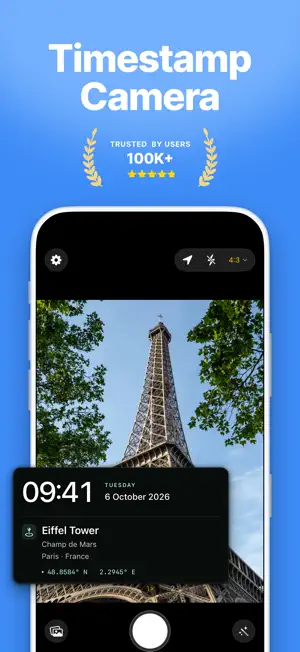
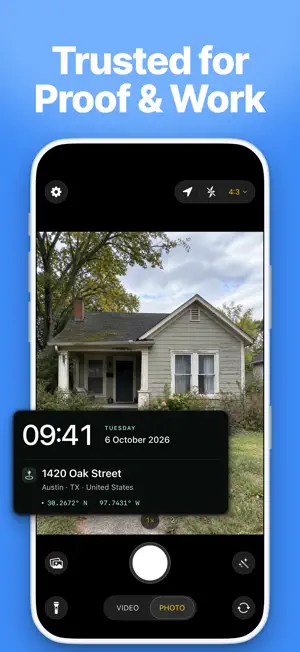


About Timestamp Camera GPS Map Photo
Timestamp puts the date, time and location on every photo and video you take. The stamp is part of the picture. It stays on when you text it to a customer or print it for the family album. It's a simple timestamp camera with no ads and no account to set up. People use it for: • Contractors: before-and-after job photos with the date and address on them • Delivery drivers: a photo of every drop-off with the time and address on it • Renters and landlords: stamped photos and walkthrough videos at move-in and move-out • Inspectors and homeowners: photos of damage or repairs for a report or an insurance claim • Families: the date on photos you took years ago ADD THE DATE TO PHOTOS YOU ALREADY TOOK Pick a photo or video from your library and date stamp it with the day it was actually taken. If a photo saved its GPS coordinates, those can go on too. No saved date, like a scanned print? Pick the date yourself. Timestamp saves a new copy, so your original stays exactly as it was. TIME STAMP EVERY NEW SHOT • The date and time go on the photo automatically, the moment you take it • Show your location as the street address, city, state, country, GPS coordinates or a nearby place. You choose which lines appear. • Add a short note to the stamp, like the job name or which room it is • Tap refresh to update your location before you shoot • What you see in the preview is what gets saved VIDEO, WITH SOUND • The time stamp stays on the whole clip, and your audio records as usual • Crop, recolor or restamp a video after you record it A STAMP YOU CAN READ • Drag it anywhere, or snap it to one of nine spots • Change the font, color, size or background until it reads clearly on a white wall or in a dark basement • 6 date and time styles, plus GPS cards that show the address and coordinates together FILM LOOKS Give any shot a warm vintage tone, a 90s film feel or classic black and white. There are 18 looks, and you can turn each one up or down in the camera or later in the editor. You'll also find 12 zodiac stamps. Terms of Use: https://teserastudio.com/terms Privacy Policy: https://teserastudio.com/privacy
App privacy
The developer, Tesera Studio OU, reported these privacy practices to Apple.
Data Used to Track You
The following data may be used to track you across apps and websites owned by other companies:
- Identifiers: Device ID
Data Not Linked to You
The following data, which may be collected but is not linked to your identity, may be used for the following purposes:
- Usage Data: Advertising Data, Product Interaction
- Purchases: Purchase History
- Identifiers: Device ID
- Diagnostics: Performance Data, Crash Data
Used for: Developer’s Advertising or Marketing, Analytics, App Functionality
Alternatives to Timestamp Camera GPS Map Photo
Looking for apps like Timestamp Camera GPS Map Photo? Here are 6 similar apps on the App Store. The highest rated is Timestamp Camera : PhotoRecord (5.0/5), and all 6 are free to download.
-
 GPS Camera: Timestamp Photos
-
 Allure: Dating Photo AI
-
 Stamp Camera Date and Location
-
 Timestamp Camera : PhotoRecord
5.0
-
 GeoLens — Geotag Camera
-
 Timestamp Camera: GPS Location
5.0
| App | Rating | Price | Last updated | Compare |
|---|---|---|---|---|
| Timestamp Camera GPS Map Photo | – | Free | October 6, 2026 | |
| GPS Camera: Timestamp Photos | – | Free | Oct 10, 2026 | Compare |
| Allure: Dating Photo AI | – | Free | Sep 26, 2026 | Compare |
| Stamp Camera Date and Location | – | Free | Jul 9, 2026 | Compare |
| Timestamp Camera : PhotoRecord | 5.0 / 5 (1) | Free | Nov 1, 2026 | Compare |
| GeoLens — Geotag Camera | – | Free | Oct 15, 2026 | Compare |
| Timestamp Camera: GPS Location | 5.0 / 5 (2) | Free | Sep 29, 2026 | Compare |