

Timestamp Camera : PhotoRecord
Daybreak Limited Photo & Video iPhoneiPadiPod touch
Timestamp Camera : PhotoRecord is a free Photo & Video app for iPhone and iPad by Daybreak Limited. Rated 5.0/5 from 1 ratings. Requires iOS 16.6.
- Rating
- 5.0
- 1 ratings
- Price
- Free
- on the App Store
- Size
- 63 MB
- Age 4+
- Updated
- Nov 1
- 2026 · v1.4
Screenshots
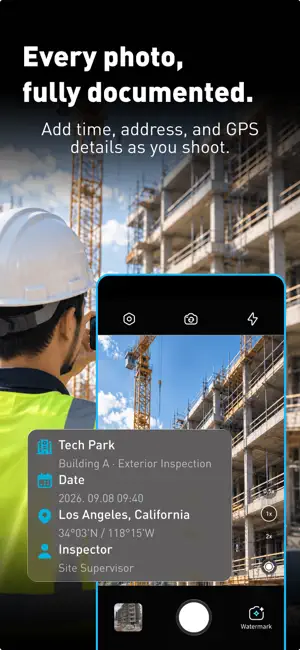


About Timestamp Camera : PhotoRecord
Turn everyday job site photos into clear, organized work records. Timestamp Camera: PhotoRecord helps you capture when and where work happened, keep related photos together, and create PDF reports to share with clients or your team. From construction progress to property inspections and delivery records, keep the details alongside every photo. CAPTURE THE DETAILS THAT MATTER • Add date, time, address, and GPS coordinates to your photos. • Include notes to explain the work, condition, or result. • Show weather and altitude with supported templates when available. • Review timestamp sources and location accuracy in your capture information. • Record watermarked videos with Pro. CHOOSE A WATERMARK FOR YOUR WORK Find a layout for site visits, inspections, deliveries, inventory checks, travel, or accident scene documentation. Customize the available fields and preview your watermark before you capture. KEEP EVERY PROJECT ORGANIZED Group photos by project or work order, with project details, notes, and tags in one place. Organize consecutive captures into sessions and zoom in on saved photos to review the details. Already have photos? Import them into a project and apply watermarks using their original date and GPS information when available. CREATE REPORTS YOU CAN SHARE Turn your project photos into a PDF report with capture details and notes. Share progress, document completed work, or keep a record for later. You can also export available original photos in a ZIP archive. BUILT FOR WORK ON LOCATION • Construction progress and site visits • Property inspections and maintenance • Delivery and service visits • Store displays and inventory checks • Accident scene documentation • Outdoor activities and travel Start with a photo. Build a record you can return to. PRO FEATURES Video watermarking and premium templates require a Pro subscription. Available plans and pricing are shown in the app before purchase. Location and weather information depend on permissions, signal, and data availability. Original date and location information for imported photos is available only when included in their metadata. Privacy Policy: https://sites.google.com/view/timestamp-cam-privacy/home Terms of Use: https://www.apple.com/legal/internet-services/itunes/dev/stdeula/
What’s new
Version 1.4 · Updated November 1, 2026
- Added support for iPhone Duo, with improved layout and display compatibility. - Optimized app performance for a smoother and more responsive experience. - Fixed minor bugs and improved overall stability.
App privacy
The developer, Daybreak Limited, reported these privacy practices to Apple.
Data Not Linked to You
The following data, which may be collected but is not linked to your identity, may be used for the following purposes:
- Purchases: Purchase History
- Identifiers: User ID, Device ID
- Diagnostics: Crash Data
- Location: Precise Location
Used for: Analytics, Product Personalization, App Functionality, Other Purposes
Alternatives to Timestamp Camera : PhotoRecord
Looking for apps like Timestamp Camera : PhotoRecord? Here are 6 similar apps on the App Store. The highest rated is GPS Photo Timestamp Camera (5.0/5), and all 6 are free to download.
-
 Timestamp Camera GPS Map Photo
-
 GPS Photo Map
-
 Stamp Camera Date and Location
-
 TimeCam: Timestamp Photo
-
 GPS Photo Timestamp Camera
5.0
-
 TimerCamera+ Self Timer Camera
5.0
| App | Rating | Price | Last updated | Compare |
|---|---|---|---|---|
| Timestamp Camera : PhotoRecord | 5.0 / 5 (1 rating) | Free | November 1, 2026 | |
| Timestamp Camera GPS Map Photo | – | Free | Oct 6, 2026 | Compare |
| GPS Photo Map | – | Free | Aug 12, 2026 | Compare |
| Stamp Camera Date and Location | – | Free | Jul 9, 2026 | Compare |
| TimeCam: Timestamp Photo | – | Free | Jun 22, 2026 | Compare |
| GPS Photo Timestamp Camera | 5.0 / 5 (3) | Free | Mar 16, 2026 | Compare |
| TimerCamera+ Self Timer Camera | 5.0 / 5 (2) | Free | Nov 3, 2026 | Compare |