

TeCluster for Tesla
Joung Hoon Lee Navigation iPhoneiPadiPod touch
TeCluster for Tesla is a free Navigation app for iPhone and iPad by Joung Hoon Lee. Requires iOS 17.0. Updated October 12, 2026.
- Price
- Free
- on the App Store
- Size
- 65 MB
- Age 4+
- Updated
- Oct 12
- 2026 · v1.1.10
Screenshots


About TeCluster for Tesla
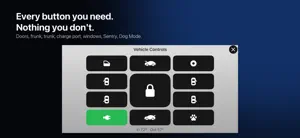
Set a destination in your Tesla. Your favorite nav app opens on your iPhone. Automatically. Google Maps · Waze · Apple Maps Model 3 and Y have no cluster. Now your iPhone is one. No more glancing at the center screen to check your speed. Speed, gear, power and regen, battery, range, tire pressures — streamed straight from the car over Bluetooth, several times a second. No server in the middle to slow it down. Your nav app. Or ours. - Built-in navigation: Map and gauges on one screen. Miss a turn? It reroutes in seconds. - The app you already use: Waze, Google Maps or Apple Maps opens full screen with your destination already entered. Tap the Lock Screen card to jump back to the cluster. Find it on your iPhone. It's waiting in the car. The destination goes straight to your Tesla's navigation — one tap on the car's screen and you're on your way. If the car is asleep, it shows up the moment the car wakes up. No warranty worries. Nothing an update can brick. Works where your signal doesn't. Cloud apps ask Tesla's servers. We ask the car. Your car's vitals, at a glance. Car Checkup checks each tire against your car's own recommended pressure and keeps an eye on battery health and software updates. When something looks different from usual, it tells you what to do. No need to open the Tesla app. One tap on the cluster. Doors, frunk, trunk, charge port, windows, Sentry, Dog Mode. Connected plan. Works near the car, over Bluetooth. Car Wash Mode, mirror folding and seat adjustment aren't possible — Tesla doesn't offer commands for them. Why does your A/C smell musty? Running the A/C leaves the evaporator wet. Park, and that moisture just sits there, which is how you get mold and that mildew smell. Once you walk away, After-blow runs the fan for 1, 3 or 5 minutes to dry it out. No more switching off the A/C a few minutes before you arrive. Speed cameras? You'll get a heads-up. About 49,000 cameras in 10 countries. Start free. Upgrade anytime. Free (US$0 · forever) - Instrument cluster — speed, gear, power, battery, range, tires - Car-to-phone destination hand-offs — 20 a month - Turn-by-turn on your iPhone, or in the nav app you already use - Speed camera alerts - My Car Info, night mode, charging screen Connected (monthly or yearly subscription · billed from day one) - Unlimited destination sync — car to phone and phone to car - Car Checkup — tires, battery health, software updates - Vehicle Controls — lock, doors, frunk, trunk, charge port, windows, Sentry, Dog Mode - After-blow — dries out the A/C after you park - Turn signals on the cluster Want to try first? Start a 7-day trial in the app with your Tesla account — no payment info, then back to Free. Prices vary by country. Cancel anytime in iOS Settings. What you'll need. - An iPhone on iOS 17 or later (iPhone XS or newer). - The cluster, navigation and speed-camera alerts work right away — open the app and tap “Start right away”. No sign-in, no VIN. - A Bluetooth key, paired once in the car with your key card when you connect. Needs car software 2024.38 or later. Works with every Model 3 and Model Y, plus Model S and Model X (2021 and newer). - A Tesla account is optional. Sign in and pick your car from the list, or just enter the VIN if you'd rather not sign in. - Tesla sign-in and the virtual key are needed only for the Connected plan — Tesla requires that key to send status while the car is far away. - Location access for navigation: “While Using the App” with Precise Location on. - One thing the app can't do: start or cancel the car's navigation. Tesla only allows that on the car's screen. Tesla, Model 3, Model Y, Model S and Model X are trademarks of Tesla, Inc. Other app names and icons are trademarks of their respective owners. TeCluster is an independent app and is not affiliated with or endorsed by them. Terms of Use (EULA): https://www.apple.com/legal/internet-services/itunes/dev/stdeula/ Privacy Policy: https://tecluster.org/privacy.html
What’s new
Version 1.1.10 · Updated October 12, 2026
• On the free plan, the battery, regen, gear (P R N D), temperature and odometer areas now appear as gray placeholders instead of empty space. They fill in once your car is connected. • Info and Records (Vehicle logbook, Charging ledger) are part of the connected plan. On the free plan they appear in gray, and tapping them opens the plans.
App privacy
The developer, Joung Hoon Lee, reported these privacy practices to Apple.
Data Used to Track You
The following data may be used to track you across apps and websites owned by other companies:
- Purchases: Purchase History
- Identifiers: Device ID
- Usage Data: Product Interaction
Data Linked to You
The following data, which may be collected and linked to your identity, may be used for the following purposes:
- Identifiers: Device ID, User ID
Used for: Third-Party Advertising, Analytics, App Functionality
Data Not Linked to You
The following data, which may be collected but is not linked to your identity, may be used for the following purposes:
- Purchases: Purchase History
- Usage Data: Product Interaction
- Other Data: Other Data Types
- Location: Precise Location
- Diagnostics: Crash Data
Used for: Third-Party Advertising, Analytics, App Functionality
Alternatives to TeCluster for Tesla
Looking for apps like TeCluster for Tesla? Here are 6 similar apps on the App Store. The highest rated is FluxMate – EV Dashboard (5.0/5), and all 6 are free to download.
-
 MOAGAUGE for Tesla
-
 TDriveViewer — EV Dashboard
-
 Roadmeter: GPS Speedometer HUD
-
 FluxMate – EV Dashboard
5.0
FluxMate – EV Dashboard
5.0
-
 DriveCluster for Tesla
4.8
DriveCluster for Tesla
4.8
-
 Driver's Road
| App | Rating | Price | Last updated | Compare |
|---|---|---|---|---|
| TeCluster for Tesla | – | Free | October 12, 2026 | |
| MOAGAUGE for Tesla | – | Free | Oct 3, 2026 | Compare |
| TDriveViewer — EV Dashboard | – | Free | Jul 12, 2026 | Compare |
| Roadmeter: GPS Speedometer HUD | – | Free | Sep 7, 2026 | Compare |
| FluxMate – EV Dashboard | 5.0 / 5 (1) | Free | Sep 15, 2026 | Compare |
| DriveCluster for Tesla | 4.8 / 5 (22) | Free | Sep 30, 2026 | Compare |
| Driver's Road | – | Free | Sep 28, 2026 | Compare |