

Roadmeter: GPS Speedometer HUD
Timur Saurbayev Navigation iPhoneiPadiPod touch
Roadmeter: GPS Speedometer HUD is a free Navigation app for iPhone and iPad by Timur Saurbayev. Requires iOS 17.0. Updated September 7, 2026.
- Price
- Free
- on the App Store
- Size
- 14 MB
- Age 4+
- Updated
- Sep 7
- 2026 · v2.1.0
Screenshots



About Roadmeter: GPS Speedometer HUD
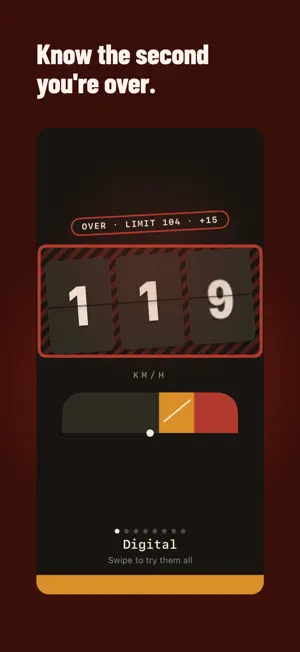
Roadmeter turns your iPhone into a precise, GPS-powered speedometer — no dashboard required. • GPS-accurate speed at a glance — mph, km/h, or knots • Speed limit alerts — sound, voice, or haptic the instant you go over • HUD mode: your speed mirrored in the windshield after dark • 8 dial styles — Digital, Analog, Minimal, Circuit, Night City, Brass, Cockpit, Phosphor — plus light, dark, night, and daylight themes • Automatic trip log: distance, duration, max speed, and a map trace of your route • Export any trip as GPX or CSV Calibrate Roadmeter to your exact dashboard so the number you see on your dash and the true GPS speed finally agree — factory dashboards commonly read a few percent high, more after a tire-size change. Everything that matters runs on your device. Roadmeter needs no account and no internet connection to work, shows no ads, and never tracks you. Your location and your trips never leave your iPhone. Whether you're keeping pace on the interstate, watching for a school-zone limit, or just curious how fast you're really going, Roadmeter gives you a clean, accurate answer at a glance. ROADMETER PRO The free version includes the digital dial, HUD mode, speed limit alerts, and one saved trip. Roadmeter Pro unlocks all dial styles and accent colors, unlimited trip history, motion analytics, and alternate app icons. Available as a yearly subscription — with a 3-day free trial — or a one-time lifetime purchase. Subscriptions auto-renew unless cancelled at least 24 hours before the current period ends; manage or cancel anytime in your App Store account settings. Privacy: https://roadmeter.vercel.app/privacy Terms: https://www.apple.com/legal/internet-services/itunes/dev/stdeula/
What’s new
Version 2.1.0 · Updated September 7, 2026
- Roadmeter now speaks Spanish, Japanese, Korean, Portuguese and British English — dial, trip log and purchase screens included - Dial numerals stay crisp and consistent in every language, including right-to-left layouts
App privacy
The developer, Timur Saurbayev, reported these privacy practices to Apple.
Data Not Linked to You
The following data, which may be collected but is not linked to your identity, may be used for the following purposes:
- Purchases: Purchase History
- Identifiers: User ID
Used for: App Functionality
Alternatives to Roadmeter: GPS Speedometer HUD
Looking for apps like Roadmeter: GPS Speedometer HUD? Here are 6 similar apps on the App Store. The highest rated is SpeedGuardian Pro (5.0/5), and all 6 are free to download.
-
 SpeedGuardian Pro
5.0
SpeedGuardian Pro
5.0
-
 GPS Speedometer – RideRank
-
 SpeedGuard: Speed Limit Alerts
-
 TeCluster for Tesla
-
 Kilometro
-
 GPS Speedometer: Route Tracker
| App | Rating | Price | Last updated | Compare |
|---|---|---|---|---|
| Roadmeter: GPS Speedometer HUD | – | Free | September 7, 2026 | |
| SpeedGuardian Pro | 5.0 / 5 (2) | Free | Oct 17, 2026 | Compare |
| GPS Speedometer – RideRank | – | Free | Aug 17, 2026 | Compare |
| SpeedGuard: Speed Limit Alerts | – | Free | Oct 16, 2026 | Compare |
| TeCluster for Tesla | – | Free | Oct 16, 2026 | Compare |
| Kilometro | – | Free | Jul 29, 2026 | Compare |
| GPS Speedometer: Route Tracker | – | Free | Jul 28, 2026 | Compare |