

Hoardware - Device Collection
Aaron Perris Utilities iPhoneiPadiPod touchMac
Hoardware - Device Collection is a free Utilities app for iPhone and iPad by Aaron Perris. Rated 4.7/5 from 9 ratings. Requires iOS 17.0.
- Rating
- 4.7
- 9 ratings
- Price
- Free
- on the App Store
- Size
- 37 MB
- Age 4+
- Updated
- Oct 21
- 2026 · v2.0
Screenshots
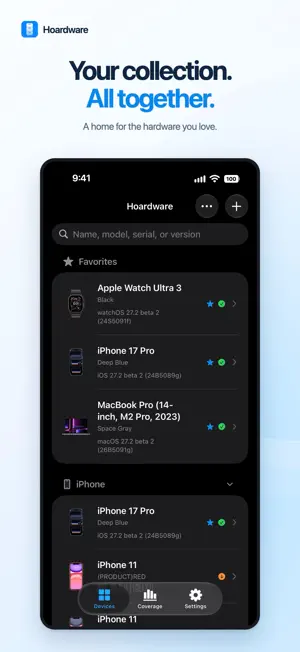

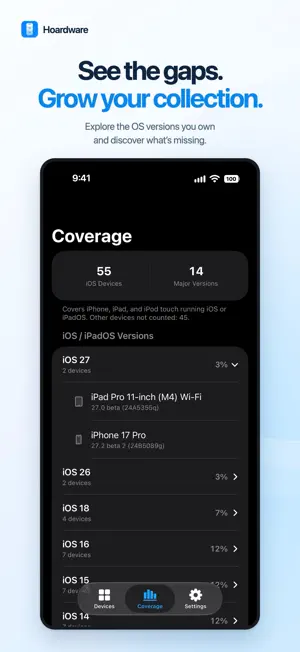
About Hoardware - Device Collection
Hoardware is a collection manager for people who keep Apple hardware. Catalog the devices you own, including iPhone, iPad, Mac, iPod, Apple Watch, Apple TV, HomePod, HomeView, AirPods, AirTag, and Beats. Look up model details and firmware using AppleDB, an independent community database. KNOW WHAT YOU HAVE - Look up model identifiers, names, and release details - Record installed firmware versions and builds - Check available stable and beta updates - Receive optional alerts for new software releases OS COVERAGE - See which software generations your iPhone, iPad, and iPod touch collection covers - Filter covered and missing versions to find the gaps ORGANIZE - Organize devices into collections and groups - Save notes, serial numbers, colors, and custom fields - Keep a wishlist for your next find - Search by name, model, serial number, or software version TAKE YOUR LIBRARY WITH YOU - Sync your library and custom fields across Mac, iPhone, and iPad using iCloud - Export your collection as text, JSON, PDF, or an image - Create library backups and restore them later - Share selected collection details through an optional read-only web link No separate Hoardware account is required. iCloud sync uses your Apple Account. Device and firmware information is provided by AppleDB (appledb.dev). Hoardware is an independent app and is not affiliated with, sponsored by, or endorsed by Apple Inc. Apple and the Apple product and service names referenced here are trademarks of Apple Inc.
Ratings & reviews
4.7
9 ratings
What’s new
Version 2.0 · Updated October 21, 2026
- Hoardini AI assistant: Ask questions about your collection, device specifications, firmware history, and software compatibility. Supports follow-up questions and links to source devices. - Synced chat history: Conversations save automatically and sync through iCloud. - Expanded Coverage: View software-version coverage across iOS/iPadOS, macOS, tvOS, watchOS, visionOS, HomePod, and HomeView - including missing major versions. - Scan another device’s About screen: Use the camera to read device information, alongside screenshot import. - Color previews: Swatches in device details and add/edit color pickers. - Redesigned Add Current Device screen: Device artwork, clearer information, and improved model selection. - Classic AppleDB app icon: An additional icon option.
App privacy
The developer, Aaron Perris, reported these privacy practices to Apple.
Data Linked to You
The following data, which may be collected and linked to your identity, may be used for the following purposes:
- User Content: Other User Content
- Identifiers: User ID, Device ID
- Diagnostics: Other Diagnostic Data
Used for: App Functionality
Alternatives to Hoardware - Device Collection
Looking for apps like Hoardware - Device Collection? Here are 6 similar apps on the App Store. The highest rated is Pinlet (5.0/5), and 5 of the 6 are free to download.
-
 Data Widget: remaining data
4.2
Data Widget: remaining data
4.2
-
 QuillCue
4.8
QuillCue
4.8
-
 Whois Master
-
 Extra Actions
-
 Pinlet
5.0
Pinlet
5.0
-
 WiFi Health Check
4.8
WiFi Health Check
4.8
| App | Rating | Price | Last updated | Compare |
|---|---|---|---|---|
| Hoardware - Device Collection | 4.7 / 5 (9 ratings) | Free | October 21, 2026 | |
| Data Widget: remaining data | 4.2 / 5 (47) | 1.99 USD | Oct 21, 2026 | Compare |
| QuillCue | 4.8 / 5 (5) | Free | Oct 21, 2026 | Compare |
| Whois Master | – | Free | Oct 4, 2026 | Compare |
| Extra Actions | – | Free | Oct 14, 2026 | Compare |
| Pinlet | 5.0 / 5 (1) | Free | Oct 12, 2026 | Compare |
| WiFi Health Check | 4.8 / 5 (4) | Free | Oct 22, 2026 | Compare |